
Lieferung heute & morgen

Qualitätsgarantie

Willkommens-Angebote freischalten: KOSTENLOSE Lieferung | Bis zu 80 % RABATT | Kostenlose 30-Tage-JoyPlus-Testphase
App herunterladen
Black printer ink is often chosen based on price or cartridge size. With inkjet printers, this can lead to unnecessary costs down the line: a cheap cartridge may not fit your printer model, a larger capacity may offer no practical benefit if you print infrequently, or the stated page yield may not be directly comparable.
This Joybuy Product Recommendation Officer buying guide explains what individuals, students, families, people working from home and small businesses should look out for when buying.
‘Canon PIXMA’ or ‘Epson WorkForce’ refers only to a product family. Different cartridges are used within these ranges. For example, Canon PG-540, Canon PGI-550PGBK and Canon CLI-581XLBK are not interchangeable.
Before buying, make a note of your printer’s exact model number and the name of the required cartridge, as shown in the printer menu, the user manual or on your old cartridge.
XL printer cartridges usually contain more ink than standard versions. Whether they’re worth it depends on how much you actually print and the price per cartridge. So don’t just compare the pack price. Where possible, compare:
Page yield is often based on standardised conditions, such as a set coverage per page. Dense graphics, frequent cleaning cycles and photo printing can all increase ink consumption.
Genuine printer cartridges are made by the printer manufacturer and designed for specific printer families. Compatible ink cartridges and remanufactured cartridges can be an attractive option on price, but you’ll need to check compatibility carefully.
For recycled cartridges, also check the specific model list, what’s included and the stated ink volume. A cartridge for the Canon PIXMA MP495, iP2700 or MX410 won’t necessarily work with every Canon printer.
Don’t just search for ‘black Canon printer ink’ or ‘Epson printer cartridges’. Check that your printer’s exact model name appears on the compatibility list.
Examples:
Black pigment ink uses finely dispersed pigments to create colour. It’s often used for printing text. Some cartridges also use dye-based black ink, which can perform differently depending on the printer and paper.
The type of ink should match the printer’s cartridge family. Don’t use a cartridge just because it says ‘Black’ if your printer requires a specific pigment black or photo black cartridge.
A larger ink volume can be useful if you regularly print documents. If you only print occasionally, storage life and actual usage are more important. Figures such as ‘up to 300 pages’, ‘up to 501 pages’ or ‘150 pages’ are manufacturer or product specifications, not a guaranteed yield for every user.
Also check whether the yield is based on ISO/IEC 24711, a specific page coverage or an internal product specification. Only figures based on comparable conditions can be meaningfully compared.
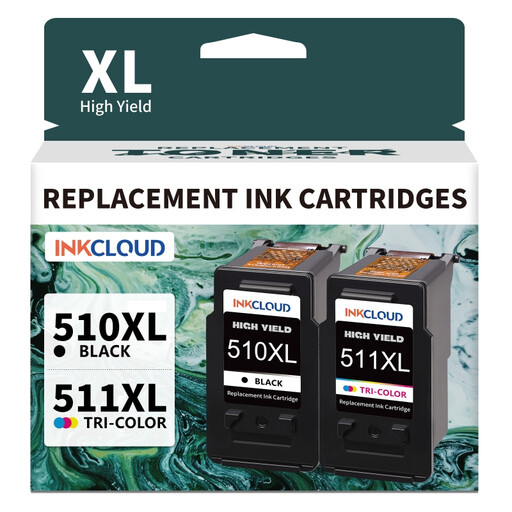
Why this product suits this profile: This remanufactured combination of a black cartridge and a colour cartridge is aimed at budget-conscious users with a compatible Canon printer.
The product description lists specific compatible models, including the PIXMA MP495, iP2700 and MX410. Check this list against your printer before buying.
Remanufactured 510XL/511XL version; pack contains a black cartridge and a colour cartridge.
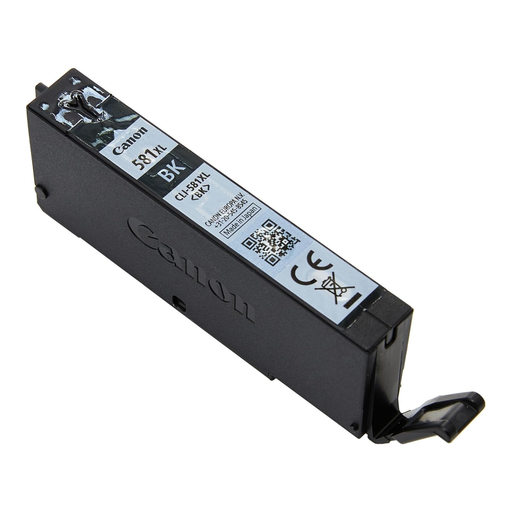
Why this product suits this profile: This genuine Canon cartridge is designed for selected PIXMA models and, according to the product information, yields up to 501 pages.
The CLI-581XLBK model number clearly narrows down the options. Check that your PIXMA printer appears on the compatibility list before buying.
Genuine Canon product; XL capacity; stated yield of up to 501 pages.
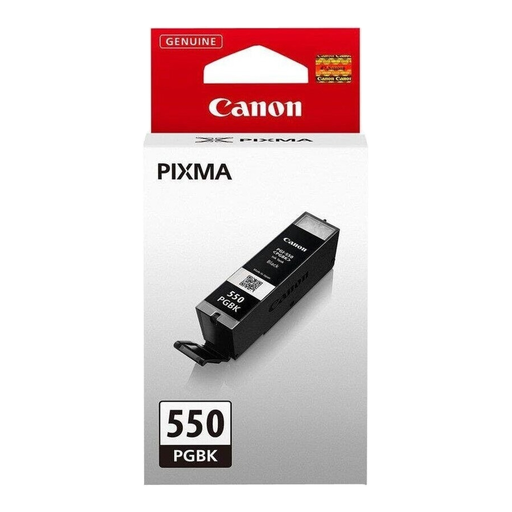
Why this product suits this profile: According to the product information, the cartridge contains 15 ml of pigment black ink and is designed for regular document printing with compatible Canon printers.
The product details specify a standard capacity of 15 ml and an approximate yield of 300 pages. This lets you check the ink volume and page yield before buying.
Black pigment ink; 15 ml capacity; stated yield of around 300 pages.
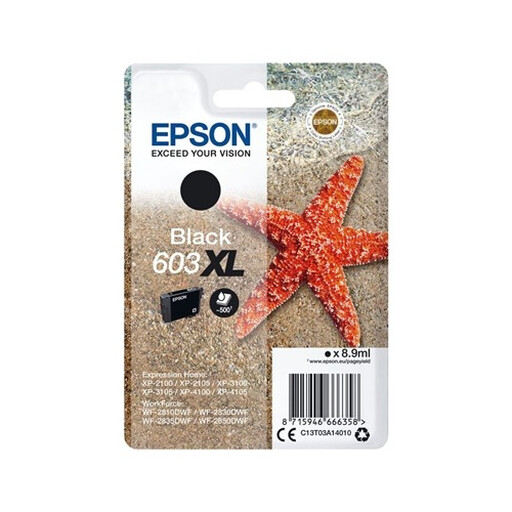
Why this product suits this profile: This cartridge is for owners of selected Epson Expression Home and WorkForce models who need a single black ink cartridge.
The product information lists specific models, including WF-2835 DWF, WF-2850 DWF, XP-2100 and XP-3100. The stated yield is 150 pages.
Genuine Epson version; 8.9 ml capacity according to the product name; separate black cartridge.
Store unopened cartridges in a dry place, away from direct sunlight and at a moderate temperature. Try not to touch the contacts or nozzles. The printer may run a short cleaning cycle after you install a cartridge, which uses ink. Repeated cleaning cycles can increase your running costs.
Empty cartridges shouldn’t go in your general rubbish. Use the manufacturer’s return or recycling schemes, or take them to a local collection point. For compatible ink cartridges, follow the supplier’s guidance.
We’ve put together a complete, regularly updated list of products that meet these strict selection criteria and fully comply with the safety regulations in force in the EU.
Make a note of your printer’s exact model number and check it against the cartridge’s compatibility list. The printer brand alone isn’t enough. Also check whether your device needs a pigment black or dye-based ink cartridge.
It depends on the ink volume, page coverage, print quality, cleaning cycles and how often you print. A stated yield, such as 180 or 300 pages, is a comparison figure based on defined conditions and may differ in everyday use.
No. XL versions can offer a higher page yield if you print regularly. What matters is the price per stated page and whether you’ll use the ink before it dries out or reaches its expiry date.