
Lieferung heute & morgen

Qualitätsgarantie

Willkommens-Angebote freischalten: KOSTENLOSE Lieferung | Bis zu 80 % RABATT | Kostenlose 30-Tage-JoyPlus-Testphase
App herunterladen
A Bluetooth conference speaker should transmit voices clearly, minimise background noise and connect to your computer without a lengthy set-up. In practice, however, some marketing claims can lead to the wrong purchase. What matters isn’t just terms such as ‘AI’, ‘360°’ or ‘professional’, but the specific technical details and where you plan to use the speaker.
A 360° microphone array can pick up voices from different directions. That doesn’t automatically mean that everyone in the room will come through equally clearly. Check the stated microphone pickup range. Depending on the model, furniture, screens and other obstacles can affect how well it picks up voices.
A single device is often enough for a small meeting table. In larger rooms, a daisy-chain conference speaker with two linked units may be a better choice.
According to the product description, AI noise cancellation can filter out certain background sounds, such as keyboard typing or air conditioning. But it can’t replace good room acoustics. Conversations in an adjacent room, strong echoes or a microphone placed too far away can’t always be fully compensated for.
Check which noise sources are specifically mentioned and whether the feature is available when using the microphone. Claims such as ‘VoiceIA’ or ‘AI Noise Reduction’ should be understood as technical features, not a guarantee of uninterrupted communication.
The stated talk time usually applies under specific conditions. High volume, Bluetooth use and multiple connected devices can all affect power consumption. For regular meetings, it’s therefore useful to have a USB-C connection as a back-up option. You should also be able to charge the speaker before longer meetings or power it during a call.
A conference speaker with a microphone should suit the size of your room. On an 8-microphone conference system, the microphones are usually arranged in a ring. This allows 360° voice pickup to capture voices from around the device.
In particular, compare:
A signal-to-noise ratio of more than 75 dB is stated for the EMEET models mentioned here. This figure describes the ratio between the wanted signal and the device’s own noise, but it isn’t the only measure of how clearly voices will be heard in a room.
For meetings, clear speech is more important than maximum music volume. The product specifications reviewed list a 5 W speaker with a 45 mm speaker unit and less than 1 per cent distortion. Actual voice clarity also depends on the size of the table, room acoustics and volume setting.
If you’d also like to use the speaker for music over Bluetooth, check which Bluetooth profiles it supports. The EMEET model is listed as having Bluetooth 5.3 with A2DP. For video calls, though, the microphone and hands-free features matter more than music playback.
A USB-C conference speaker can usually be connected directly to a computer. This can be handy if the wireless connection is weak, the battery is flat or you’re using a managed business set-up. Bluetooth, on the other hand, gives you more freedom to move around and reduces the number of cables on the meeting table.
According to the product description, the EMEET models are compatible with Windows, macOS and Android. Zoom, Microsoft Teams, Skype and Webex are also listed. Before buying, check that your operating system recognises the device as both a speaker and a microphone, and that the right audio sources are selected in your meeting software.

Why this product suits this profile: This compact model is ideal for small teams, home workers and occasional online meetings. It offers Bluetooth 5.3 and USB-C, and according to the product description, can be used with Zoom, Microsoft Teams and Skype.
The specifications list eight microphones, a pickup range of up to 3 metres, USB-C and up to 10 hours of talk time. This makes it easy to check the key buying criteria in advance.
8-microphone array, 5 W speaker, up to 10 hours of talk time and two connection options.
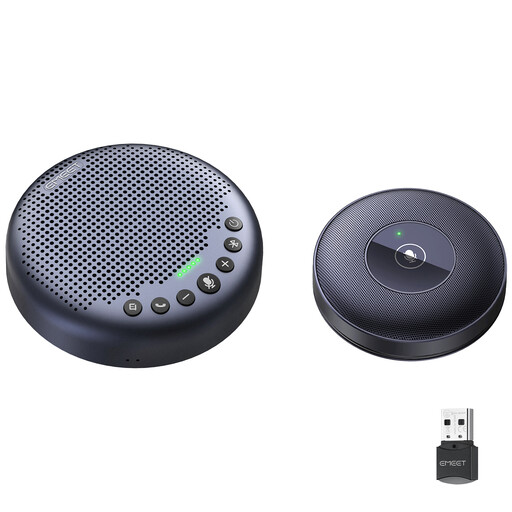
Why this product suits this profile: This set is designed for businesses and hybrid teams looking to cover a larger meeting table or room. The two units can be connected using daisy chain.
The specifications state a microphone pickup range of 4 metres, 8 microphones per unit and a dedicated daisy-chain cable. This makes planning easier, but you’ll still need to check the layout of your room.
Two devices for wider table coverage, a stated pickup range of 4 metres, Bluetooth 5.3 and up to 10 hours of talk time.
Why this product suits this profile: For frequent users who work in different locations, the combination of a battery, Bluetooth and USB-C is handy. You can use the device on a meeting table, in a home office or in a small project room.
USB-C provides a wired alternative if the battery runs low. For reliable voice pickup, place the device centrally and make sure it isn’t blocked by a laptop or monitor.
2600 mAh battery, up to 10 hours of stated talk time, USB-C, Bluetooth 5.3 and touch controls for volume and muting.
For a reliable speakerphone for Zoom and Microsoft Teams, follow these steps:
The EMEET model is stated to have a Bluetooth range of up to 66 feet, or around 20 metres. Walls, metal surfaces and wireless interference can reduce the actual range. For important meetings, a USB-C connection is a useful alternative.
According to the product description, the EMEET models mentioned are compatible with Zoom, Microsoft Teams, Skype and Webex. Once connected, you’ll need to select the speaker and microphone in the relevant application. Compatibility may also depend on your operating system, company policies and software version.
The EMEET models are stated to offer up to 10 hours of talk time and have a 2600 mAh battery. Actual battery life depends on factors such as volume, Bluetooth connection and usage. Keep the USB-C cable handy if you have a full day of meetings.
We’ve put together a complete, regularly updated list of products that meet these strict selection criteria and fully comply with the safety regulations in force in the EU.