
Lieferung heute & morgen

Qualitätsgarantie

Willkommens-Angebote freischalten: KOSTENLOSE Lieferung | Bis zu 80 % RABATT | Kostenlose 30-Tage-JoyPlus-Testphase
App herunterladen
In a professional world increasingly shaped by hybrid models and remote work, the quality of online meetings has a direct impact on productivity. Common issues like muffled voices, distracting background noise, or the constant need to repeat sentences can significantly hinder efficiency. A dedicated Bluetooth conference speaker is a practical solution to overcome these challenges.
This article serves as a guide. It explains the key features to consider when making your selection and presents a curated list of devices designed for various professional use cases.
Selecting the right device depends on your specific needs. The following criteria will help you make an informed decision.
The ability to clearly capture voices from different directions is crucial, especially when multiple people are seated at one table. A 360-degree microphone is the standard technology for this purpose. Multiple microphone capsules built into the device pick up sound from the entire room. Pay attention to the specified microphone range to ensure that participants sitting further away are also heard clearly.
A high-quality conference speaker with noise cancellation is essential for a professional call environment. Modern devices use AI-powered algorithms (often called AI Noise Cancellation) to actively filter out ambient sounds like keyboard typing, air conditioning, or paper rustling. This ensures that only the human voice is transmitted to the other participants, significantly improving clarity.
Flexibility in connection options is a key factor for daily use. Most models offer dual connectivity:
Also, ensure the device is compatible with the platforms you use, such as Zoom, Microsoft Teams, Skype, or Webex. Most manufacturers explicitly state this compatibility.
Based on the criteria above, we have compiled a selection of devices that cater to different requirements.

Why It Stands Out: This model is designed for scalability. With eight microphones and the ability to pair two devices (daisy chain), it is suitable for both individuals and growing teams.
Features:
Who is it for? Small to medium-sized teams and businesses looking for a flexible audio solution that can adapt to different room and participant sizes.
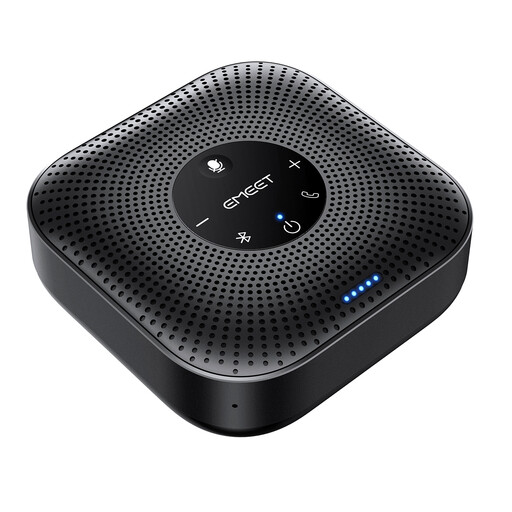
Why It Stands Out: A compact and straightforward speakerphone for meetings that focuses on the core functions for clear communication in a home office or for small groups.
Features:
Who is it for? Home office professionals, consultants, and mobile workers who need a reliable and portable conference speaker for personal use or for small group meetings.
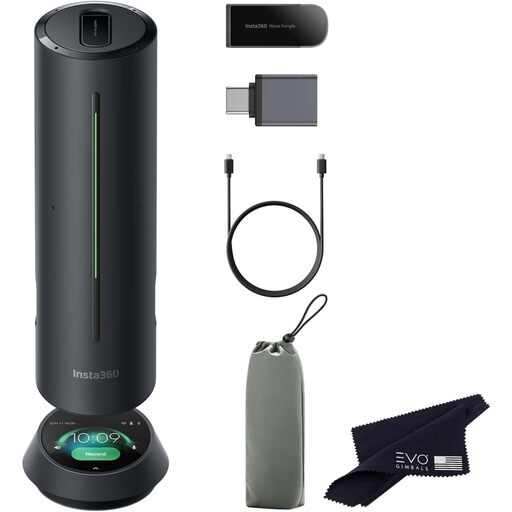
Why It Stands Out: This device goes beyond basic audio functions by integrating AI-powered tools to boost meeting productivity, such as automatic transcription.
Features:
Who is it for? Tech-savvy users and teams who are not just looking for a speaker for Zoom meetings, but also want to optimize their workflows with smart features like automatic minute-taking and task tracking.
If our selection doesn't include the perfect model for your specific needs, you can find a wider range of devices in our bluetooth speakers and microphones category. There, you can compare more products with different specifications.
1. How do I connect a conference speaker to my computer? Most devices offer two simple methods: either connect the speaker directly to your computer using the included USB cable (Plug & Play), or pair it wirelessly via the Bluetooth settings on your laptop or smartphone.
2. What does a 360-degree microphone mean on a speakerphone for meetings? A 360-degree microphone means the microphones in the device are arranged to pick up sound evenly from all directions. This is ideal when the device is placed in the middle of a table where multiple people are sitting, as each participant's voice is captured clearly.
3. Is a conference microphone with a speaker better than my laptop's built-in microphone? A dedicated conference microphone with a speaker generally offers functional advantages. It features more advanced noise and echo cancellation technologies, a greater voice pickup range, and a more powerful speaker. This results in significantly clearer audio quality for all participants, especially in environments with multiple people or background noise.