
Lieferung heute & morgen

Qualitätsgarantie

Willkommens-Angebote freischalten: KOSTENLOSE Lieferung | Bis zu 80 % RABATT | Kostenlose 30-Tage-JoyPlus-Testphase
App herunterladen
Bluetooth headphones are part of everyday life for many people in the UK: on the commute, while working from home, exercising, travelling or gaming. The choice ranges from wireless in-ear headphones to large over-ear models with active noise cancellation. But that variety can make it harder to choose.
If you focus only on claims such as ‘long battery life’, ‘noise cancelling’ or ‘high definition’, it’s easy to overlook important details. Our selection is based on clear technical specifications, intended use and practical limitations.
Manufacturers usually quote battery life under specific conditions. With over-ear headphones, switching on noise cancelling can reduce playback time. High volume, phone calls, RGB lighting and a constant wireless connection can also affect power consumption.
So don’t just compare the maximum figure. Look out for details such as:
Noise-cancelling headphones use microphones to pick up sounds around you and create an opposing signal. They may reduce low-frequency, continuous sounds such as the rumble of a train or plane more effectively than voices or sudden noises.
So a model with ANC isn’t automatically suitable for every situation. When cycling, in traffic or in places where important warning signals need to be heard, switch on ambient mode or choose an open-ear style.
Bluetooth 5.3 or Bluetooth 5.4 mainly describes the wireless technology and may offer benefits in power consumption, connectivity and compatibility. The codecs, drivers, app support and tuning of the headphones also affect the audio you hear.
Also check that the headphones are compatible with your device. Bluetooth headphones generally work with many smartphones, tablets and computers, but some features, such as Bluetooth multipoint or certain codecs, may depend on the device.
Consider the weight, adjustable headband, padding and whether you can change the ear cups or tips for a better fit. For sports headphones, a secure fit and documented splash resistance are also important. For example, an IPX4 rating means protection against splashes, not submersion.
For daily commuters, 15 to 30 hours may be enough. Frequent travellers can benefit from headphones with longer battery life. Claims such as ‘up to 50 hours’ or ‘up to 76 hours’ should be understood as manufacturer figures achieved under specific conditions.
Useful features include:
If you make regular calls, look for a headphone model with a microphone and clear information about its microphone characteristics. A mono Bluetooth headset may be useful for the office or working from home, while music and video calls usually call for a binaural model.
Bluetooth multipoint lets you connect to two devices. It’s useful if you want to switch between your work laptop and smartphone. For gaming, a 2.4 GHz connection via a USB receiver can be more suitable, as it may offer different latency characteristics from standard Bluetooth on compatible devices.
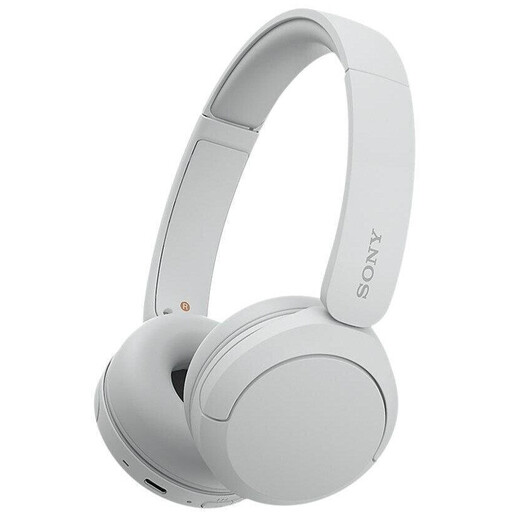
Why this product suits this profile: According to the product details, this lightweight on-ear model weighs 147 g and offers up to 50 hours of battery life. It’s suited to music, calls and daily journeys without the bulk of a larger style.
Battery life, weight and the multipoint feature are all specified clearly. This makes it easier to assess the practical benefits than relying on general marketing claims.
Weighs 147 g, offers up to 50 hours of battery life and features a five-band app EQ, according to the product description.
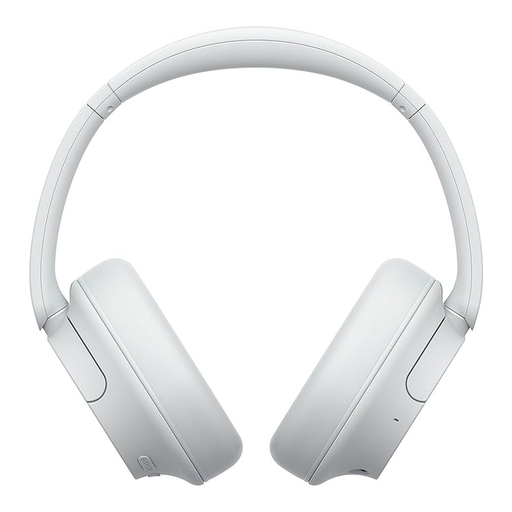
Why this product suits this profile: This over-ear model combines active noise cancellation, ambient sound mode and Bluetooth multipoint. It’s aimed at commuters, travellers and professionals.
The figures distinguish between up to 35 hours with ANC and up to 50 hours without it. That way, battery life isn’t presented as a single figure.
Weighs 192 g, with a 3.5 mm audio connection, ANC and quick charging that provides up to 60 minutes of playback from a 3-minute charge, according to the product details.
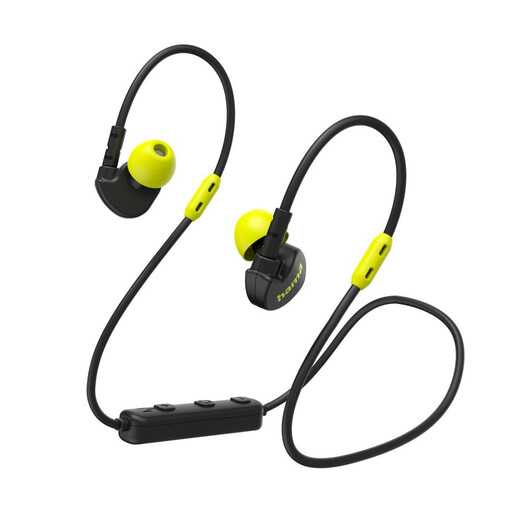
Why this product suits this profile: According to the product details, these in-ear headphones weigh 12 g, come with ear hooks and a clothing clip, and are designed for active use.
Three sizes of silicone tips and two ways to wear them help you adjust the fit to your ears. The stated sweat resistance shouldn’t be confused with protection against submersion.
Bluetooth 5.3, multipoint, USB-C and up to 6 hours of music playback, according to the product description.
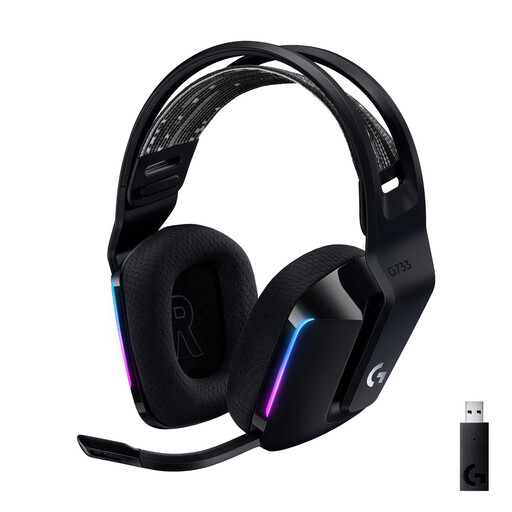
Why this product suits this profile: This gaming headset uses LIGHTSPEED via USB, has a detachable microphone and is designed for PC and selected consoles.
It doesn’t rely solely on Bluetooth for its connection. Range, microphone type, platform compatibility and battery life are listed separately.
Up to 20 m wireless range, up to 29 hours of battery life without lighting and a unidirectional microphone, according to the product details.
We’ve put together a complete, regularly updated list of products that meet these strict selection criteria and fully comply with the safety regulations in force in the EU.
Switch on the headphones and activate pairing mode. Then open the smartphone’s Bluetooth settings and select the device name shown. Once paired, headphones will often connect automatically. If they don’t, try restarting the devices, deleting old pairings or resetting the headphones.
Their lifespan depends on the battery, charging habits, exposure to sweat and moisture, and physical wear and tear. Batteries built into the headphones usually aren’t designed to be replaced later. Store your headphones somewhere dry, avoid extreme temperatures and use suitable USB-C chargers. High volume doesn’t necessarily shorten their lifespan, but it can damage your hearing.
Headphones use little power compared with a smartphone or laptop. Regular charging usually costs very little. Battery capacity, charging frequency and how long you use them are the main factors. Quick charging doesn’t save energy in itself, but it reduces the time you need to spend charging them day to day.