Students who write a lot
If you write longer answers, the keyboard layout and typing feel may matter more than having the smallest possible keyboard.


If you switch between several devices or want to position the keyboard and screen separately, a standalone Bluetooth keyboard could be a good option – just remember to allow space for a screen stand. If you mainly type on one particular tablet and want an integrated stand, a keyboard case made specifically for it may be more practical. For longer answers, a familiar keyboard layout and typing noise that suits your surroundings also matter.
If you write longer answers, the keyboard layout and typing feel may matter more than having the smallest possible keyboard.
You need to fit your screen, keyboard and drink into a limited space, and you want to carry your keyboard around regularly.
If you mainly type on a tablet, you’ll need to decide whether a standalone keyboard or a case made specifically for your device is better suited to your setup.
A good fit if: you switch between compatible devices or want to position the keyboard and screen separately.
What to consider: you may also need a suitable stand for your screen.
A good fit if: you mainly type on a specifically supported tablet and want an integrated stand.
What to consider: the tablet model and generation must match the case; it isn’t a universal alternative to a Bluetooth keyboard.
For longer answers, start by considering the layout and typing feel. If space in the café is limited, the overall setup and device compatibility matter too.
| Priority | What to look for when buying | Who is this important to? |
|---|---|---|
| Typing longer answers | Check the German keyboard layout and the position of punctuation marks and editing keys; try typing a longer piece of text if possible. | When I write detailed answers, I want to type quickly using familiar keys. Around 28% of consumers are likely to prioritise typing comfort. |
| Space and portability | Compare the dimensions and weight of the specific version, and allow space for your screen and a possible stand too. | If there’s hardly any room on my café table, the whole setup needs to fit alongside my drink and study materials. Around 22% of consumers are likely to prioritise light luggage and a compact footprint. |
| Compatibility with your device | Check the tablet model and generation, operating system requirements, connection type and keyboard layout. | When I type on my tablet, I want the connection or case to be exactly right for that device. Around 22% of consumers are likely to prioritise device compatibility above all. |
| Typing noise | If possible, listen to the specific keyboard, including its space bar, in similar conditions. | When I study in a shared space, I want to choose a typing sound that suits me and those around me. Around 17% of consumers are likely to prioritise considerate typing above all. |
| Power supply | Check the battery type or charging port on the exact version, and follow the instructions provided. | When I study for a long time away from a socket, I want to know whether I’ll need spare batteries or a charging plan. Around 11% of consumers are likely to check the power supply first. |
In a café, your screen and keyboard need to be set up so you can use them at the same time. So, if you choose a standalone keyboard, think about where you’ll position your screen too.
Consider the space needed for your whole setup before choosing a standalone model.
An extra stand or suitable case takes up more room in your bag and on the table.
Manufacturers list compatibility with specific devices and model numbers. A case for a different tablet from the same brand won’t necessarily fit.
Check the exact tablet generation, the case’s model number and, if applicable, the required software version.
If the case doesn’t fit, you may need to buy another one.
A small format saves space, but that alone doesn’t tell you whether the keyboard layout and typing feel will work for you when writing longer texts.
If possible, try typing a longer paragraph with the special characters you need, rather than comparing dimensions alone.
Samsung EF-DX715 and EF-DX725 are different model numbers. Compatibility with some of the same tablets doesn’t make them the same product.
Before buying, check the model number, layout and the devices specifically listed as compatible.
The Keys-To-Go 2 and Pebble Keys 2 K380s are two different compact keyboard models.
The KW 7100 MINI BT is a compact standalone keyboard that can connect to multiple Bluetooth devices.
Magic Keyboard cases are designed for the specific iPad models listed as compatible.
Book Cover Keyboards combine a keyboard and stand for certain Galaxy Tab models; some models also include a trackpad.
The K3 Max is a compact mechanical keyboard, also available with a DE-ISO layout.
This selection includes standalone Bluetooth keyboards and device-specific keyboard cases for writing on the go.
 Image unavailable
If you’re short on space or use several devices, this foldable model with a touchpad and three Bluetooth channels could be worth considering.
Compatibility listed in the product name: iPadOS, Android and Windows.
 Image unavailable
If you want to position your screen separately from the keyboard, the magnetic stand described may come in handy for a smartphone or tablet.
The product name describes a foldable design and a rechargeable model.
 Image unavailable
If you want to use a mouse as well as a keyboard, this set is an option for working on the go.
The product name lists three connection modes, connections to up to three devices and USB-C charging. Compatible systems listed are Windows, Android and iOS.
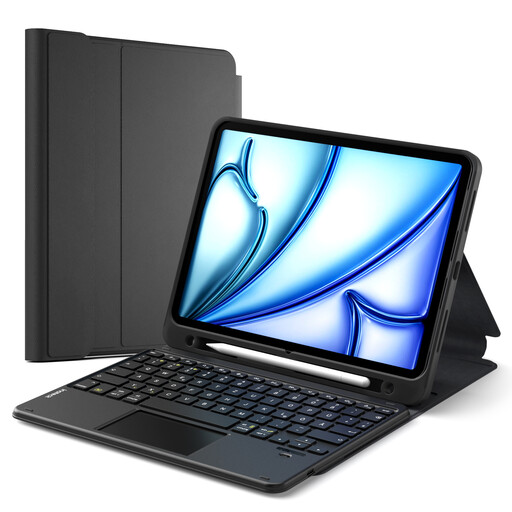 Image unavailable
If you use a specifically compatible iPad and want to position the screen while you type, the case offers a three-position stand and a touchpad.
Listed models: iPad 11 (A16), iPad 10th gen., iPad Air 11″ M4/M3/M2, iPad Air 5/4 and iPad Pro 11″. Not universally compatible.
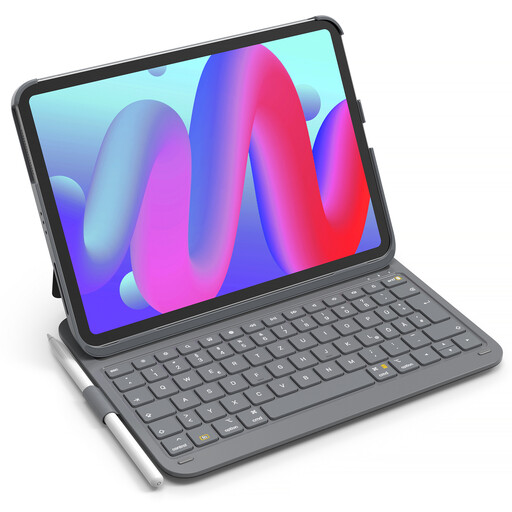 Image unavailable
If you type on a compatible iPad and want to navigate without a separate mouse, the product description lists an adjustable stand and a multi-touch trackpad.
Listed models: iPad 11 (A16), iPad 10th gen., iPad Air 11″ M4/M3/M2, iPad Air 5/4 and iPad Pro 11″. Not universally compatible.
With a standalone Bluetooth keyboard, first test the connection and input language on your device, and find a secure place for your screen. For a keyboard case, check the exact tablet model number and, if necessary, the required operating system version against the manufacturer’s details.
No, it depends on the model. Logitech Support lists two CR2032 coin cells for the Keys-To-Go 2 and two AAA batteries for the Pebble Keys 2 K380s. Read the instructions for your keyboard before changing its batteries.
Remove the batteries before disposal wherever possible, and take them separately to a battery collection point. The German Environment Agency recommends separating removable batteries from old electrical devices.