What should you look for when buying?
First, check that the keyboard and key layout are compatible with your device. Then consider its portability, typing comfort and power supply to see whether it suits short bursts of work between appointments.
| What matters to you |
What to check before buying |
Who is it most important for? |
| Size and setup |
Check the dimensions and carry case. If you’re buying a separate keyboard, work out how you’ll prop up your device where you’ll be using it. |
If I have limited space between appointments, I want to be able to pack my keyboard away quickly; around 36% of consumers put portability first. |
| Compatibility and switching devices |
Check the operating system, connection type and full model name of your device. |
If I switch between a tablet and smartphone, I need a keyboard that works with my devices; around 29% of consumers say switching between devices is their main concern. |
| Typing comfort and layout |
Check the key arrangement and the exact layout variant. Don’t assume it has a German layout just because the product listing is in German. |
For longer drafts, I want to type comfortably and rely on the key layout; around 21% of consumers put typing comfort first. |
| Power |
Before buying, check whether the model needs charging or batteries. |
If I only have a short window to work, I don’t want to waste time figuring out how to power my keyboard; around 14% of consumers say being ready to use is their main priority. |
Joybuy products for mobile typing
This selection includes separate mobile Bluetooth keyboards and a keyboard case for specific iPad models.
 No image available
Inateck Bluetooth keyboard, QWERTZ, 3 Bluetooth connections
An option if you’re looking for a separate QWERTZ keyboard for several devices.
This product is described as an ultra-slim keyboard with three Bluetooth connections.
View on Joybuy
 No image available
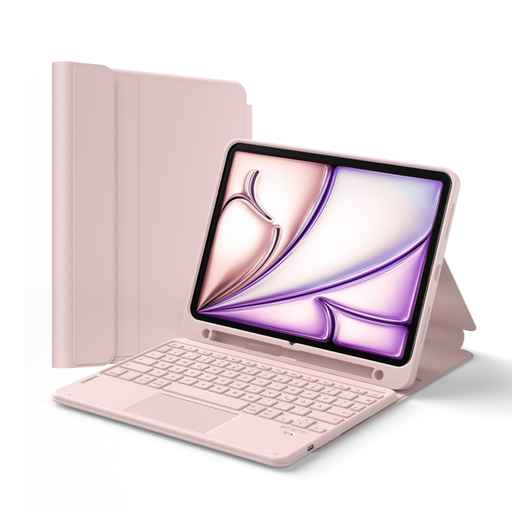
Inateck keyboard case for iPad 11 (A16, 2025), QWERTZ, pink
A good fit if you want to type on a compatible iPad and have the keyboard and stand in one.
Detachable keyboard, touchpad and stylus holder. According to the product name, it’s designed for iPad 11 (A16, 2025), iPad 10th Gen., iPad Air 4/5, iPad Air 11-inch M2/M3/M4 and iPad Pro 11-inch; check your exact model number.
View on Joybuy
 No image available
NAXSIR foldable Bluetooth keyboard with magnetic stand
The magnetic stand is useful if you want to position your keyboard and mobile device together.
This product is described as foldable and rechargeable, with an aluminium casing and black keys.
View on Joybuy
 No image available
Foldable Bluetooth keyboard with wireless mouse, USB-C, silver-white
An option if you’re looking for a foldable keyboard and mouse for mobile use.
The product listing mentions quiet scissor keys, three connection modes, connections to up to three devices and USB-C charging.
View on Joybuy
 No image available
Redragon RS68, 68-key mechanical keyboard, blue
The compact size could suit you if you want to use a 68-key layout while travelling.
The product listing mentions Bluetooth, 2.4 GHz wireless and wired connections, as well as a detachable wrist rest. Check that the layout suits the way you type.
View on Joybuy
Frequently asked questions
How do I set up a Bluetooth keyboard before my first appointment?
Pair the keyboard with your device beforehand and test it in the app you plan to use. For the Samsung Smart Keyboard Trio 500, Samsung describes starting pairing mode with F7, F8 or F9, then entering the PIN shown on screen. Other models may work differently.
Will any Surface Pro keyboard fit any Surface Pro?
No. Microsoft lists, among others, keyboards for the Surface Pro 12-inch, Surface Pro 8 and later models, as well as Type Covers for Surface Pro 7+ and older models. Compare your device’s full model name with the keyboard’s compatibility details.
How can I make sure my keyboard is ready to use between appointments?
Before you set off, check whether your model needs charging or batteries. Trust describes the Lyra as rechargeable; Samsung lists two coin-cell batteries for the Smart Keyboard EJ-B7800BBEGDE. These details apply to the models named.
Who should I contact if there’s a fault?
If a product is faulty, your statutory rights to a remedy from the seller are separate from any voluntary manufacturer’s guarantee. The Verbraucherzentrale says that requesting a remedy is the first step when a product is faulty. Whether you’re buying as a consumer or for business should also be taken into account.
What should I check about compliance when buying a Bluetooth keyboard?
For the specific product listing, check the details on CE marking, product and manufacturer identification, whether German instructions are required, and the declaration of conformity. The Bundesnetzagentur lists these points in its market surveillance of Bluetooth products; the information here doesn’t confirm that any individual product listing is compliant.


