For a catalogue containing links to local rulebooks and photos, a laptop will suit your intended workflow only if the desktop application you choose supports those file paths on your planned operating system. Microsoft Support notes that Excel for the web only uses web addresses as destinations for the LINK function. If you’re planning a cloud-based Chromebook workflow, test the files you need and how they work offline in advance. Only then is it worth choosing a display, SSD and ports to suit your needs.
Who is this guide for?
Collectors with local source files
If you want to link catalogue entries to rulebooks, photos or other files in your own folders, you’ll want to be able to find both the catalogue and its sources even after changing devices or storage locations. Microsoft Support and LibreOffice Help explain how spreadsheet programmes handle file paths and relative or absolute links.
People managing large folders of images and documents
If you’re cataloguing lots of games and their associated photos or documents, check the SSD capacity and ports on the specific configuration against your file workflow. The specifications from HP, Dell and Lenovo show that features can vary between model variants.
People cataloguing on the go or with others
If you catalogue in different places or with other people, consider whether the files you need are accessible online and, where necessary, offline. Google Chromebook Help explains the limitations of offline files and apps, so test your actual workflow with your catalogue software.
What should you consider when choosing?
Windows laptop with a desktop spreadsheet programme
A good choice if: You want to use local file paths in a spreadsheet. Microsoft Support explains that Excel for the web only links to web addresses using the LINK function.
Consider: RAM, SSD, display and ports vary between configurations. Check the product details and test your links.
Mac with suitable desktop software
A good choice if: Your chosen catalogue software runs on macOS and you’ve tested your existing file links on it. The Document Foundation also offers LibreOffice for macOS.
Consider: Before buying, check that the peripherals you need are compatible with the ports on the specific variant.
Chromebook with a cloud-based catalogue
A good choice if: You use a cloud-based workflow and have tested the files and apps you need in advance. Google explains that some Drive files can be used offline, but not every app can.
Consider: OneDrive is required for the Microsoft 365 editing on Chromebooks described by Google. Also check that you can access your source files offline.
| What you need |
What to check before buying |
Who it matters most to |
| Software and file links |
Choose your catalogue software; open sample links to the file types you plan to use on your intended system, including after trying a change of location. |
If your rulebooks and photos are stored locally, you’ll want the links to remain accessible from your catalogue. Around 31% of consumers put working links to local files first. |
| Space for source files |
Estimate how many files you have and expect to add; check the SSD capacity, the USB or card ports you need, and a separate backup option. |
For large collections with lots of photos and documents, having enough space for source files is important. Around 25% of consumers prioritise storing and organising them locally. |
| Readability and input |
Compare the display size and resolution of the specific variant with a typical catalogue spreadsheet; consider the keyboard and whether you might use an external monitor. |
If you’re entering lots of details and reading a spreadsheet alongside a source file, workspace can make a real difference. Around 19% of consumers place particular importance on screen use and comfortable input. |
| Cataloguing on the go |
Check the weight, ports and offline workflow with the files you actually use. |
When you’re maintaining your catalogue in different locations, you’ll need to take your device and source files with you or have them available offline. Around 13% of consumers prioritise mobile access. |
| Overall cost |
Check the operating system, included software and any extras you’ll need before comparing specific offers. |
If you want to keep the cost of your laptop and necessary extras down, consider what’s included in the complete offer. Around 12% of consumers prioritise overall cost. |
Common mistakes when choosing
-
Opening a spreadsheet doesn’t mean all its file links will work
Microsoft Support distinguishes between local file paths and web addresses in Excel for the web. Absolute paths may stop working after a move, while LibreOffice Help sets out the conditions under which relative file links can work.
Test sample links to PDFs, photos and other important sources in the application you plan to use. Try changing the storage location with a copy first.
Fixing links to sources that are no longer accessible can take extra time.
-
Comparing only the model name, not the configuration
Dell lists different RAM configurations for the DC15250, while Lenovo’s datasheet also describes several possible variants. The model name alone therefore doesn’t tell you all the features included.
Before ordering, check the full product code, RAM, SSD, operating system, ports and what’s included.
-
Treating a Windows 10 offer as a routinely supported system without a support plan
Microsoft states that regular support for Windows 10 ended on 14 October 2025. According to Microsoft, an ESU programme can extend protection until 12 October 2027, subject to its terms.
If you’re considering a Windows 10 device, check whether it can be upgraded or what ESU option is available before you decide.
Upgrading or using the ESU programme may require extra planning.
Brands to consider
HP
The documented Laptop 15-fd0058ng is an example of a 15.6-inch Windows configuration for desk-based work.
- HP lists Windows 11 Home, 16 GB RAM and a 512-GB SSD for variant 876Z2EA#ABD.
- These details apply to the variant specified and don’t confirm compatibility with any particular catalogue software.
Dell
The Dell 15 DC15250 is available in documented configurations for spreadsheet work.
- Dell lists variants under this model name with either 8 GB or 16 GB RAM, each with a 512-GB SSD and FHD display.
- Dell notes that configurations vary. Check the specific product variant against the features you want.
Apple
A MacBook Air is a macOS option if you’ve tested your intended software and file links on macOS.
- Apple lists 16 GB of unified memory, a 512-GB SSD and two Thunderbolt 4 ports for the 13-inch base configuration of the MacBook Air M5.
- These configuration details don’t confirm compatibility with an unspecified catalogue app. Also check the ports your devices need.
Lenovo
The IdeaPad Slim 3 range is a potential Windows option if you need ports for external source files.
- Lenovo’s datasheet for the IdeaPad Slim 3 15IRH10 lists USB-A, USB-C and an SD card reader.
- The datasheet describes different operating system and storage configurations rather than one standard specification. Check the specific variant.
Joybuy products
The following Joybuy devices are mainly Windows laptops for working with local spreadsheets, plus a MacBook for macOS software you’ve already tested.
 No image available
Acer TravelMate TMP216-41-TCO, 16-inch WUXGA, Ryzen 3 PRO 7335U, 16GB DDR5, 512GB SSD, Windows 11 Pro Education
A Windows configuration for working with local spreadsheets and file links, provided your chosen application and links work on this system.
16-inch WUXGA display, 16GB DDR5, 512GB SSD, AMD Ryzen 3 PRO 7335U and Windows 11 Pro Education.
View at Joybuy
 No image available
HP ZBook 8 G1i 16, Ultra 7 265H, 64GB, 2TB
For a local collection with lots of source files, the specified storage could be a factor in your choice. Test your catalogue software and file links on the system you plan to use.
64GB RAM and 2TB SSD.
View at Joybuy
 No image available
HP OmniBook Ultra Flip 14-fh0670ng, 14-inch 2-in-1, Core Ultra 7 258V, 32GB RAM, 1TB SSD, 2.8K OLED, Windows 11 Home
If you’re considering a Windows 2-in-1, check that it suits your specific catalogue software and preferred way of working.
14-inch display, 2.8K OLED, 32GB RAM, 1TB SSD and Windows 11 Home.
View at Joybuy
 No image available
Apple 15-inch MacBook Air M5 (2026), 10-Core CPU, 10-Core GPU, 16GB, 512GB SSD, Midnight, German QWERTZ keyboard
A macOS option if you’ve tested your specific catalogue software and file-link workflow on macOS.
16GB and 512GB SSD. The product details state that no power adapter is included.
View at Joybuy
 No image available
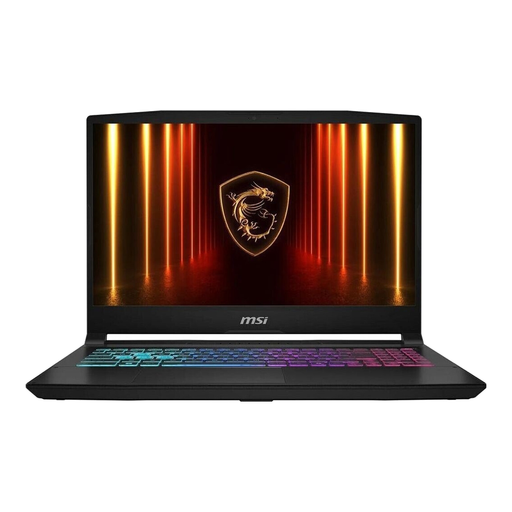
MSI Katana 15 HX B14WFK-487, 15.6-inch FHD, Intel Core i7, 16GB RAM, 512GB SSD, RTX 5060 DDR5, Windows 11
A Windows configuration for catalogue work, provided the spreadsheet application you need and local file links work on it.
15.6-inch FHD display, 16GB RAM, 512GB SSD and German QWERTZ keyboard.
View at Joybuy
Frequently asked questions
Can I link to local source files in Excel for the web?
Not with the LINK function as you can in Excel for Windows: Microsoft Support lists only web addresses as valid destinations in Excel for the web. Test your workflow in the application you actually plan to use.
How can I prevent broken links when I move my catalogue folder?
Where possible, keep your catalogue and source files in a clear folder structure, and test the move with a copy first. LibreOffice Help notes that absolute drive paths may fail when you change the storage location, and that relative file links have certain requirements.
Can I edit a catalogue on a Chromebook without an internet connection?
It depends on the files and apps you use. Google Chromebook Help explains that some Drive files, including Google Sheets, can be used offline, but not every app can. Make the files you need available offline in advance, and test whether you can open linked sources without an internet connection.


