High-volume typists
If you enter lots of game titles, details and numbers at a fixed workstation, look for a layout that feels comfortable to type on. CHERRY specifies an SX scissor mechanism for its STREAM models.


First, choose a keyboard layout that matches your computer. Then decide whether you often need a number pad or would rather have more room for your mouse and games. Set up shortcuts in your catalogue software, not on the keyboard: for example, LibreOffice Help distinguishes between relative and absolute file paths. Programmable keys are only useful if the action you want works with the software you use.
If you enter lots of game titles, details and numbers at a fixed workstation, look for a layout that feels comfortable to type on. CHERRY specifies an SX scissor mechanism for its STREAM models.
If you link local documents or web sources to catalogue entries, make sure the keyboard layout matches your computer’s input layout. Microsoft Help explains how to manage input layouts in Windows, while LibreOffice Help covers file hyperlinks.
If you enter longer descriptions over extended sessions, consider the position of your keyboard, hands and mouse when choosing a model. The Institute for Occupational Safety and Health of the German Social Accident Insurance notes that intensive computer work can put different input devices to use.
First, work out whether you need a number pad for your entries. Then consider how much desk space you have and the hand position you prefer. Programmable keys are worth considering if your catalogue software supports the actions you need.
| What matters | What to check when buying | Who is it most relevant to? |
|---|---|---|
| Typing flow when entering lots of items | Check for a German layout and decide whether you need a number pad. | If I enter lots of titles and descriptions, I want a layout that suits the way I type; around 31% of consumers would put this first. |
| File links, shortcuts and layout | Match the physical key layout to the input layout; test link commands in your catalogue software. | If I link sources to catalogue entries, I need the right characters and software commands; around 25% of consumers would prioritise file links and layout. |
| Hand position during longer sessions | Consider the keyboard’s shape and size alongside your hand position, mouse and available space. | If I enter items for long periods, I want to take my hand and arm position into account; around 19% of consumers would give this priority. |
| Space for games and a mouse | Measure the available width and compare keyboards with and without a number pad. | If I keep game boxes or sources beside my keyboard, free space matters more than a separate number pad; around 13% of consumers would prioritise desk space. |
| Connectivity and switching between devices | Check the variant’s Bluetooth, receiver, USB connection and supported devices. | If I switch between several devices for entering information, the connection needs to suit them; around 12% of consumers would put connectivity and device switching first. |
Variants can differ in layout or features. For example, a Joybuy listing for MX Keys specifies “MX Keys for Business” in the technical details, while a STREAM TKL listing states that it has a US layout.
On the specific product page, check the full model name, manufacturer’s part number, key layout and what’s included.
A different layout, device version or set of included items could mean the keyboard isn’t right for the way you plan to use it.
Hyperlinks are created in the software you use. LibreOffice Help, for example, distinguishes between relative and absolute links, so the location and paths matter for local source files.
Test the links in a small library, then open them again after saving or moving your catalogue and source files. Check the exact steps for your software.
If paths change, you may need to spend extra time relinking source files that are no longer accessible.
Perixx notes that you may need time to get used to the split keyboard on the PERIBOARD-512. The design alone doesn’t tell you whether it will suit the way you position your hands.
Check the shape, desk space and position of the keyboard and mouse rather than assuming how it will feel for you.
STREAM models are available in full-size, TKL (without a number pad) and wireless versions.
MX Keys S and Wave Keys cater to different needs around workflows, key shape and switching between devices.
The PERIBOARD-512 B is a wired, split-keyboard alternative available with a German QWERTZ layout.
The HP 975 Dual-Mode is aimed at buyers looking for programmable shortcuts and the ability to switch between devices.
The KB700 is described as a German QWERTZ full-size model with Bluetooth and a wireless receiver.
The models below include compact and full-size keyboards, with a range of connectivity options and key shapes.
 No image available
A compact option if you want to leave room beside the keyboard for a mouse or games; there’s no separate number pad.
Akko V3 Pro Cream Yellow switches; hot-swappable; RGB; wired.
 No image available
A wired, full-size option for a fixed workstation and frequent number entry.
Mechanical keyboard; CHERRY MX2A Red switches; RGB backlighting.
 No image available
A wired, full-size option if you catalogue items on a fixed computer and want to use a number pad.
USB plug and play; listed as compatible with Windows; described as spill-resistant in the product name.
 No image available
An option for longer typing sessions if you’re considering a split, curved keyboard layout; check whether the shape suits the way you position your hands.
Wireless; Bluetooth and USB receiver; listed as compatible with Windows and Mac.
 No image available
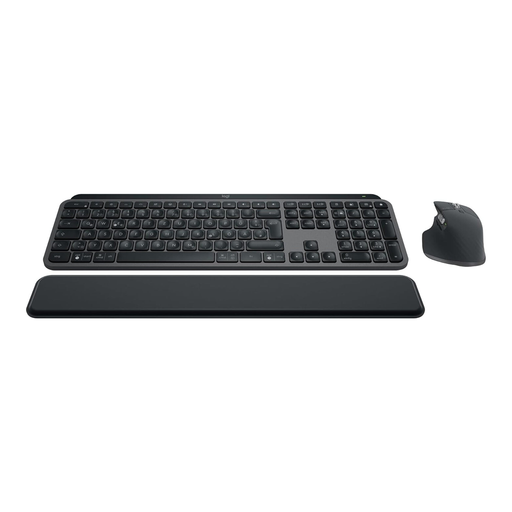
A keyboard and mouse set if you switch between compatible devices and plan to use Smart Actions. The keyboard doesn’t create file links in your catalogue.
Bluetooth and Logi Bolt; backlighting; Smart Actions.
No. You create links in the software you use. For example, LibreOffice Help explains how to select a file for a hyperlink and distinguishes between relative and absolute paths. Test the features in your catalogue software, then open a link again after saving or moving the files.
Match the physical key layout to the input layout selected on your computer. In Windows, you can manage input layouts in the language settings; other operating systems have their own settings, as Microsoft Support explains.
No, it depends on the individual. Perixx says you may need time to get used to its split PERIBOARD-512. Check the shape and the position of the keyboard and mouse at your workstation rather than assuming that the label “ergonomic” guarantees it will suit you.
Consumers generally have a right to cancel a distance purchase; the usual cancellation period is 14 days. The consumer advice centre explains that the exact start of the period and any exceptions depend on the purchase.
No. For consumer purchases in the EU, faulty goods are covered by a statutory guarantee from the seller for at least two years from receipt. A voluntary commercial guarantee is an additional promise; the European Commission’s Your Europe service explains the difference between these rights. Check the terms before paying for extra protection.