If you’re hosting the discussion alone at your computer, a headset with an adjustable microphone is a sensible starting point. Then choose based on how you like to wear it, how it connects and how clearly you want to hear the online contributions. If other people in the shared room also need to be heard online, plan for a room-audio solution: a personal headset isn’t a reliable room microphone for the whole group.
Which setup is right for you?
Hosting the discussion alone
You’re leading the discussion from your own seat and want online guests to hear you clearly despite the usual background noise in a shared house. Logitech and HP describe microphone and connection features on specific headset models that you can check against your setup.
Hosting a hybrid book club
Several people are speaking in the room, and their contributions need to be heard online too. Microsoft Support covers room-audio equipment for hybrid meeting spaces and warns that multiple audio devices can cause echo in Microsoft Teams.
Moving between the room and the online discussion
You want to hear the online contributions while keeping track of what’s happening in the shared room. A mono headset leaves one ear free; with stereo ear cushions, check whether the level of isolation suits your situation.
What should you consider when choosing?
First, decide whether only your voice or everyone’s voices in the room need to be heard online. Microsoft Support’s guidance for Microsoft Teams covers hybrid room-audio scenarios and ways to prevent echo. Test the complete seating arrangement with someone joining remotely.
Personal headset
A good fit if: you’re hosting the discussion alone and speaking yourself while the others join online.
Consider: Microphone noise reduction affects the voice being transmitted; it doesn’t turn a personal headset into a microphone for several people in the room.
Room audio for the group
A good fit if: several people in the room are joining the discussion and need to be heard online.
Consider: The microphone position and playback need to suit the seating arrangement. Microsoft Support warns that multiple active audio devices in the same room can cause echo in Teams.
| What matters |
What to check when buying |
Who is it important to? |
| Making your voice easy to understand |
Microphone position and mute control; test the microphone with the usual background noise in your shared house. |
If I’m hosting the discussion alone, I want my voice to remain clear despite the noise in the room. Around 25% of consumers prioritise being understood. |
| Capturing everyone’s voice |
Choose a room microphone and playback setup to suit the seating arrangement; check for other active audio paths. |
If several people in the room are speaking, their contributions need to come through online. Around 25% of consumers prioritise making the whole group audible. |
| Hearing online contributions clearly |
Assess passive isolation from the ear cushions separately from the microphone’s noise reduction. |
If I need to understand the guests joining remotely, I want background noise to be less distracting while I listen. Around 20% of consumers focus above all on listening without interruption. |
| Fit and freedom of movement |
Choose mono or stereo to suit your needs; with a wireless connection, check the battery and connection in advance. |
If I want to get up during the discussion or keep hearing what’s going on in the room, fit and freedom of movement matter most. Around 15% of consumers put this first. |
| Connection and controls |
Check that the specific version’s connection is compatible with your device; test the audio selection in your meeting software. |
If I want to connect the headset directly to my device and select the microphone and playback easily, I need a version that’s compatible. Around 15% of consumers prioritise compatibility and ease of use. |
Common mistakes
-
Expecting a personal headset to work as a microphone for the whole group
A microphone designed for the person wearing it does a different job from a solution intended to pick up several voices in the room.
Before you buy, establish who needs to be heard by the online guests and test the full seating arrangement.
If the whole group needs to be heard, you may also need a suitable room-audio solution.
-
Assuming “noise cancelling” always does the same thing
Microphone noise reduction affects the voice being transmitted; isolating ear cushions mainly affect what you hear. Logitech and Jabra describe these features separately for their respective models.
Check the microphone and ear cushions separately, and test the headset in the conditions you’re likely to encounter during your discussion.
-
Waiting until the meeting to check the connection or version
Connections and specifications can vary within a product range.
Check the exact model version against your device, then select the microphone and playback device in your meeting software before you begin.
Key brands at a glance
Logitech
The H390 is a wired computer headset for one person hosting a discussion. Logitech lists USB-A and USB-C versions.
- Logitech lists a swivel microphone and in-line controls for the H390.
- Check the specific connection version. The manufacturer’s information doesn’t confirm that it can pick up several people or measure its performance with background noise in a shared house.
Jabra
The wired Evolve2 40 SE is described as suitable for calls at a fixed desk. Versions are available for UC and Microsoft Teams.
- Jabra lists isolating ear cushions and three microphones for the Evolve2 40 SE.
- The noise-reduction claims come from the manufacturer. Ear cushions don’t replace a solution for picking up several voices in the room.
HP Poly
The Blackwire range includes wired stereo and mono versions; the connection details here are for the Blackwire 3325.
- For this Blackwire 3325 version, HP lists USB-C, a USB-A adapter, 3.5 mm audio and a mute function.
- These connections apply to the version listed and shouldn’t be assumed to apply to other Blackwire or Voyager models.
EPOS
The IMPACT-100 range includes wired mono and stereo versions for calls on a computer.
- For the range, EPOS lists a USB-C-to-USB-A adapter, control buttons and a unidirectional microphone with noise reduction.
- The stated weight of 76 g applies to the stereo versions listed. Check the fit and certification of the specific version.
Joybuy product options
The options below are personal headsets for hosting a discussion at your computer, with some freedom to move around. If several people in your shared room need to be heard online, a personal headset isn’t a reliable room-microphone solution.
 Image unavailable
Jabra Evolve2 75 wireless PC headset with charging stand, USB-C Bluetooth adapter, black
The listed Bluetooth and USB-C connections are useful for hosting a discussion at your computer while having some freedom to move around.
Stereo version; the product name lists a USB-C Bluetooth adapter and charging stand. The product details also mention technology with eight microphones.
Joybuy
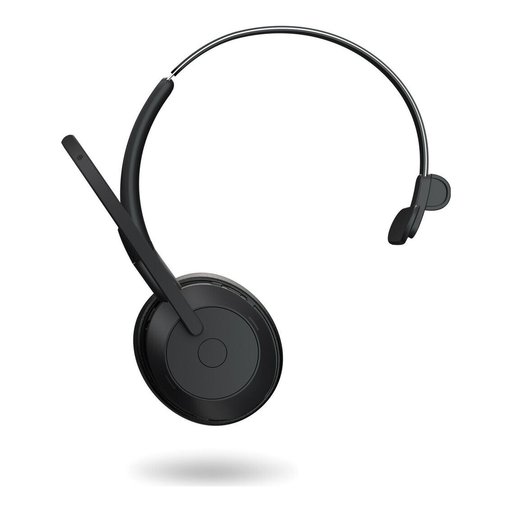 Image unavailable
Jabra Evolve2 55 mono wireless headset, black
The mono version leaves one ear free, so you can hear what’s happening in the room during an online discussion.
Bluetooth and USB-C wired connections, as well as microphone mute, are listed for this version.
Joybuy
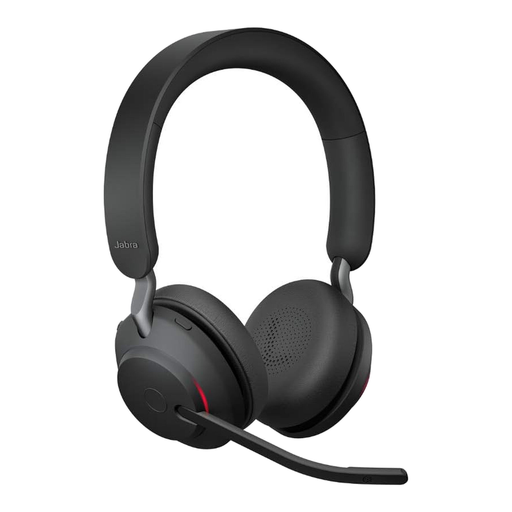 Image unavailable
Jabra Evolve2 65 wireless PC headset, stereo, USB-C Bluetooth adapter, black
The stereo version is an option if you want to hear remote contributions through both ear cups while hosting the discussion.
A USB-C Bluetooth adapter and three microphones on a swivel microphone boom are listed for this version. The stated battery life is 37 hours.
Joybuy
 Image unavailable
Logitech H570e mono headset, wired, USB-A, black
This wired mono headset suits hosting a discussion at your computer if you want to keep one ear free to hear what’s going on in the room.
This version is listed with a USB-A connection, microphone boom and in-line controls with mute and an LED indicator.
Joybuy
 Image unavailable
Jabra Evolve 20 SE mono headset, wired, USB-C and USB-A, black
The mono version is described as suitable for online calls on a computer and leaves one ear free.
The wired headset is listed for USB-C and USB-A. The external control unit includes call controls and mute.
Joybuy
Frequently asked questions
Is a headset enough if several people in the room are joining the discussion?
Not as a reliable solution if everyone needs to be heard online. Plan for a suitable room-audio solution and test the seating arrangement; Microsoft Support warns that multiple audio devices active at the same time in the same room can cause echo in Microsoft Teams.
Is a noise-reducing microphone the same as isolation when listening?
No. Logitech describes noise reduction for voice transmission on the H390; Jabra also lists passive isolation from the ear cushions on the Evolve2 40 SE. Check these two features separately.
What should I set up in the software before the book discussion?
Select the microphone you plan to use and your chosen speaker in your meeting software. Then test your voice and the playback with someone joining remotely.
How can I check that the headset connection is compatible?
Check the exact version against your device’s connection, such as USB-A, USB-C or a 3.5 mm jack, and check the audio selection in your chosen software before the meeting.
What happens if a product develops a fault after purchase in Germany?
For purchases from a business seller, the statutory warranty generally lasts for two years from the date you receive the goods. The European Union distinguishes these statutory rights from a voluntary manufacturer’s guarantee.


