When several people speak quietly, your choice depends on whether a shared table microphone can pick up everyone clearly from their seats, or whether you need individual microphones close to each speaker. If one person will do most of the talking, a USB microphone placed nearby may be enough. Separate microphones give you more control, but require suitable inputs and more set-up. Test your planned arrangement from the actual seats, with both quiet and loud contributions.
Which set-up is right for you?
A book group with several quiet voices
If you need to hear contributions clearly from different seats, try a shared pick-up area or place individual microphones at each seat. Zoom documents recorders with several external inputs, while HyperX describes a table microphone with switchable polar patterns.
A group with one main speaker
If one person will do most of the talking or reading and can stay close to the microphone, a microphone aimed directly at them could be a good option. Shure describes the MV7+ as a USB-C/XLR microphone, while Audio-Technica lists the ATR2100x-USB as a dynamic USB/XLR microphone with a cardioid polar pattern.
Recording in a noisy or echoey room
If there’s echo or background noise in the room, test the distance and direction from the intended seats. The Audacity manual points out that increasing the volume afterwards also amplifies room noise.
What should you consider when choosing?
A close-up microphone for one main speaker
A good fit if: one person does most of the talking and can stay close to the microphone.
The trade-off: It won’t necessarily pick up quiet contributions from people further away clearly. To use XLR, your computer will need a suitable additional signal path.
One USB table microphone for the group
A good fit if: you want to record a small group with one device and everyone can be heard clearly in a test.
The trade-off: A wider pick-up area may also capture more room noise, and individual voices won’t be recorded on separate tracks.
Several microphones with a multichannel recorder
A good fit if: you want to record several quiet voices up close and control each one separately.
The trade-off: The microphones, cables and inputs need to suit the number of people speaking, and setting up and monitoring everything takes more work.
| What matters |
What to check before buying |
Who is it important to? |
| Quiet main speaker |
Polar pattern and positioning; test it with a naturally quiet speaking voice. |
If I mainly want to record one quiet speaker, I need their voice to come through clearly from nearby. Around 34% of consumers put this voice first. |
| Several speakers |
Test the seats during a trial; check how many inputs you need for separate recordings. |
If I want to pick up contributions from several seats, my test needs to include quiet comments too. Around 33% of consumers prioritise being able to hear several voices clearly. |
| Room noise and echo |
Record in the actual room; check the distance, direction and sources of distracting noise. |
If there’s echo or background noise where I’m recording, I want to understand its effect before I start. Around 20% of consumers put this first. |
| Simple set-up |
Check the computer connection, any cables and accessories you need, and whether you can monitor the exact model. |
If I want to get started without unnecessary extra equipment, I need a connection that suits my set-up. Around 13% of consumers prioritise a straightforward connection. |
Which mistakes should you avoid?
-
Assuming one shared microphone will record separate voices
Switchable polar patterns change the area the microphone picks up, but they don’t give you a separate microphone position at every seat.
First decide whether one shared recording will do. If you want to control each voice separately, plan for suitable microphones and enough inputs.
A poor recording may mean you have to run another test or record everything again.
-
Treating USB and XLR as interchangeable connections
Features described for USB don’t automatically apply to the XLR connection too.
Check which connection you plan to use with the specific model and which features are available through it.
To record via XLR on a computer, you’ll need a suitable signal path, such as an audio interface or compatible recorder, as well as the necessary cables.
Which brands are worth considering?
Zoom
The H4essential and H6essential recorders are worth considering for set-ups using external XLR/TRS inputs.
- Zoom lists two external inputs on the H4essential and four on the H6essential.
- Having inputs doesn’t mean external microphones are included, and built-in X/Y microphones aren’t a substitute for microphones positioned individually.
Shure
Shure describes the MV7+ as a USB-C/XLR microphone for a single, carefully positioned speaker.
- Shure lists Auto Level and digital processing features for the MV7+.
- These manufacturer specifications don’t show that it can capture an entire book group, and whether a stand is included depends on the version.
Audio-Technica
According to the manufacturer, the ATR2100x-USB is a dynamic handheld microphone with USB and XLR outputs.
- The two connection options allow for different set-ups when recording a carefully positioned speaker.
- You’ll need a suitable additional signal path to use XLR with a computer.
RØDE
According to the manufacturer, the PodMic USB is a dynamic USB/XLR microphone designed for use close to the speaker.
- RØDE lists USB monitoring and an integrated swing mount.
- These specifications don’t tell you how it will record several people in a room.
HyperX
According to the manufacturer, the QuadCast 2 is a USB table microphone with switchable polar patterns.
- HyperX lists cardioid, omnidirectional, bidirectional and stereo patterns, as well as a desk stand and headphone socket.
- Test it in the room to check whether it picks up people clearly from their seats.
Microphones and kits at Joybuy
The products listed are designed for close-up voice recording, computer connections and lavalier recording. Check that the connections, microphone positions and seating arrangement suit your book group.
 No image available
FIFINE K688CT USB/XLR microphone kit
For a main speaker positioned close to the microphone; the product name specifies a boom arm.
The product description lists USB and XLR connections, a headphone socket and a mute button. It says the microphone buttons are disabled in XLR mode and that an XLR cable is not included. The clamp is described as fitting desks less than 2 inches thick.
View at Joybuy
 No image available
USB condenser microphone for PC, 7-piece set
For a single PC recording position, if you want to check that the USB connection is suitable and that you can monitor the audio.
The product name mentions a Type-C adapter, and the description lists real-time headphone monitoring.
View at Joybuy
 No image available
Yinkaer G10-P15-XB podcast microphone kit
For a set-up where the microphone is positioned at the intended speaking seat.
The kit includes a mixer, a boom arm and a 3.5 mm condenser microphone. The product description lists computers and mobile devices as compatible options.
View at Joybuy
 No image available
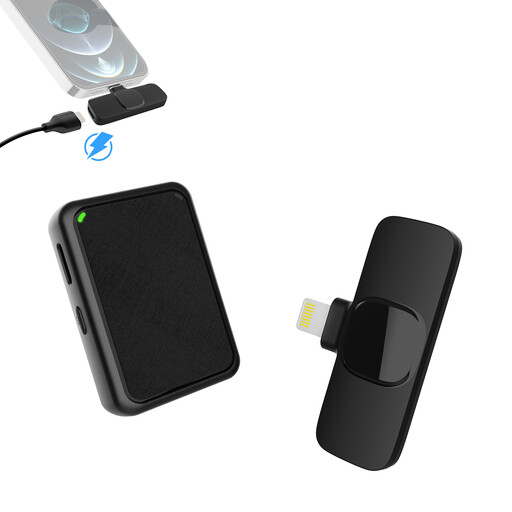
Moman MB1X(A) 2.4GHz lavalier microphone kit, 2TX & 1RX
For two microphone positions using one lavalier kit, provided the recording set-up is compatible with the receiver.
The product title specifies two transmitters and one receiver. The listed version is for iPhone and iPad models with a Lightning connector.
View at Joybuy
 No image available
SYNCO S8 lavalier microphone
For one person speaking while wearing the clip-on lavalier microphone.
The product title lists smartphones, PCs, laptops and cameras as compatible devices. Its described omnidirectional pick-up pattern isn’t focused on just one direction of speech.
View at Joybuy
Frequently asked questions
How can I check the recording level before a longer book discussion?
Ask everyone to speak from their intended seats, and test the loudest passage you expect to record. For recordings with Audacity, the Audacity manual recommends peaks between −18 dB and −6 dB for normal speech; if the signal reaches 0 dB, it is clipping. Turning up a recording that’s too quiet afterwards will also amplify room noise.
Do I need extra hardware to use an XLR microphone with a computer?
To connect an XLR microphone to a computer, you’ll need a suitable signal path, such as an audio interface or compatible recorder. A USB output, on the other hand, can connect directly to a compatible computer port. Check the connection on the specific version.
What should I know about faults or cancelling an online microphone purchase?
Your statutory rights against the seller are separate from any voluntary guarantee, as the Verbraucherzentrale explains. For a distance purchase as a consumer, you generally have 14 days from delivery to withdraw from the contract. Your Europe notes that exceptions and conditions for return costs apply. Don’t assume there is a special manufacturer repair right for all microphones: the Verbraucherzentrale lists certain product categories, but not microphones.
Can I record a private book discussion without the others knowing?
Under § 201 (1) StGB, recording another person’s non-public speech without their permission is a criminal offence. Before recording, check that everyone agrees to the recording and how you plan to share it; recording and publishing it later are separate decisions. The circumstances need to be assessed separately for an event that is genuinely public or where there are specific data-processing purposes.


