Choose a desktop PC based first on the development tools and testing goals you actually use, then on the services you want to run at the same time. A well-equipped mini PC may suit a modest local workflow; an expandable tower is an option if you have the space and might want to add more RAM or storage later. A Mac mini could be a good fit if your IDE, database, containers and required tests are compatible with macOS and Apple silicon.
Who develops a book-lending app?
Developers running local tests
If you run your app, development environment and tests on the same desktop, make sure the operating system and processor architecture are compatible with your tools. Microsoft Learn and Docker Docs explain the relevant system and installation requirements.
Developers using containers
If you also run a database or other services locally in containers, check the required operating system and backend configuration. Docker Docs outlines the different requirements for Docker Desktop on Windows.
Developers planning to upgrade
If you might want to add RAM or drives later, compare the upgrade options for the specific configuration with those of a compact PC that already has its components installed. HP and Lenovo’s specifications each apply to particular variants.
What should you look for when buying?
For a book-lending app, what matters is whether the specific combination of tools, operating system and local test services suits your workflow.
| Buying consideration |
What to check |
Who is it most relevant to? |
| Tool compatibility |
Match the operating system and processor architecture to the requirements of your IDE, database, test framework and target platforms. If you use containers, check the intended backend too. |
If I need to use a particular IDE, database or test environment, I want to know in advance whether it will run on the system I choose. Around 31% of consumers put tool compatibility first. |
| Concurrent builds and tests |
Consider the processes running at the same time, along with the installed and upgradeable RAM. If you have an existing project, your own build and test measurements can help. |
If I want to run tests and local services at the same time while developing, I need enough headroom for that workflow. Around 31% of consumers prioritise concurrent tests and builds. |
| Storage and upgrade options |
Compare the installed RAM and SSD storage with the upgrade options for the specific variant. Also check whether an operating system is included. |
If I might need more room for project files, RAM or storage later, I look at the options available for the specific case. Around 23% of consumers put storage and future upgrades first. |
| Space and workspace |
Check the case size, whether it has the right connections for your existing monitor and what’s included. You may need to budget separately for any peripherals that aren’t included. |
If my workspace has limited room or I’m putting together a complete setup, I want to consider the space required and the included equipment together. Around 15% of consumers prioritise space and the total cost of a complete setup. |
Avoiding common buying pitfalls
-
Confusing maximum supported capacity with what’s installed
A mini PC with an AMD Ryzen 7 8845HS listed on Joybuy Germany is explicitly offered as a barebone model without RAM, an SSD or an operating system. Variants with components are also listed on the same product page.
Before buying, check which variant you’ve selected and exactly which parts are included.
With a barebone model, you’ll need to choose and install the necessary components; setting up an operating system may also be part of the process.
-
Assuming test results apply to a different model number
The HP variant D6B240EA reviewed by COMPUTER BILD is not the same as the German HP Store variant 6D3E9EA#ABD. Matching specifications don’t prove that the review results apply to both devices.
Compare the full model number, installed RAM and SSD storage, operating system and what’s included.
-
Overlooking what’s included with a compact PC
The keyboard and mouse weren’t included with COMPUTER BILD’s GEEKOM A5 Pro test unit; HP lists a mouse as included with the specific 6D3E9EA#ABD variant. This doesn’t tell you what comes with other variants.
Check what’s included with the exact configuration and compare it with the monitor, input devices and cables you already have.
Missing peripherals or suitable connection cables may mean extra purchases and setup work.
-
Confusing statutory rights with a voluntary warranty
For consumer purchases in the EU, a statutory legal guarantee of at least two years from receipt of the goods generally applies. It is the seller’s responsibility and is separate from any additional voluntary warranty.
Compare optional service plans separately from your statutory rights and check their specific terms. Your Europe explains the EU rules on legal guarantees and warranties.
Brands to consider
GEEKOM
In the configuration tested, the A5 Pro is an already-equipped mini PC with a Ryzen 5 7530U, 16 GB RAM and a 1 TB SSD.
- In its 2026 review, COMPUTER BILD described the test unit as fast in everyday use, with quiet fan noise.
- A keyboard and mouse weren’t included with the tested device. The review results aren’t a measure of how quickly your app will build or run tests.
MSI
The Cubi NUC 1M is a mini PC range that lets you put together a workspace with a separate monitor and input devices.
- COMPUTER BILD highlighted the modern connections on the Cubi NUC 1MG-019DE it tested.
- In its 2024 test, SSD access was considered relatively slow. This result applies to the model tested and isn’t a measure of other Cubi variants.
GMKtec
When comparing NucBox M6 Ultra variants, the specific RAM and SSD configuration is important.
- COMPUTER BILD described the device tested in October 2026 as fast and quiet.
- The review lists an SSD with 477 GB of storage. Similarly named listings may have different specifications.
HP
The German HP Pro Mini 400 G9 variant, product number 6D3E9EA#ABD, is a compact desktop with clearly specified components.
- For this variant, HP Store Germany lists Windows 11 Pro, 16 GB RAM, a 512 GB SSD and a wired mouse.
- These specifications apply to 6D3E9EA#ABD and shouldn’t automatically be assumed to apply to other product numbers in the range.
Lenovo
The ThinkCentre M75q Gen 5 Tiny is available in several configurations, so you should check the specifications of each one individually.
- For variant 12RQ004MEZ, Lenovo Germany lists Windows 11 Pro, 16 GB DDR5-5600MT/s and a 512 GB SSD.
- The specifications for this variant don’t automatically apply to other configurations in the same range.
Apple
The Mac mini is a compact macOS option if your entire development and testing workflow works with Apple silicon.
- Apple Germany offers M6 and M5 Pro models with different storage options.
- Check that your IDE, database, containers and required platform tests are compatible with macOS and Apple silicon.
Joybuy products
The devices below include tower and compact desktop configurations for local development and testing. Before choosing, check that the operating system, specifications and tool compatibility suit your specific workflow.
 No image available
Dell Alienware Aurora ACT1250 1J3N5, Core Ultra 9 285K, 32 GB RAM, 2 TB SSD
A tower configuration for anyone looking for a desktop for local development tools and project files.
Specifications include a Core Ultra 9 285K, 32 GB RAM, a 2 TB SSD and Windows 11 Home. Check that your tools and testing goals are compatible with the installed version of Windows.
View at Joybuy
 No image available
Lenovo ThinkStation P2 Tower Gen2, Core Ultra 7 265, 32 GB DDR5, 512 GB NVMe SSD
A tower for a local development and testing setup, if you’re considering a separate case.
The listed specifications include 32 GB DDR5, a 512 GB NVMe SSD and Windows 11 Pro. Check your project’s storage needs and whether the tools you require are compatible.
View at Joybuy
 No image available
THUNDEROBOT Mini-PC Workstation AI Max+ 395, 128 GB LPDDR5X, 1 TB SSD
A compact mini PC for a workspace where you can compare the listed specifications with your development and testing needs.
The product title lists 128 GB LPDDR5X RAM at 8000MT/s, a 1 TB SSD and a side-mounted SSD interface. Check the details of your chosen configuration before buying.
View at Joybuy
 No image available
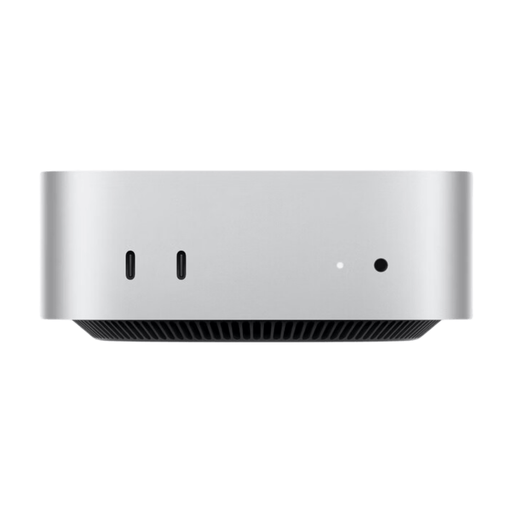
Apple Mac mini M6, 16 GB unified memory, 256 GB SSD
A compact macOS configuration for development tools and tests that are compatible with Apple silicon.
Specifications include an M6 chip with a 12-core CPU and 12-core GPU, 16 GB unified memory and a 256 GB SSD. The product description says that a keyboard and mouse must be bought separately.
View at Joybuy
 No image available
Apple Mac mini MHQM4 CTO 2, M6, 24 GB unified memory, 1 TB SSD
A compact macOS option if your development tools and required tests run on Apple silicon.
The listed specifications include an M6 chip with a 12-core CPU and 12-core GPU, 24 GB unified memory and a 1 TB SSD. Check that your specific tools and platform tests are compatible before buying.
View at Joybuy
Frequently asked questions
Do I need a dedicated graphics card for a book-lending app?
The development task described doesn’t in itself require a dedicated graphics card. Check the specific requirements of the development and testing software you actually use, rather than assuming you need gaming hardware.
What should I check before running local containers on Windows?
Check the latest Docker Desktop documentation for your Windows version, backend and installation mode. Docker Docs covers, among other things, the standard WSL 2 setup and the different options for Windows containers.
Will extra CPU cores make my automated tests run faster?
Start by measuring builds and tests with your specific project. Gradle notes that the benefits of parallel builds depend on the project structure and its dependencies, so the number of cores alone doesn’t guarantee a particular time saving.
What legal guarantee applies when buying a desktop PC?
For consumer purchases in the EU, a statutory legal guarantee of at least two years from receipt of the goods generally applies. It is the seller’s responsibility and is separate from any additional warranty. Distance sales generally come with a 14-day right to cancel, although legal exceptions apply. Your Europe and EUR-Lex explain these EU rules.
Where can I take an old desktop PC in Germany?
Waste electrical equipment must be handed over to an authorised collection point, such as a municipal collection centre, manufacturer or retailer. Germany’s Federal Ministry for the Environment explains the options for disposing of waste electrical and electronic equipment.


