What should you look for when buying?
First, check that the camera can capture both your work surface and the smallest important movements from where you plan to position it. Then test the picture and controls under the lighting and in the recording setup you’ll actually use.
| Consideration |
What to check before buying |
Who is it important to? |
| Desk and close-up views |
Measure the width of your table and the distance to the camera. Using the specific lens or zoom, check both the wide view and the smallest shot you’ll need. |
If you want to switch from showing the whole process to folds or threads, the close-up you can actually achieve matters. Around 36% of consumers are likely to prioritise this. |
| Artificial lighting and colour |
Record under the lamps you use. Look for banding and shifts in colour, and check whether you can adjust the shutter speed and white balance. |
If you want your book pages and materials to look clear and true to colour under your own lights, test the camera under those exact conditions. Around 29% of consumers are likely to prioritise this. |
| Longer lessons |
Check the power supply, storage, audio setup and recording format for the planned duration and settings. |
If you want your explanation to keep recording throughout a longer task, test the entire recording setup in advance. Around 21% of consumers are likely to place particular importance on uninterrupted recording. |
| Live view of your desk |
Check compatibility with your computer and software, mounting options and the area visible in your video-conferencing or streaming app. |
If you teach from a computer and want to switch to a view of your desk without a complicated setup, the camera needs to suit the way you teach live. Around 14% of consumers are likely to prioritise this. |
Joybuy products for filming at your desk and teaching
The products below include compact gimbal cameras and computer-connected webcams for video and desk views. Check that each model’s mounting options and framing suit your workspace.
 No image available
Osmo Pocket 4P Vlog Combo, Black
Described as a compact gimbal camera for video recording, it’s worth considering if you want to show moving angles as well as a fixed view of your desk.
Beforehand, check whether you can capture the desk and close-up views you need from your planned camera position.
Joybuy
 No image available
Logitech C922 Pro Stream Webcam
Described as a USB webcam for streaming and video recording, it could suit a computer-based lesson if it gives you the right view of your desk from your chosen position.
Check the angle to make sure your book, hands and tools are in frame before relying on this setup.
Joybuy
 No image available
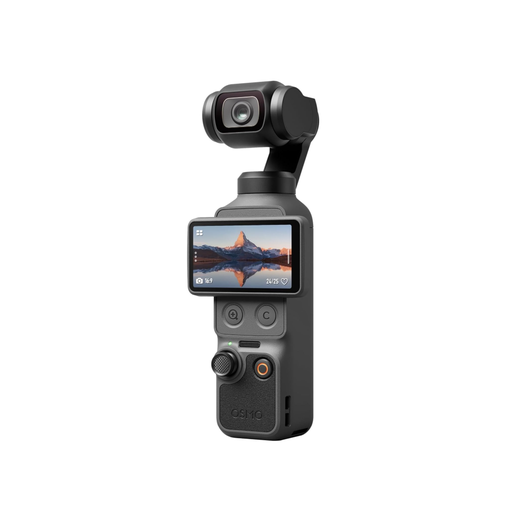
DJI Osmo Pocket 4 Standard Combo
This compact gimbal camera could be an option for video recording and changing angles. Test the close-up range at your actual workspace.
Listed in the product name: 1″ CMOS, 4K/240fps, 3-axis stabilisation, 2× lossless zoom, 107GB of built-in storage and a rotating 2″ screen.
Joybuy
 No image available
DJI Osmo Pocket 3 Creator Kit
Described as a gimbal camera for video recording, check whether you can position it securely for the fixed desk view you have in mind.
Listed in the product name: 4K/120fps and 1-inch sensor.
Joybuy
 No image available
Insta360 Link 2C Standard Bundle, Graphite Black
Described as a webcam for PC and Mac, its DeskView mode is intended for a computer-based view of your desk, according to the product description.
Listed in the product name: 4K, 1/2″ sensor, Auto-Framing and HDR. According to the product information, this model is currently not compatible with ARM-based Windows systems.
Joybuy
Frequently asked questions
Does 4K automatically help with small bookbinding details?
No. What matters is how large the details appear in the frame from your actual camera distance, using the specific lens or zoom. Resolution and zoom range alone don’t determine the shot you’ll get.
What can I try if I get banding under LED lights?
Take a test shot under those exact lights and, if your model allows it, adjust the shutter speed. Sony describes horizontal banding under certain artificial light sources and says adjusting the shutter speed may help. This doesn’t guarantee a flicker-free picture with every light. Canon cites 25 fps with 1/50 second as a general exposure rule, not a universal fix for flicker.
What should I test before recording a long lesson?
Test the planned recording time with your chosen quality, power supply, available storage and audio setup. Sony lists different bitrates for the ZV-E10M2K depending on the 4K mode; a grip designed for longer filming sessions doesn’t tell you how long the camera will run.
Can I record and publish a lesson featuring participants in Germany?
If people can be identified, you need an applicable legal basis to process their personal data. The Federal Commissioner for Data Protection and Freedom of Information lists consent as one possible legal basis under Article 6(1) of the GDPR, but not the only one. Recording and publication must be assessed for the specific purpose. If you film only your own hands and materials, you can’t make a blanket statement about all personal data that may be captured.


