What should you look for when buying?
First, check the field of view and focus from your planned mounting height. Then consider the lighting and recording process, as well as the space and accessories required for the complete setup.
| What matters |
What to check before buying |
Who is this important to? |
| Overhead view and close focus |
Check the field of view from the intended mounting height and focus on the book, hands and tools; make sure you have a stable mount. |
If I want to show the whole process while keeping small details in focus, getting this framing right comes first. Around 33% of consumers with this main concern are likely to feel the same way. |
| Lighting and details on the paper |
Review a test recording of paper and hands under the room lighting you plan to use; check the exposure and white balance settings. |
If changing light or shadows from my hands could make details on the paper hard to see, I want to assess the result in my own room. Around 27% of consumers put visible detail in room lighting first. |
| Longer steps in the process |
Test a complete recording at the planned length, then check the video file and sound. |
If I want to record a longer bookbinding step in one go, I need a reliable process for power, storage and sound. Around 20% of consumers focus mainly on this process. |
| Overall cost and space required |
Check what’s included and which components you need for your specific recording space; distinguish between the camera body and a complete kit. |
If desk space is limited and I need to keep the whole setup in mind, there’s more to consider than just the camera body. Around 20% of consumers focus on the complete setup. |
Joybuy products for your desk
These products are compact gimbal cameras and USB webcams for recording at a desk or computer.
 No image available
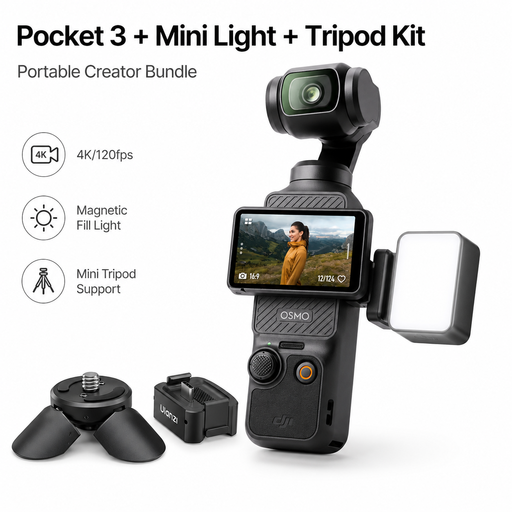
DJI Osmo Pocket 3 Standard Combo with ULANZI LM001, adapter and mini tripod
According to the product description, the mini tripod base is designed for stationary desk recording.
The bundle includes a magnetic video light and an adapter. The product name lists a 1-inch CMOS sensor, 4K/120fps and a 3-axis gimbal.
View at Joybuy
 No image available
AOC 4K PRO webcam with Sony IMX363 sensor
Described as a USB webcam for a computer workstation; the desk tripod is useful for positioning it on your desk.
The product specifications list a 75° field of view, autofocus and USB-A/USB-C.
View at Joybuy
 No image available
Logitech C922 Pro Stream webcam
This webcam is designed for use with a computer workstation; the description lists an adjustable desktop tripod.
Autofocus and exposure correction are listed in the product description.
View at Joybuy
 No image available
Philips 4K UHD Webcam 4000 Series SPL6408BT/00
Described as a USB webcam for computers and video platforms; check how best to position it for your desk.
The product name lists 8 MP, autofocus, two microphones, a privacy cover and USB-A.
View at Joybuy
 No image available
Insta360 Link 2C Standard Bundle Graphite Black
This webcam is described as suitable for recording on a PC or Mac and includes DeskView mode.
The product name lists 4K, a 1/2-inch sensor and HDR.
View at Joybuy
Frequently asked questions
How can I tell whether a camera will capture my whole book from above?
Check the framing from the exact mounting height available, using the lens you plan to use: there needs to be room for the book, both hands and any tools you need. Then check whether the smallest steps are in focus. Neither 4K nor a short minimum focusing distance answers both questions on its own.
How do I set up a webcam to film bookbinding?
If you’re recording with a computer, point the camera at your work surface and check a saved test recording, including the sound, before starting your project. Logitech’s Show Mode is designed for a view of your desk, but it doesn’t guarantee the framing you need for your book.
What extra components should I allow for in my camera setup?
Check whether the lens, mount and storage are included for your setup, and plan how you’ll handle power and sound. The Verbraucherzentrale distinguishes the statutory consumer rights you have against the seller from a voluntary manufacturer’s guarantee, and generally specifies two years for claims relating to defects in purchased goods.
Can I publish recordings showing my flatmates or pages from someone else’s book?
Not simply because you filmed in your own room. Under § 22 KunstUrhG, consent is generally required to distribute or publicly display recognisable images of people; any legal exceptions must be considered on a case-by-case basis. Where someone else’s book content is protected, the right of reproduction under § 16 UrhG and the right of making content available to the public under § 19a UrhG are also relevant. Whether a particular recording is permitted depends on its content and how it is used.
Can I return a camera if the framing isn’t right?
According to the Verbraucherzentrale, many online purchases generally come with a 14-day right of withdrawal from the date you receive the goods. Check for possible exceptions and the specific terms of your contract. You must notify the seller if you wish to withdraw.


