Start by considering where you listen and what equipment you already have. Compact active speakers or nearfield monitors could work well on a desk; passive bookshelf speakers are best suited to a setup with a compatible amplifier. Next, check whether you can position a stereo pair sensibly, which connections your source needs and whether the listing includes one or two speakers. Manufacturers’ descriptions of sound and frequency response are no substitute for listening at your own desk.
Who are the different types of speakers suited to?
Chamber music at a dedicated listening spot
If you mainly listen at your desk, consider how you’ll position both speakers and how the room might affect the sound. Genelec’s placement guide explains why similar reflections on the left and right are important for a stable stereo image.
A home office with limited desk space
If there’s little room left alongside your screen and work materials, compare the cabinet dimensions with the space actually available for both speakers. The term ‘bookshelf speaker’ alone doesn’t tell you whether a stereo pair will fit on your desk.
PC listeners without a separate amplifier
If you want to connect your computer directly, check its audio outputs against the inputs on the specific model. Edifier lists analogue AUX, RCA and TRS inputs for the MR4; KEF’s German product page lists USB-C for the LSX II LT.
What should you look for when choosing?
Compact active speakers with a PC connection
A good fit if: you want to listen directly from your computer without a separate amplifier. Check that the inputs are compatible with your computer or audio interface.
Things to consider: The Edifier MR4 and KEF LSX II LT offer different connection options, but that doesn’t tell you how they compare sonically. In its review of the LSX II LT on 18 January 2024, HIFI.DE noted the lack of an analogue input.
Active nearfield monitors
A good fit if: you mainly listen from a fixed desk position and can position two monitors appropriately. Genelec describes the 8020D as a compact active nearfield monitor.
Things to consider: Genelec says the box contains one 8020D monitor, so you’ll need to allow for two if you want stereo. The stated lower limit of 56 Hz is measured at −6 dB and, on its own, doesn’t predict how the bass will sound at your desk.
Passive bookshelf speakers
A good fit if: you already have a compatible amplifier or want to build a separate hi-fi system. ELAC describes the Debut 3.0 DB63 as a speaker that connects to an amplifier or receiver.
Things to consider: Your amplifier, source, cables and available space are all part of the system decision. Don’t compare the price of a single speaker with that of a complete active system.
| Buying priority |
What to look for |
Who is it important to? |
| Stereo image and instruments |
Allow space for two speakers and aim to position them as symmetrically as possible in relation to your listening spot. Genelec’s placement guide highlights the importance of similar reflections on the left and right. |
If I want to hear the instruments in chamber music in their spatial context, I check how both channels can be positioned at my listening spot. Around 40 % of consumers say the stereo image is their top priority. |
| Desk space and positioning |
Compare the cabinet dimensions with the free space on either side of your screen. Genelec gives the 8020D’s dimensions with the Iso-Pod as 242 × 148 × 142 mm (H × W × D); these measurements don’t apply to other models. |
If I have limited desk space, I want to know whether there’s room for both speakers and a sensible positioning. Around 30 % of consumers put available space first. |
| Connections and controls |
Compare your computer’s output with the connections on the specific model: Edifier lists AUX, RCA and TRS for the MR4; KEF lists USB-C for the LSX II LT. HIFI.DE notes that the LSX II LT has no analogue input. |
If I want to use the speakers directly with my PC or audio interface, I need a compatible input and controls that suit my workspace. Around 20 % of consumers prioritise connection compatibility. |
| Complete stereo system |
Check what’s included and which extra equipment you’ll need: Genelec lists one 8020D per box; KEF describes the LSX II LT as a pair on its German product page. Passive speakers need a compatible amplifier. |
If I want to keep the cost of the complete setup in view, I add together the speakers I need and the equipment I already have. Around 10 % of consumers say the cost of the full system is their top priority. |
Avoiding buying mistakes
-
Confusing a single-speaker listing with a stereo pair
What’s included can vary by model: Genelec lists one monitor per box for the 8020D, while KEF offers the LSX II LT as a pair on its German product page.
Before comparing prices, check whether the specific version includes one speaker or two.
Without a suitable amplifier, you’ll need an extra piece of equipment as well as speaker cables.
-
Assuming ‘compact’ means it will fit anywhere on your desk
Your desk, walls and nearby obstacles can affect sound reflections. Genelec’s placement guide explains why similar reflections on both sides matter.
Measure the space available for both speakers and check whether you can position them as symmetrically as possible in relation to your listening spot.
-
Assuming the connections from the term ‘active speaker’
Active models can have different inputs. In its review of the KEF LSX II LT on 18 January 2024, HIFI.DE noted that it had no analogue input.
Check the output on your specific computer or audio interface against the connection list for the exact model version.
If your source and speakers don’t share a compatible connection, you may need an additional suitable audio device.
Brands to consider
Edifier
The MR4 is a compact active speaker for analogue connections to a PC or audio interface. Edifier lists AUX, RCA and balanced TRS inputs, as well as a control on the front.
- The listed analogue connections may suit the outputs on compatible PCs or audio interfaces.
- The manufacturer’s claim of neutral sound isn’t independent evidence of how it performs with chamber music. USB-C isn’t included in the listed connections.
Genelec
The active 8020D is designed for nearfield listening from a fixed position. Genelec lists compact dimensions and provides placement advice for studio monitors.
- The manufacturer’s information can help you check the cabinet dimensions and positioning for your workspace.
- According to Genelec, the box contains one monitor. The lower limit of 56 Hz is specified at −6 dB and isn’t a comparative judgement of sound quality.
KEF
The LSX II LT is a compact active stereo system with a PC connection and streaming. KEF’s German product page lists USB-C and describes the offer as a pair.
- According to KEF, USB-C is a connection option for a desktop computer or laptop.
- In a review on 18 January 2024, HIFI.DE noted the lack of an analogue input; its listening impressions at the time don’t confirm whether later versions have changed.
ELAC
The passive Debut 3.0 DB63 is an option for a system with a suitable external amplifier. ELAC describes it as connecting to amplifiers and receivers.
- Its passive design may suit a compatible amplifier system you already own.
- You’ll need to include an amplifier and source in your setup plans. Manufacturer claims of superior sound aren’t an independent comparison.
Speakers at Joybuy
This selection includes active PC speakers and passive models for use with a suitable amplifier.
 No image available
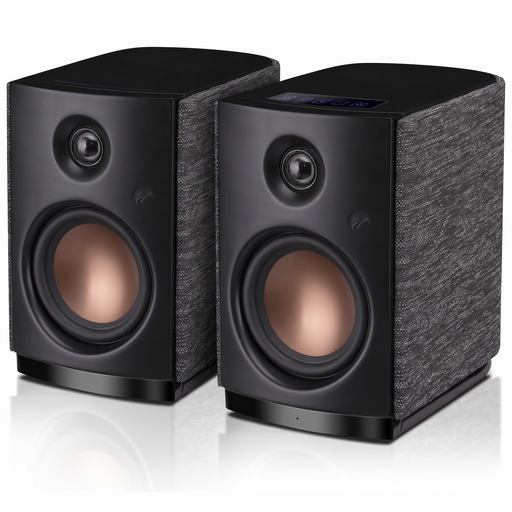
HiVi-Swans OS-10 active stereo bookshelf speakers, black
Described as suitable for PC and desk use; product details list Bluetooth 5.0 and an AUX input.
4-inch woofer; 62 W RMS; touch controls.
View at Joybuy
 No image available
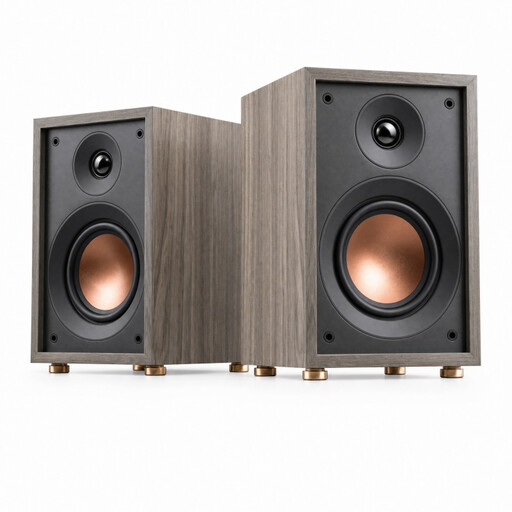
HiVi-Swans Oasis passive two-way bookshelf speaker
Described as suitable for listening to music in smaller rooms; as a passive speaker, this model needs a suitable external amplifier.
4-inch woofer; 20 mm dome tweeter; 60 Hz–20 kHz; 4 Ω; recommended amplifier power 10–50 W.
View at Joybuy
 No image available
HiVi D3.1MKII passive two-way stereo bookshelf speaker
Described as suitable for music playback with a compatible amplifier system; this passive speaker needs a suitable external amplifier.
6.5-inch mid/bass driver; 28 mm dome tweeter; 8 Ω; recommended amplifier power 10–120 W.
View at Joybuy
Frequently asked questions
How should I position two speakers on my desk?
Position both speakers at roughly the same height, with similar distances from your listening spot and nearby side surfaces. Genelec recommends an equilateral triangle for studio monitors and also notes the effect of the room; check the instructions for your specific model too.
Can I connect passive bookshelf speakers directly to my laptop?
No. You’ll need a suitable amplifier between your source and the passive ELAC DB63 speakers. Active PC models have different connections depending on the version, so check these against the actual output on your laptop.
What should I know about single-speaker listings, returns and faults?
First, check whether a listing includes one speaker or a pair: Genelec lists one monitor per box for the 8020D. According to Your Europe’s consumer information, online purchases from a trader generally come with a 14-day right to cancel from the date of delivery; new faulty goods are covered by a statutory minimum guarantee of two years. This is separate from any voluntary manufacturer’s warranty.
How should I dispose of old active speakers in Germany?
Electrical waste shouldn’t go in your household rubbish. The German Environment Agency lists local recycling centres and suitable retail take-back points as possible disposal options; check the requirements with the collection point you plan to use.


