Choose two speakers that you can position sensibly around your listening spot, and first check the signal path from your music source to the stereo pair. An active pair works without a separate Hi-Fi amplifier; passive speakers are suited to a compatible system you already own. If nearfield monitors are sold individually, you’ll need two for stereo. And power or frequency-response figures alone won’t tell you how natural choral recordings will sound in your room.
Who this speaker guide is for
Choral music listeners with a fixed listening spot
You want to appreciate the voices and how they are arranged in space while sitting at your desk, and you can position a stereo pair to face your listening spot. That makes speaker placement and room reflections important factors in your choice. Genelec notes that similar reflection conditions for both speakers help support the stereo image.
Computer listeners without a Hi-Fi system
You want to play choral recordings from your computer without buying a separate amplifier. The key is to make sure an input on the active speaker system matches your source’s output; ADAM Audio and Edifier list different connection options for their respective models.
Listeners who already own an amplifier
You want to keep using your Hi-Fi equipment and are looking for passive bookshelf speakers. Check that the requirements of the specific speakers match your amplifier; KEF describes the Q1 Meta as passive and specifies an amplifier requirement of 10–150 W.
What to consider when buying
| Consideration |
What to check before buying |
Who should pay particular attention |
| Stereo image at your listening spot |
Check whether both speakers can be positioned at the same height, as symmetrically as possible around your listening spot, and angled towards it. |
When I listen to choral recordings at my regular desk, I want to appreciate how the voices are arranged in space and be able to position both speakers accordingly. That’s why around 36% of consumers put the stereo image at their listening spot first. |
| Connecting your music source |
Match your source’s outputs to the inputs on the specific model. ADAM Audio lists USB-C and balanced TRS inputs for the D3V; Edifier lists Bluetooth, Line-In, and optical and coaxial inputs for the R1280DBs. |
When I want to listen directly from my computer or another source I already own, I need a compatible signal path. Around 29% of consumers prioritise connecting their source. |
| Space and positioning |
Measure the space available for both speakers, allowing room for cables, and check whether you can position them sensibly on your desk. Compare model dimensions in the same order. |
At a cramped workstation, I want to fit two speakers without losing sight of my screen or compromising my workspace. Around 21% of consumers focus mainly on the space available and speaker positioning. |
| A complete stereo system |
Check whether the product is sold as a pair or as a single speaker, and whether you’ll need an amplifier, cables or compatible connections. KEF describes the Q1 Meta as passive; Genelec lists one monitor in the 8010A package. |
When I want to keep using my existing Hi-Fi equipment or plan a complete system, I need to consider the amplification and what’s included together. Around 14% of consumers put this first. |
Common buying misconceptions
-
Expecting to connect passive speakers directly to your computer
The KEF Q1 Meta is passive and needs a compatible amplifier. On its own, the speaker therefore doesn’t provide the complete signal path from your computer to a stereo pair.
Plan your source, a suitable amplifier and your speakers together. Also check how you can connect your computer to the amplifier.
-
Assuming one individually sold monitor is a stereo pair
Genelec lists one monitor in the 8010A package. You’ll therefore need to plan for two units to listen in stereo.
Check the quantity in the specific listing before planning the space and connections for stereo.
-
Judging choral sound directly from power or frequency figures
Power and frequency figures can be based on different reference conditions. For example, the Genelec 8010A’s stated lower frequency limit of 67 Hz is specified at −6 dB; the room and speaker position also affect playback.
Compare measurements only with their respective reference values, and separately consider how a stereo pair could be positioned at your own listening spot.
Brands to help you choose
ADAM Audio
The active D3V desktop stereo set is worth considering for computer listening if you need USB-C audio or balanced TRS inputs.
- According to ADAM Audio, the D3V includes detachable stands and switches for adapting to different placements.
- These features don’t prove a particular level of performance with choral recordings, and they don’t automatically apply to other models from the brand.
Edifier
According to Edifier, the active R1280DBs bookshelf speaker system offers several connection options for different sources.
- Edifier lists Bluetooth, Line-In, optical and coaxial inputs, as well as a subwoofer output, for the R1280DBs.
- A USB-C audio input isn’t listed for this model. A subwoofer output doesn’t mean a subwoofer is included.
KEF
The passive Q1 Meta is an option if you’re planning to choose your speakers and amplifier as separate components.
- KEF specifies an amplifier requirement of 10–150 W for this model and sells it as a pair on its German product page.
- The manufacturer’s description of the driver technology isn’t independent evidence that the Q1 Meta will sound better than active alternatives in your particular home-office listening spot.
ELAC
The passive Debut 3.0 DB53 is an option if you want to choose your speakers and amplifier separately.
- ELAC describes the DB53 as a pair of bookshelf speakers with an aluminium tweeter and an aramid-fibre woofer.
- The manufacturer’s comparative descriptions of sound aren’t independent listening tests and don’t prove that the speakers are superior for home-office use.
Genelec
The compact active 8010A is a nearfield option if space is limited and you have a suitable analogue signal path.
- Genelec specifies a width of 121 mm with the Iso-Pod and an analogue XLR input for the 8010A.
- According to Genelec, the package contains one monitor; you’ll need to plan for two, along with the necessary connections, for stereo. The stated lower frequency limit of 67 Hz is specified at −6 dB.
Joybuy products
The following Joybuy listings include active computer speakers and passive bookshelf speakers for a separate amplifier system. For passive models, check the amplifier requirements; for every listing, check what’s included to make sure you have a stereo pair.
 No image available
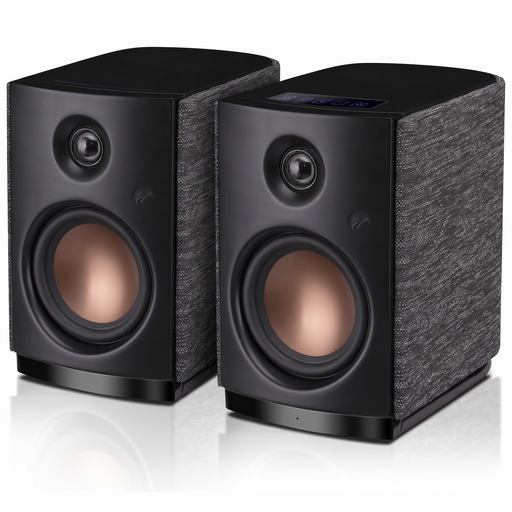
HiVi-Swans OS-10, active stereo bookshelf speakers, black
For computer or desktop use if you’re considering active stereo speakers with Bluetooth; check that the connection suits your music source.
Bluetooth 5.0; 4-inch woofer; 62 W RMS.
View on Joybuy
 No image available
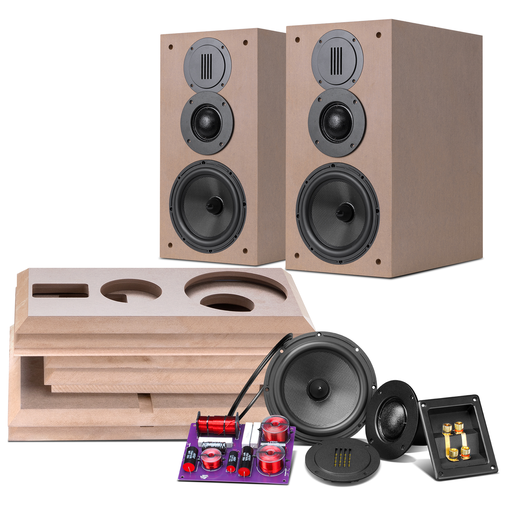
HiVi-Swans DIY3.1, passive bookshelf speaker pair
For a passive stereo system if you already have a suitable amplifier or plan to buy one separately. Check that its requirements match your system.
6.5-inch mid/bass driver; 28-mm soft-dome tweeter; 8 Ω; 10–120 W.
View on Joybuy
 No image available
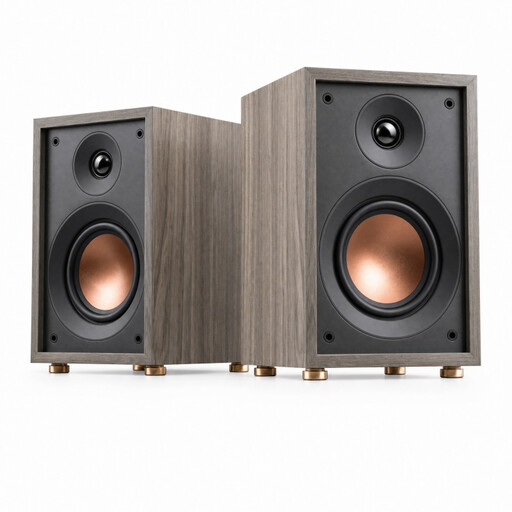
HiVi-Swans Oasis, passive bookshelf speaker
For music in smaller rooms or at your desk, provided you have a suitable amplifier. If you’re planning a stereo pair, also check how many speakers are included.
Two-way bass reflex; 4-inch woofer; 20-mm dome tweeter; 60 Hz–20 kHz; 4 Ω; 10–50 W.
View on Joybuy
 No image available
HiVi D3.1MKII, passive Hi-Fi bookshelf speakers
For music playback with a suitable amplifier. Before planning a stereo system, check how many speakers are included in the specific listing.
6.5-inch mid/bass driver; 28-mm soft-dome tweeter; 8 Ω; 10–120 W.
View on Joybuy
Frequently asked questions
How should I position two speakers for choral recordings at my desk?
Angle both speakers towards your listening spot, and aim for similar distances and reflection conditions on the left and right. Genelec describes an equilateral stereo triangle as ideal for positioning its monitors; the space available at your desk is still the deciding factor.
Can I connect passive bookshelf speakers directly to my computer?
A passive speaker such as the KEF Q1 Meta needs a suitable separate amplifier. Also check how you can connect your computer to the amplifier.
Is one Genelec 8010A enough for stereo?
No. Genelec lists one monitor in the 8010A package; for stereo, you’ll need to plan for two speakers, along with suitable outputs and power connections.
What should I check if my Edifier R1280DBs isn’t producing any sound?
Check the power indicator, volume, cable connections and selected input. Also make sure your source is outputting a signal.


