If you want to play your blues collection straight from your computer or smartphone and don’t have an amplifier, start by looking at an active stereo pair with suitable inputs and enough space on your desk. If you have a compatible amplifier, passive bookshelf speakers are also an option. With either type, positioning and listening position affect the sound, and the design alone doesn’t guarantee a particular sound.
Who are the different types of speakers suitable for?
Blues at your PC desk
If you want to listen to your collection at your desk straight from your computer, consider how much space you have, your listening position and the right connection. KEF lists USB-C for desktop computers and laptops; Audioengine describes USB-C as a connection for computer audio.
Music from multiple sources
If you switch between a computer, smartphone and other devices, compare the inputs available on the specific model you’re considering. Edifier lists Bluetooth, optical and coaxial inputs, as well as RCA connections, for the R1280DBs.
Upgrading with an existing amplifier
If you have a suitable amplifier, you can consider passive bookshelf speakers as a separate component. ELAC describes the DB63 as connecting to an amplifier or receiver.
What should you look for when buying?
First, decide whether you want to keep using an existing amplifier. Then match the outputs on your playback devices to the speakers’ inputs, and check how the pair will fit on your desk.
| What matters |
What to check before buying |
Who is this important to? |
| Space and positioning |
Check there’s enough room for both speakers and that you can position them towards your seat. Genelec lists the 8010A’s dimensions, including the Iso-Pod, as 195 × 121 × 115 mm. |
If I have limited space on my desk, I want to be able to position both speakers to suit my listening spot. Around 40% of consumers put space and positioning first. |
| Connections for your music sources |
Match the playback device’s output to the speaker’s input. KEF lists USB-C for the LSX II LT; Edifier lists RCA, optical and coaxial inputs, as well as Bluetooth, among the connections on the R1280DBs. |
If I play my collection from a computer or several devices, I want to use a connection that works with my sources. Around 30% of consumers prioritise connection compatibility. |
| Active or passive system |
With passive speakers, allow for a suitable amplifier and the complete signal path. ELAC describes the DB63 as connecting to an amplifier or receiver. |
If I already own a suitable amplifier, I may want to keep using it; without one, an active pair is likely to be a better fit. Around 20% of consumers make the system setup their main priority. |
| Compact studio monitors |
Check the input type and positioning options against your audio source. The Genelec 8010A is listed with an analogue XLR input and room response switches. |
If I’m specifically looking for compact nearfield monitors, I pay particular attention to the connection and how they can be positioned. Around 10% of consumers put monitor features first. |
Avoiding common buying mistakes
-
Buying based only on wattage or sound claims
Manufacturers’ claims about power or sound don’t predict how a pair of speakers will sound in your listening space or with your recordings.
Start by comparing the connections you need and the positioning options. Treat sound descriptions on product pages as manufacturers’ claims, not as independent listening comparisons.
-
Expecting passive speakers to be a complete PC setup
Passive bookshelf speakers such as the ELAC Debut 3.0 DB63 connect to an amplifier or receiver, so you’ll need to plan a suitable system setup.
Before you buy, check which devices you already have and how the audio signal will travel from your computer to the speakers.
-
Choosing studio monitors without checking the connections
The Genelec 8010A has an analogue XLR input. Check in advance whether it can connect to your existing audio source.
Check that the source, output, speaker input and controls meet your needs for the specific model.
Key brands to consider
Edifier
According to the model-specific details, active bookshelf speakers such as the R1280DBs offer a range of connections for multiple sources.
- The R1280DBs are listed with Bluetooth, optical and coaxial inputs, two RCA inputs and a subwoofer output.
- These features apply to the model named here and not necessarily to every product from the brand. Sound descriptions are manufacturers’ claims.
KEF
The LSX II LT is an active system with documented connections for computers and other digital devices.
- KEF lists USB-C for desktop computers and laptops, as well as HDMI-ARC and streaming features.
- Whether you need additional digital features depends on the sources you actually use at your listening spot.
ELAC
Passive Debut 3.0 bookshelf speakers, such as the DB63, are designed to be used with an amplifier or receiver.
- ELAC describes the DB63 as connecting to an amplifier or receiver.
- If you don’t already have a suitable amplifier, factor the additional equipment into your choice. The manufacturer’s comparative sound descriptions are not an independent assessment.
Genelec
Compact studio monitors such as the 8010A are designed for a dedicated listening position at your desk.
- Genelec lists compact dimensions, room response switches and an analogue XLR input for the 8010A.
- The XLR input needs to be compatible with your existing source. The manufacturer’s claims about neutrality are not an independent listening comparison for blues.
Audioengine
The manufacturer describes the active A2+ Gen 3 Home Music System as suitable for desktop use.
- Audioengine lists USB-C, aptX Adaptive Bluetooth and an output for an additional subwoofer.
- These details apply to the A2+ Gen 3; different versions shouldn’t be treated as the same.
Joybuy speakers for your desk
The products below include active bookshelf speakers for direct playback, as well as passive bookshelf speakers for use with a suitable amplifier.
 No image available
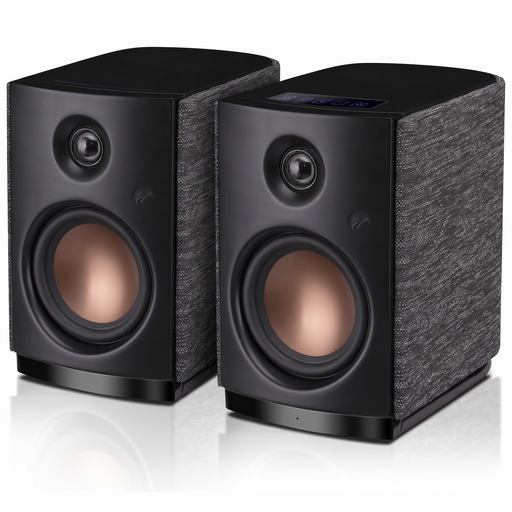
HiVi-Swans OS-10, active Hi-Fi bookshelf speakers, black
This active pair is worth considering if you want to play audio directly from your computer at your desk.
The product title lists Bluetooth 5.0, a 4-inch woofer, 62 W RMS and touch controls.
View at Joybuy
 No image available
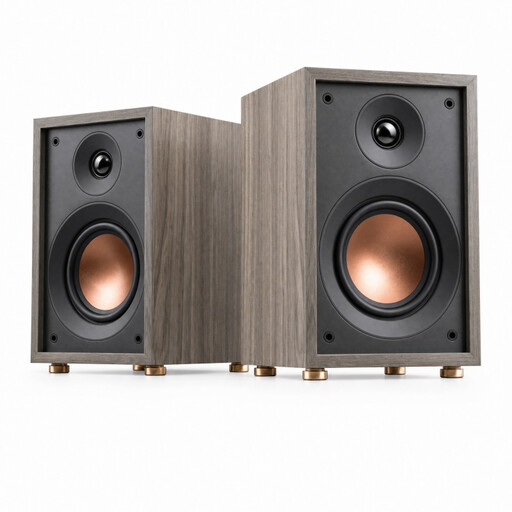
HiVi-Swans Oasis, passive 2-way bookshelf speakers
This passive pair is worth considering for your desk if you already have a suitable amplifier.
The product title lists a 4-inch woofer, a 20 mm dome tweeter, 60 Hz–20 kHz, 4 Ω and 10–50 W.
View at Joybuy
Frequently asked questions
How should I position two speakers on my desk?
Position both speakers as symmetrically as possible towards your listening spot, and check whether furniture or nearby walls affect where they can go. Genelec’s guidance on monitor positioning can be a useful starting point, but it doesn’t guarantee a particular sound with other speakers.
Is Bluetooth enough to play my blues collection?
Bluetooth is enough if your playback device supports it. For wired playback from a computer, check that its audio output matches the input on the specific speaker model. KEF lists USB-C for the LSX II LT, while Edifier lists RCA and optical inputs, among others, for the R1280DBs.
What are my rights regarding returns and faulty goods when shopping online in Germany?
According to the Verbraucherzentrale, online purchases generally come with a 14-day right to cancel; when the period starts and which exceptions apply depend on the circumstances. The Verbraucherzentrale also distinguishes statutory rights for faulty goods from a voluntary guarantee.
Can old active speakers go in household rubbish?
No. The Umweltbundesamt advises that waste electrical equipment must be disposed of separately and not put in household rubbish.


