Choose a stereo pair that you can position sensibly on either side of your usual listening spot and connect to your music source. Active speakers don’t need a separate amplifier; passive speakers are a good option if you already have a suitable amplifier or are planning a system with separate components. With connected active systems, also check the actual inputs and whether a cable is needed between the speakers.
Which speakers are right for you?
Jazz listeners at a fixed desk setup
If you usually listen from the same seat, you’ll need room for two speakers and should plan their positions in relation to your listening spot. Genelec’s monitor positioning guidance highlights the importance of similar reflective conditions for the left and right speakers.
PC listeners without a hi-fi amplifier
If you want to play albums directly from your work computer, check that its audio output matches the inputs on the specific active speaker model. Edifier and Nubert list different connection options for their respective models; Bluetooth, an analogue input and USB-C are not interchangeable.
Listeners with an existing hi-fi system
If you want to keep using your existing amplifier, a passive speaker pair could be right for you. ELAC describes its Debut 3.0 range as suitable for connection to amplifiers and receivers; still, check that your specific device is compatible with the model you choose.
What should you look for when buying?
For jazz at your desk, first consider the space for both speakers and the signal path from your playback device. Then you can decide whether built-in or separate amplification best suits your setup.
| What matters |
What to check when buying |
Who should pay particular attention? |
| Stereo image and positioning |
Check the dimensions of both speakers, along with their distances and orientation in relation to your usual listening spot. |
If I usually listen from the same spot, I want to be able to position both speakers to suit where I sit. Around 36% of consumers place particular importance on a practical stereo setup. |
| Connecting your music source |
Check that the output on your PC or playback device matches the inputs on the exact model variant. |
If you want to listen to jazz from your work computer or through a specific playback device, the speaker needs a compatible input. For around 29% of consumers, connecting their existing source is a key consideration. |
| Active or passive |
Check whether you have a suitable amplifier and speaker cables, or need to include them in your plans. |
If I want to keep using my existing amplifier or plan a system with separate components, the amplifier is a key consideration. Around 21% of consumers prioritise system planning and amplification. |
| Bass and listening volume |
If possible, listen to the speakers with familiar recordings at your usual volume. If you might want to expand your system, check for a suitable subwoofer output. |
If you’re particularly interested in how double bass and drums sound at your usual working volume, assess playback in a room like the one you’ll use. For around 14% of consumers, bass and volume are the main priorities. |
Common misconceptions
-
“Bookshelf speakers will automatically fit next to my screen”
Each speaker needs a suitable surface to stand on. Different distances and reflections can affect your listening conditions at your desk.
Measure both spaces and consider whether you can position the speakers at similar angles from your usual seat.
-
“Active or wireless means completely cable-free and universally compatible”
Active speakers don’t automatically have every input you might want. Even a system with wireless playback options may need a cable between the speakers.
Check the signal path, power supply and connection between the speakers separately for the exact model. For example, Edifier’s list of connections for the R1280DBs doesn’t include USB audio, while KEF specifies a C-Link cable for the LSX II LT.
-
Comparing the price of passive speakers with that of a complete active system
Passive speakers need suitable amplification. So, comparing the speakers alone won’t necessarily account for all the equipment and cables in the playback chain.
Factor in any components you already own and compare complete systems with the connections you actually need.
Key brands to consider
Edifier
The active R1280DBs and MR4 pair are designed for different desk and listening setups.
- Edifier says the R1280DBs offers analogue, optical and Bluetooth inputs, as well as a subwoofer output.
- Edifier’s published list of R1280DBs inputs doesn’t include USB audio. Features listed for the MR4, such as monitor and music modes, don’t necessarily apply to other models.
Nubert
According to the manufacturer, the active nuBoxx A-125 pro offers connection options suited to PC listeners, among others.
- Nubert lists USB-C, two digital inputs and Bluetooth for this model.
- The power specifications distinguish between peak and continuous power. These are manufacturer specifications and don’t prove an independent sound advantage over other speakers.
KEF
The connected LSX II LT combines a compact active stereo system with several playback options.
- KEF lists USB-C, AirPlay 2, Google Cast and a subwoofer output among the LSX II LT’s features.
- This model uses a C-Link cable to connect the two speakers. Make sure you plan for its route around your workspace.
ELAC
The passive Debut 3.0 DB53 is suited to a system with a compatible amplifier or receiver.
- ELAC describes the Debut 3.0 range as suitable for connecting to amplifiers and receivers; its manual covers speaker cables and polarity.
- The range’s connection options don’t mean that every existing amplifier is suitable. Check that the specific combination will work.
Joybuy products for desks and hi-fi systems
The products below include active and passive speakers for desk or hi-fi setups, as well as a compact PC desktop speaker model that isn’t part of the bookshelf speaker category.
 No image available
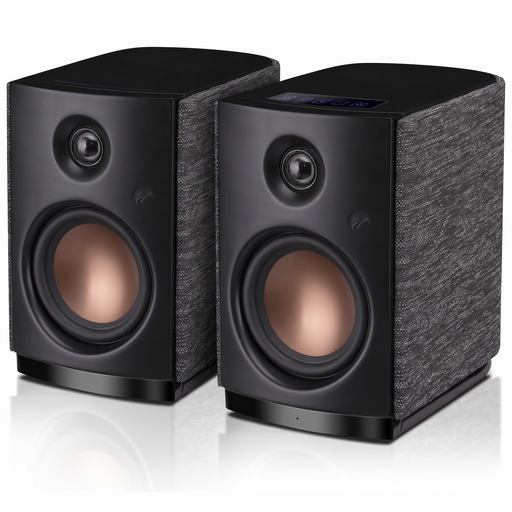
HiVi-Swans OS-10
This active stereo pair is worth considering for a PC or desk setup if Bluetooth or AUX works with your source.
The title lists Bluetooth 5.0, a 4-inch woofer and 62 W RMS.
Joybuy
 No image available
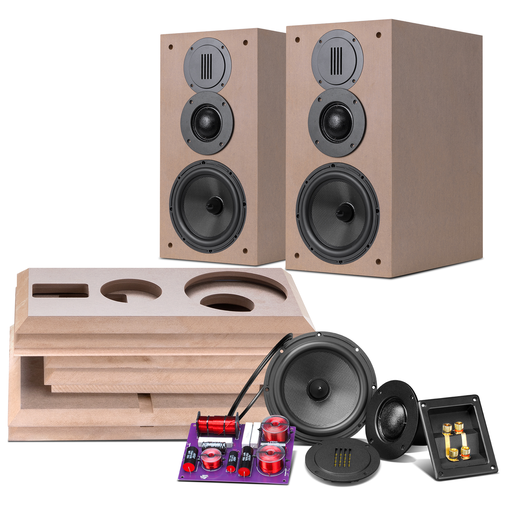
HiVi-Swans DIY3.1
This passive speaker pair is suited to a system planned around separate components, provided you have or plan to buy a suitable amplifier.
The product description lists 6.5-inch mid-bass drivers, 26 mm tweeters, 86 dB sensitivity and 8 ohms. An amplifier and speaker cables are required for use.
Joybuy
 No image available
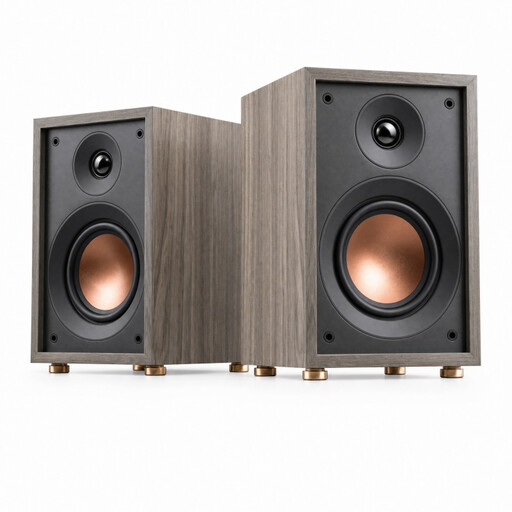
HiVi-Swans Oasis
This passive speaker could suit listening to music at your desk or on a shelf, provided your system includes suitable amplification.
The product description lists a 4-inch woofer, a 20 mm tweeter, 4 ohms and a recommended amplifier power of 10–50 W. An amplifier and speaker cables are required.
Joybuy
 No image available
HiVi D3.1MKII
This passive hi-fi model suits a system with a compatible amplifier; remember to allow for speaker cables too.
The product title lists a 6.5-inch mid-bass driver, a 28 mm tweeter, 8 ohms and a recommended amplifier power of 10–120 W.
Joybuy
 No image available
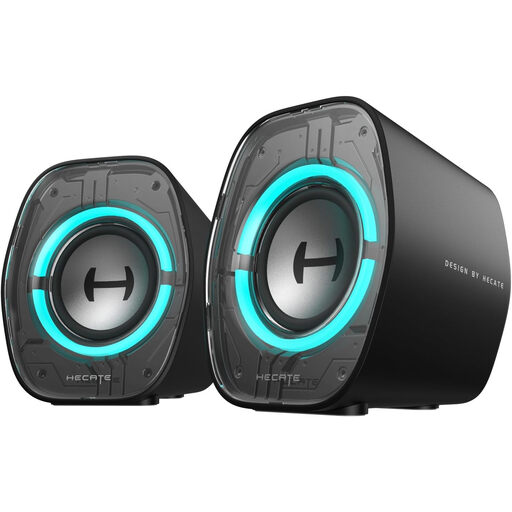
Edifier G1000 II
This model is described as a PC desktop speaker, not a bookshelf speaker. It could be an option if compact sound at your desk matters more than finding a speaker in the category you’re looking for.
The product description lists a 2.5-inch full-range driver, Bluetooth 5.4, USB-C, USB-A and AUX, as well as a music mode.
Joybuy
Frequently asked questions
Can I connect passive bookshelf speakers directly to my laptop?
No. Passive speakers need a suitable amplifier. Also check how your laptop will send the audio signal to the amplifier; ELAC’s manual describes connecting the amplifier to Debut 3.0 speakers.
How should I position two speakers on my desk?
Position both speakers as similarly as possible towards your usual listening spot, and be aware of reflections from your desk and walls. Genelec’s monitor guide recommends symmetrical positioning; the effect at your desk will depend on your specific surroundings.
Can I assume active speakers have USB audio?
No. ‘Active’ alone doesn’t tell you whether a speaker has a USB audio input. Check the connections on the exact model variant against your computer’s output; for example, Edifier’s published list of inputs for the R1280DBs doesn’t include USB audio.
Do connected speakers need a cable between them?
It depends on the model. For the KEF LSX II LT, the manufacturer specifies a C-Link cable; so, even if a speaker supports wireless playback, check how the two speakers connect to each other.
What are the rules on returns and faulty goods when buying online in Germany?
According to Verbraucherzentrale, online purchases by consumers are generally covered by a 14-day right to cancel; you must notify the seller that you wish to cancel. Your statutory rights against the seller are separate from any voluntary guarantee. Check the terms that apply to your specific purchase and seller.


