Choose a pair of speakers that you can position sensibly on either side of your listening spot and connect to your audio source. Active nearfield speakers don’t need a separate amplifier; passive bookshelf speakers are a better fit if you already have a suitable hi-fi system. Very compact models are easier to place, but may struggle with the lowest orchestral notes. Frequency specifications aren’t a reliable way to compare sound unless they’re based on the same measurement conditions.
Who these speakers are for
Orchestral music listeners at a fixed desk
If you want to pick out the different sections of an orchestra in their positions, you need to be able to aim two speakers at a fixed listening spot. Similar positioning on the left and right is important; Genelec explains how uneven reflections can affect stereo imaging.
Listeners who focus on the lower orchestral registers
If you pay particular attention to low instruments and powerful passages, consider the bass limitations of very compact cabinets alongside the space you have available. Genelec notes that small systems may not reproduce the very lowest frequencies.
Listeners with an existing hi-fi system
If you already own an amplifier and are looking for passive speakers, check that it’s suitable and that its connections match the specific speaker pair. KEF specifies an amplifier requirement of 10–150 W for the passive Q1 Meta.
What to consider when choosing
Active speaker pair
A good fit if: You don’t use a separate amplifier and your source’s outputs match the pair’s inputs.
The trade-off: Built-in amplification simplifies your set-up, but you’ll still need to check the signal path and position the speakers appropriately for stereo.
Passive bookshelf speaker pair
A good fit if: You already have a suitable amplifier or want to choose your amplifier and speakers separately.
The trade-off: The amplifier requirements, speaker cables and space available all need to work with the complete system.
| What matters |
What to look for when buying |
Who should consider this? |
| Spatial imaging |
Plan to place two speakers at similar positions and distances from your listening spot. |
If I want to pick out the positions of different orchestral sections at my fixed desk, I need two speakers aimed appropriately. Around 31% of consumers prioritise spatial imaging. |
| Lower orchestral registers |
Compare frequency specifications alongside their stated level definition; Genelec specifies 67 Hz at −6 dB for the 8010A. |
If low instruments and powerful passages matter to me, I want to know the limitations of smaller speakers before buying. Around 25% of consumers prioritise bass extension and headroom. |
| Space and positioning |
Measure the space for both speakers and their connections; Genelec specifies a width of 121 mm per monitor for the 8010A. |
If space beside my screen is limited, I need to be able to fit both speakers around my actual listening spot. Around 25% of consumers prioritise space and positioning. |
| Connections and system |
Check your source’s outputs against the speaker inputs, the number of speakers supplied and, for passive models, the amplifier. |
If I want to keep using my existing equipment, the connections need to suit my entire system. Around 19% of consumers prioritise connections and a complete stereo system. |
Common buying mistakes
-
Confusing a single monitor with a stereo pair
Genelec lists one monitor in the box for the 8010A and specifies one analogue XLR input per unit. A single monitor is therefore not the same as a pair.
Before comparing complete stereo systems, check what’s included and how many units you need.
For stereo, you may need a second unit and suitable signal cables.
-
Comparing low-frequency figures without checking the measurement conditions
The 67 Hz specification for the Genelec 8010A is given at −6 dB. Figures based on different level definitions can’t be compared directly for bass performance.
Check the level definition and bear in mind the limitations of compact systems if deep orchestral notes matter to you.
-
Assuming passive speakers are a complete system, ready to connect
The KEF Q1 Meta is a passive speaker; KEF specifies an amplifier requirement of 10–150 W.
Before deciding, check the whole chain: source, amplifier, cables and speaker pair.
If you don’t already have one, you’ll need a suitable amplifier and speaker cables.
-
Treating desk positioning as just a question of space
Your desk, the walls and unequal distances can all affect the sound at your listening spot. Genelec explains that similar reflections on the left and right are important for stereo imaging.
Measure more than just the cabinets. Check whether you can position both speakers as evenly as possible around your actual listening spot.
Key brands at a glance
Edifier
Active desk speakers; the MR4 has documented analogue connections and controls for sources used at your workstation.
- Edifier lists a front-facing AUX and headphone connection, as well as balanced TRS inputs, for the MR4.
- Descriptions of a linear or natural sound come from the manufacturer and don’t prove that the speakers perform better with orchestral recordings.
Genelec
Compact active nearfield monitors; the 8010A may suit a set-up with limited space on either side, provided the signal path is compatible.
- Genelec specifies a width of 121 mm and one analogue XLR input per monitor for the 8010A.
- The monitor is sold individually. Its stated lower limit of 67 Hz applies at −6 dB, highlighting the trade-off between compact size and the lowest orchestral notes.
Neumann
Active nearfield monitors with positioning options; the KH 80 DSP is worth considering for a fixed listening spot where your desk may affect the sound.
- Neumann documents rear-panel settings for different desk sizes and optional MA-1 alignment for the KH 80 DSP.
- These adjustment options don’t independently confirm what results you’ll get at a particular listening spot. Check what accessories you’ll need for optional room alignment.
KEF
Passive bookshelf speakers for systems with a suitable amplifier; the Q1 Meta is a documented example.
- KEF identifies the Q1 Meta as a passive hi-fi speaker.
- Its stated amplifier requirement of 10–150 W is a reason to check your system’s compatibility, not proof of any particular sound quality.
Q Acoustics
Passive bookshelf speakers; the 3020i is documented as a pair.
- Q Acoustics lists speaker terminals for the 3020i and says it can be placed on shelves or stands.
- A suitable amplifier is part of the system you’ll need to use these speakers; check that it’s compatible and that you have room for both speakers.
Speakers at Joybuy
This selection includes active and passive bookshelf speakers for your desk. If you choose a passive model, make sure to allow for a suitable amplifier before you buy.
 No image available
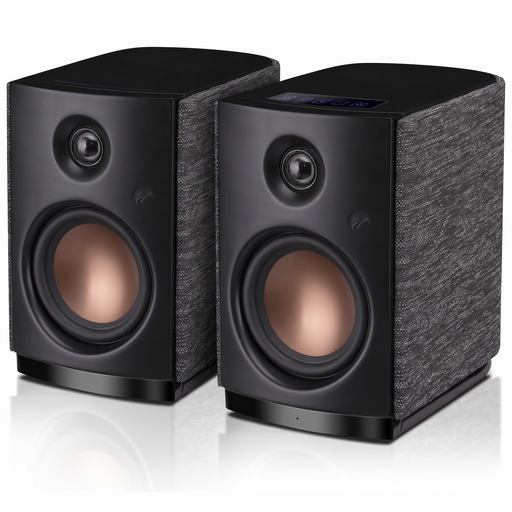
HiVi-Swans OS-10 stereo bookshelf speakers, Bluetooth 5.0, active, 4-inch woofer, 62 W RMS, black
Listed as active stereo bookshelf speakers for your desk; check that the inputs match your source.
Bluetooth 5.0; 4-inch woofer; 62 W RMS.
View at Joybuy
 No image available
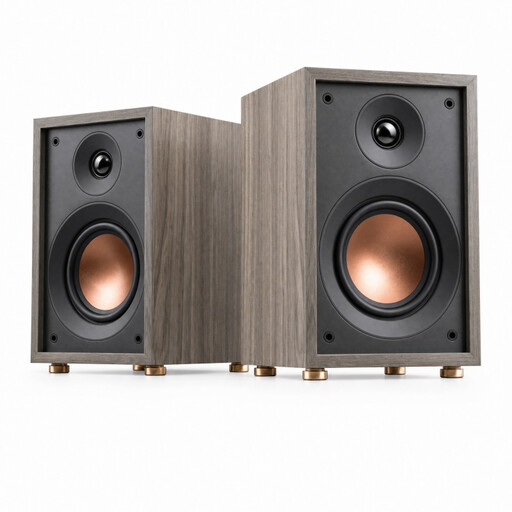
HiVi-Swans Oasis passive 2-way bass reflex bookshelf speaker, 4-inch woofer, 20 mm dome tweeter
This passive bookshelf speaker may suit you if you have a suitable amplifier and its requirements match.
Frequency range: 60 Hz–20 kHz; impedance: 4 Ω; amplifier power: 10–50 W.
The specifications list a 4-inch woofer and a 20 mm dome tweeter.
View at Joybuy
Frequently asked questions
Should I choose active or passive bookshelf speakers for my desk?
Active speakers are a good fit if you don’t use a separate amplifier and your source is compatible with their inputs. Passive models are more suitable if you already have a compatible amplifier or want to choose your amplifier and speakers separately.
Is a single Genelec 8010A enough for stereo?
You’ll need two Genelec 8010A monitors for a stereo pair, as Genelec lists the monitor as a single unit. You’ll also need a suitable signal path to the analogue XLR inputs.
How should I position a pair of speakers for a fixed listening spot?
Aim both speakers at your listening spot, keeping their distances and heights as similar as possible on the left and right. Genelec describes an equilateral stereo triangle as ideal for monitoring; whether this works at your desk depends on the space available.
Can I compare the frequency specifications of small speakers directly?
Only if the figures were measured under comparable conditions. Genelec’s stated lower limit of 67 Hz for the 8010A applies at −6 dB, so make sure you take the level definition into account.
What should I consider when switching between computer work and listening to music?
Check how your source connects and where the volume and headphone controls are. Edifier documents a front-facing headphone output, AUX input and controls on the MR4. These are features of this particular model, not requirements for every pair of active speakers.


