
Lieferung heute & morgen

Qualitätsgarantie

Willkommens-Angebote freischalten: KOSTENLOSE Lieferung | Bis zu 80 % RABATT | Kostenlose 30-Tage-JoyPlus-Testphase
App herunterladen
A Bose Smart Soundbar 5.1.2 with Dolby Atmos is designed to improve your TV sound without taking up much space. For film and series fans, it is not just the surround sound and brand name that matter. The key considerations are the connections, speaker layout, speech clarity and integration with your home network.
The designation ‘5.1.2’ is often misunderstood. It describes a multi-channel configuration with five main channels, one bass channel and two upward-firing channels. Whether you can actually perceive the height effect depends on factors including the room height, ceiling surface, seating position and the audio format being used.
Dolby Atmos is an audio format, but it is not a standalone measure of quality. The TV, streaming service and film must all provide the appropriate signal. If only stereo or a simpler multi-channel format is transmitted, the soundbar cannot convert that content into a native Atmos signal.
According to the product specifications, the Bose Smart Soundbar 220V (EU Version) supports Dolby Atmos, Dolby Digital, Dolby Digital Plus and Dolby TrueHD. It is therefore worth checking the TV’s audio output and the streaming devices you use before buying.
A smart soundbar with Dolby Atmos may support streaming services and voice control, but it will generally require a network connection and setup via an app. For a direct TV connection, this model provides HDMI eARC and an optical TOSLINK input.
HDMI eARC is usually the more practical choice for modern TVs. It can transmit compatible high-quality audio formats and allows you to control the volume using the TV remote. The optical connection is an alternative for older TVs, although it does not offer the same audio functions in every setup.
A slim soundbar fits more easily beneath many TVs, but it does not automatically replace a separate subwoofer. According to the product specifications, the Bose Smart Soundbar 220V measures 5.61 × 69.44 × 10.39 cm and weighs 3.13 kg. That makes it relatively space-saving for a living-room unit.
If you expect particularly powerful bass, check whether a compatible Bose Bass Module can be added later. This model can also be expanded with surround speakers.
The two upward-firing speakers in a 5.1.2 soundbar need sufficient clearance from the ceiling. Very high, highly absorbent or open ceilings can affect the perceived height effect. The soundbar should ideally be positioned centrally beneath the TV and should not be obstructed by furniture or decorations.
An HDMI eARC soundbar is the right solution for many current TVs. Check the following:
The optical input is suitable as a fallback option. The Bose Smart Soundbar 220V also has a subwoofer output. According to the product specifications, the Micro-USB-B port is intended exclusively for servicing.
Bluetooth 5.0 enables wireless playback from a smartphone or tablet. This is practical for music fans, but it does not replace network functions. The Bose Music App is used for setup, managing connections, adjusting settings and installing firmware updates.
According to the specifications, the model has built-in Amazon Alexa and Google Assistant. The availability of individual voice functions may depend on language, account, region and network connection. The AI Dialogue Mode is designed to automatically emphasise voices over surround and background sounds. However, this is an audio setting, not a guarantee of clear speech in every film scene.
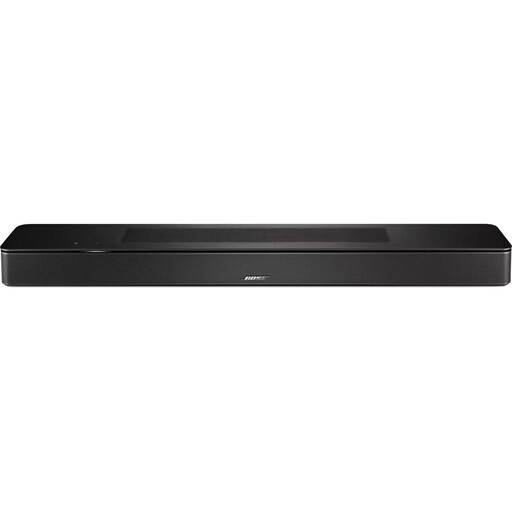
Why this product suits the profile: The combination of HDMI eARC, an optical input, Bluetooth 5.0 and app-based setup covers typical TV and music use without initially requiring additional speakers.
The relevant connections and supported audio formats are clearly specified. This makes it possible to check whether your TV and streaming devices are compatible before buying.
5.1.2-channel configuration, Dolby Atmos support and a width of 69.44 cm.
Why this product suits the profile: If you are looking for a compact home cinema soundbar with expansion options, this gives you a documented foundation for adding bass and surround components later.
The expansion options are explicitly stated. Buyers therefore do not have to assume that this is a closed, standalone solution.
Compatibility with Bose Bass Module and surround speakers, plus Dolby TrueHD support.

Why this product suits the profile: As a standalone Bluetooth device, this speaker is ideal for listening to music in the kitchen, garden or while out and about. It is not a soundbar and does not replace an HDMI eARC TV connection.
This clear distinction prevents you from mistakenly buying a portable speaker as a compact home cinema soundbar.
IP67 protection, USB-C charging and up to 12 hours of playback time according to the product specifications.
We have compiled a complete, regularly updated list of products that fully meet these strict selection criteria and the safety regulations applicable in the EU.
To set up the Bose soundbar, connect it to the TV using HDMI eARC or an optical cable. Then install the Bose Music App to configure the network, voice assistants and firmware. The soundbar should be positioned in the open, and its ventilation openings must not be blocked.
According to the product specifications, power consumption in standby is 0.5 W. With the device left on standby continuously, this works out at around 4.38 kWh per year. Actual running costs depend on your electricity tariff and usage habits. Firmware updates can be installed via the app.
Preferably via HDMI eARC, provided that the TV supports this connection. Alternatively, you can use the TOSLINK optical cable supplied. Once connected, the audio output and, where applicable, eARC should be enabled in the TV menu.
No, the soundbar can be used without a separate Bass Module. If you are planning a stronger bass response or an expanded home cinema setup, you can take its documented compatibility with Bose Bass Module and surround speakers into account.
The AI Dialogue Mode can be activated automatically and is designed to emphasise voices more strongly. You can also adjust the settings using the Bose Music App. However, the effect depends on the source material, room acoustics and the volume of music or effects tracks.