Choose your equipment based on framing, how close you need to get and how much control you want over white balance and exposure – not just megapixels. A standard zoom may be enough for whole loaves and changing arrangements; for tiny crust details, the magnification of the specific lens is what matters. In dim or flickering artificial light, test the actual light source with your camera, and factor in both the lighting and camera position.
Which equipment suits you?
Bakeries taking regular product photos
If you photograph several loaves under the same lighting, adjustable white balance and RAW shooting can help you achieve consistent colour and editing. Sony Germany explains how to adjust white balance, while Nikon Germany describes the extra flexibility RAW files offer when editing.
Photographers focused on crust details
If you want cut surfaces, air pockets or crust texture to fill more of the frame, check the magnification of the lens you plan to use. Canon Germany explains 1:1 magnification, and Nikon Germany specifies this magnification for the NIKKOR Z MC 50 mm f/2.8.
Beginners photographing different bread arrangements
A zoom lens can give you different framing options for individual loaves and table settings. Canon Germany describes the RF-S 18–45 mm as a zoom lens, but check that its close-focusing range is suitable for your detail shots.
What should you look for when buying?
Mirrorless camera with a standard zoom
Best suited to: Photographing whole loaves, cut surfaces and table arrangements with different framing.
Trade-off: A standard zoom won’t necessarily offer enough magnification for very small details. At 45 mm with autofocus, the Canon RF-S 18–45 mm has a maximum magnification of 0.16x, according to Canon.
Mirrorless camera with a macro lens
Best suited to: Making air pockets, scoring or individual crust details appear larger in the frame.
Trade-off: A macro lens isn’t automatically included with a camera kit, and depth of field becomes shallower at close range. Nikon specifies 1:1 magnification for the separately available NIKKOR Z MC 50 mm f/2.8.
| Buying priority |
What to check |
Who is it important to? |
| Bread colours under artificial light |
White balance settings and RAW shooting on the specific model; take test shots under the light you’ll be using. |
If I photograph bread regularly, I want to keep colours consistent and edit my shots afterwards when needed. Around 33% of consumers put colour control first. |
| Crust and crumb details |
Check the maximum magnification, as well as the mount and what’s included in the package. |
If I want to show tiny air pockets or scoring in close-up, choosing the right lens matters more than the camera body alone. Around 27% of consumers prioritise close-up details. |
| Loaves and table arrangements |
Check the focal length range and minimum focusing distance of the supplied lens. |
If I photograph both individual loaves and full arrangements, I want the flexibility to choose my framing. Around 20% of consumers prioritise versatile framing. |
| Sharpness in dim or flickering light |
Check the lens aperture and stabilisation of the camera-and-lens combination; test the actual light source with the available shutter speed settings. |
If my workspace is dimly lit, I want to consider motion blur and possible light bands separately. Around 20% of consumers prioritise low-light photography. |
Common misconceptions
-
Assuming every kit lens is a macro lens for close-ups
A standard zoom won’t automatically offer enough magnification to make small bread details appear large in the frame. Canon specifies a maximum of 0.16x for the RF-S 18–45 mm at 45 mm with autofocus; this isn’t comparable to the 1:1 magnification of Nikon’s separate macro lens.
Decide how large you want the smallest details to appear, then check the lens, mount and package contents together.
-
Assuming a wider aperture will solve both lighting and sharpness issues
A wide aperture lets in more light, but reduces depth of field. Canon Germany explains this relationship.
If you want both the crust and the cut surface to be sharp, consider aperture, exposure, lighting and a stable camera position together.
-
Assuming stabilisation guarantees flicker-free images
Camera shake and bands caused by flickering light sources are different problems. Sony Germany describes model-specific ways to reduce flicker effects by adjusting shutter speed; this doesn’t mean every camera model has the same feature.
Test the specific light source with your chosen camera and check which shutter speed settings are available.
Key brands at a glance
Canon
The EOS R50 with a standard zoom is one option for getting started with interchangeable lenses.
- Canon specifies a 24.2 MP APS-C sensor and an RF/RF-S mount for the EOS R50.
- According to Canon, it doesn’t have sensor-shift IS or EF-M compatibility. At 45 mm with autofocus, the RF-S 18–45 mm reaches a maximum magnification of 0.16x, so you may need a different lens for very small details.
Nikon
The Z system offers a route from a standard zoom kit to a separately chosen macro lens.
- Nikon specifies 1:1 magnification for the NIKKOR Z MC 50 mm f/2.8.
- The Z50II kit described includes standard and telephoto zoom lenses, but not this macro lens. Check what’s included with the specific version.
Fujifilm
The X-S20 is an X-mount camera body for a flexible photography and editing workflow.
- Fujifilm specifies 26.1 MP, RAW and five-axis in-body stabilisation for this model.
- These specifications aren’t the result of a comparison test under bread-photography lighting. For close-up details, you’ll need to choose a suitable X-mount lens.
Panasonic
The LUMIX G97 is a Micro Four Thirds option with interchangeable lenses.
- Panasonic specifies a 20.3 MP MFT sensor and RAW shooting for the camera body.
- These specifications refer to the body. Check separately which lens is suitable for your framing and focusing distance.
Sony
The ILCE-6700 is an APS-C camera body with an E-mount and a separately chosen lens.
- Sony specifies approximately 26.0 effective megapixels for still images.
- Sony’s information on anti-flicker features varies by model; check the settings on the specific camera and test it with the light source you’ll be using.
Joybuy products
The following Joybuy cameras differ in their lenses, framing and stated shooting options. Check whether each combination suits the bread you want to photograph and the editing workflow you have in mind.
 No image available
Sony Alpha 6100 APS-C mirrorless camera with 16–50 mm power zoom lens
The zoom lens offers flexible framing for both individual loaves and full arrangements.
APS-C mirrorless camera with a 16–50 mm power zoom lens.
Joybuy
 No image available
Komery G7-A 4K digital camera, 80 MP, 18x zoom, white
The zoom listed in the product name offers different framing options; check whether the camera can focus closely enough for the bread details you want to capture.
The product name specifies 4K video, 80 MP photos and 18x zoom.
Joybuy
 No image available
Songdian digital camera with 8x optical zoom, 5K and 64 MP, white
The optical zoom listed in the product name offers different framing options. For close-ups, check that the focusing distance suits your subjects.
The product name specifies 5K video, 64 MP photos and an 8x optical zoom lens.
Joybuy
 No image available
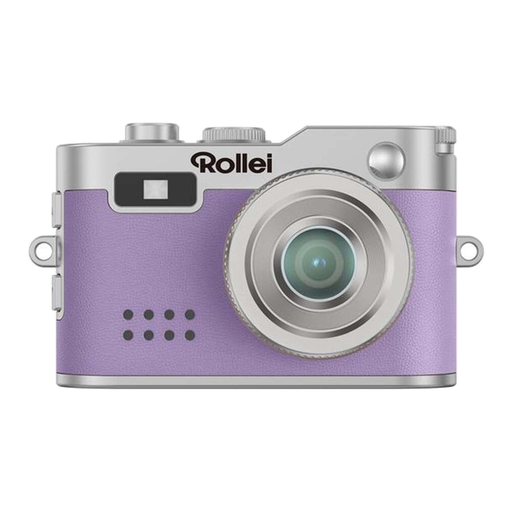
Rollei mini digital camera, purple
The fixed focal length described is less flexible if you want to change your framing; the stated photo resolution is 2 MP.
Joybuy
Frequently asked questions
What should I check first if the bread crust looks too orange or too grey under artificial light?
Compare test shots taken under that exact light and adjust the white balance. If you want to make targeted edits later, check whether the specific model supports RAW shooting; a warmer look may also be a deliberate creative choice.
Will a tripod help if I want the whole cut surface to be sharp?
If the bread isn’t moving, a stable camera position can make it easier to use a longer exposure when you stop down for greater depth of field. But it won’t prevent colour casts from the lighting or necessarily eliminate bands caused by a flickering light.
Do I need to buy a macro lens straight away to capture crust details?
Not for every shot: first check whether the framing and minimum focusing distance of your current lens are enough. For very small details, compare the maximum magnification of the specific lens. At 45 mm with autofocus, Canon specifies a maximum of 0.16x for the RF-S 18–45 mm; Nikon specifies 1:1 magnification for the NIKKOR Z MC 50 mm f/2.8.
What are my rights when buying a camera from a retailer as a private customer?
For consumer purchases in the EU, official EU information states that you’re entitled to a legal guarantee of at least two years from the date you receive the goods, covering faults or items that don’t match their description. This is separate from a voluntary manufacturer’s warranty. Consumer advice from the Verbraucherzentrale also states that online orders generally come with a 14-day right to cancel from delivery, subject to legal requirements and exceptions. These consumer rules don’t automatically apply to business purchases.


