Tripod photographers using an interchangeable-lens camera
If you don’t want to touch the camera when taking a shot, check that the remote release is compatible with your camera model and connection.


If your camera is fixed on a tripod for your bread photos, first choose a remote release confirmed to work with your camera model and connection. A cable release is enough if you’re staying by the tripod; Bluetooth or a compatible camera app can give you more freedom to move around while styling your shot and working with the window light. For automatic sequences, you’ll need suitable interval functions, while a smartphone selfie remote won’t operate an interchangeable-lens camera.
If you don’t want to touch the camera when taking a shot, check that the remote release is compatible with your camera model and connection.
If you move between the bread, the lighting and the camera position, consider a wireless remote release or a compatible camera app. Canon notes that the direction of the window, time of day and weather all affect the quality of the light.
If you’re photographing bread with your smartphone, you’ll need a control option for its camera app. A smartphone remote release isn’t automatically compatible with the remote port on an interchangeable-lens camera.
Suitable if: You’re staying by the tripod and want a simple way to take a photo without touching the camera. Nikon lists the MC-DC2 for specific camera models; Canon lists the RS-80E3 for compatible cameras with an E3 connection.
Keep in mind: The cable and connection limit where you can stand. E3 and N3 releases aren’t interchangeable just because they’re made for the same camera brand.
Suitable if: You want to keep your distance from the camera while styling your shot or arranging the light. The Canon BR-E1 and Sony RMT-P1BT are brand-specific examples for compatible cameras.
Keep in mind: The camera model, supported functions, connection and power supply must all suit your specific device.
Suitable if: Your camera can be controlled remotely using the manufacturer’s app, and you want to check what’s already available before buying a separate remote release. Sony notes that app support varies by model.
Keep in mind: You’ll need a compatible camera model, the right app and a configured connection. Available functions may vary by model.
Suitable if: You’re planning several shots at set intervals from the same camera position. JJC describes programmable interval functions for the WT-868+CABLE-C.
Keep in mind: The receiver and the correct cable version must suit your camera connection. The extra settings are only worthwhile if you’ll actually use the interval functions.
Suitable if: You’re taking photos with your smartphone camera and its software supports the remote. Hama describes the BRS5 as suitable for smartphone and tablet cameras.
Keep in mind: According to Hama, the shutter function depends on the device’s software; this remote isn’t a substitute for one designed for an interchangeable-lens camera.
| What matters | What to check before buying | Who it matters to |
|---|---|---|
| Camera compatibility | Compare the exact camera model, connection or supported wireless connection, and the buttons you need. | If I want to make sure the remote release works with my camera, model compatibility is essential. Around 27% of consumers put it first. |
| Taking photos without touching the camera | Check that the cable is long enough for you to stay beside the tripod when taking a photo. | If I’m working at the tripod and don’t want to touch the camera when pressing the button, a compatible cable release may be enough. Around 27% of consumers prioritise this straightforward way of taking a photo. |
| Freedom to move around your setup | Check the wireless connection type, camera support, controls you need and power supply. | If I’m moving between the bread and the window light, I want to be able to take a photo from a little further away. Around 20% of consumers prioritise this freedom to move around. |
| Control from your smartphone | Decide whether you want to control your smartphone camera or an interchangeable-lens camera via an app, then check that the relevant software is supported. | If I’m photographing bread with my smartphone or want to control my interchangeable-lens camera through an app, support for the device in question is key. Around 13% of consumers prioritise this type of control. |
| Automatic photo sequences | Check the interval function, receiver and correct cable version for your camera connection. | If I want to take several photos automatically in sequence, I need suitable interval functions rather than a simple single-shot release. Around 13% of consumers prioritise this type of workflow. |
Even within the same brand, connections and supported camera models can differ. An incompatible connection may mean you need a different remote release or the correct connecting cable.
Before buying, compare your camera’s exact model name with the compatibility list and the specified cable version.
The Hama BRS5 is described as suitable for smartphone and tablet cameras. Even then, Hama says that its function depends on the device’s software.
First decide what you’ll be taking photos with, then choose a remote release designed for that device.
An intervalometer comes with extra settings and a receiver. With JJC, the right setup also depends on the cable version.
Choose interval control only if you actually want to take an automatically repeated sequence of photos.
Canon offers wired and wireless remote releases for specific camera models.
Nikon offers the wired MC-DC2 and the ML-L7 Bluetooth remote control, among other options, for compatible models.
Sony describes the RMT-P1BT as a Bluetooth remote control and Imaging Edge Mobile as an app option for supported cameras.
According to JJC, the WT-868+CABLE-C is an intervalometer that can be used wired or wirelessly with compatible camera connections.
The BRS5 is described as suitable for smartphone and tablet cameras, not as a remote release for interchangeable-lens cameras.
This Joybuy selection includes smartphone tripods and remote controls for hands-free smartphone photography. It doesn’t include remote releases for the remote port on an interchangeable-lens camera.
 No image available
For anyone who takes photos of bread with a smartphone and wants to set up their device for hands-free shots.
The product name mentions a built-in stand and a smartphone holder. According to the product description, this model is designed for smartphones up to 6.0 inches.
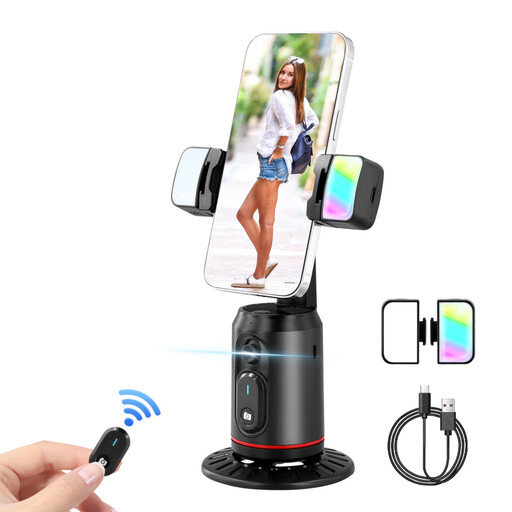 No image available
For anyone who wants to position their smartphone for hands-free shots and use a remote control.
The product name mentions a smartphone gimbal, two selfie lights, a remote control and face tracking.
 No image available
For anyone who wants to position their smartphone for photos and operate the shutter from a little further away.
The product name describes a foldable, height-adjustable tripod with Bluetooth remote control.
Not necessarily. If your compatible camera is on a tripod and you’re standing beside it to take the shot, a suitable cable release may be enough. Wireless is an option if you want more freedom to move around while arranging your shot or the light.
First check whether your exact camera model supports remote control via an app. Sony says that setup for Imaging Edge Mobile varies by model. Test the connection and take a photo before preparing your setup for the bread shot.
Keep the cable away from the area where you’re working with the bread, and check the battery level of battery-powered devices before a planned sequence of shots. JJC lists batteries in the WT-868+CABLE-C package; Hama specifies a CR1632 battery for the BRS5.
In Germany, consumers who buy online generally have a 14-day right to cancel. The Verbraucherzentrale distinguishes this right from the statutory consumer guarantee against the seller and a voluntary warranty.
A Bluetooth claim alone doesn’t prove that a specific product complies with the relevant requirements. The Bundesnetzagentur explains that products covered by harmonisation legislation must carry CE marking, so check the markings and product information for the device in question.