
Lieferung heute & morgen

Qualitätsgarantie

Willkommens-Angebote freischalten: KOSTENLOSE Lieferung | Bis zu 80 % RABATT | Kostenlose 30-Tage-JoyPlus-Testphase
App herunterladen
Finding the right mechanical keyboard can quickly become overwhelming. Manufacturers advertise a host of features, but not every innovation is worth the premium. Often, well-intentioned advice or persuasive marketing leads to a purchase that proves impractical in daily use. This guide will help you identify the crucial features and navigate common pitfalls.
Before we dive into the technical details, let's address three common issues that often lead to disappointment.
To avoid buyer's remorse, you should focus on three fundamental technical features. These are the primary determinants of functionality and user experience.
Mechanical switches define the typing feel and acoustics. The three main categories are:
The size of the keyboard affects both ergonomics and the available space on your desk.
Regardless of the form factor, checking the layout is crucial. Look for the QWERTY designation to ensure the keyboard is designed for your region.
The connection method is a matter of personal preference and need.
Here are some models tailored to specific user profiles that take the aforementioned pitfalls into account.
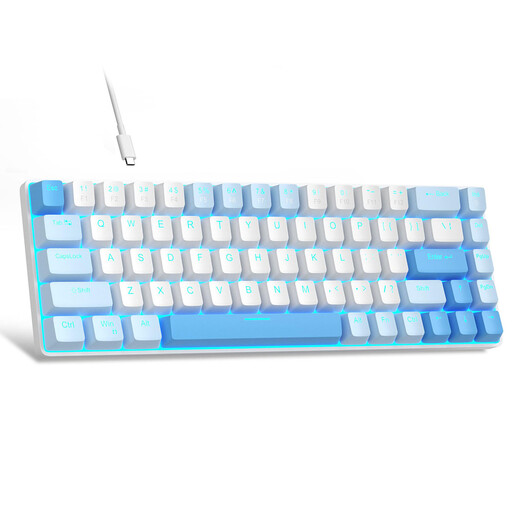
Why This Fits Their Persona: Ideal for gamers just entering the world of mechanical keyboards. The compact 60% format creates plenty of space for the mouse, while the linear red switches enable fast, smooth inputs without loud clicking noises.
This model avoids the RGB trap by offering simple, single-colour LED backlighting. The focus is on mechanical functionality and great value for money, not on visual gimmicks.
Compact design and anti-ghosting for all 68 keys. Important Note: This model comes with a QWERTY (US) layout.
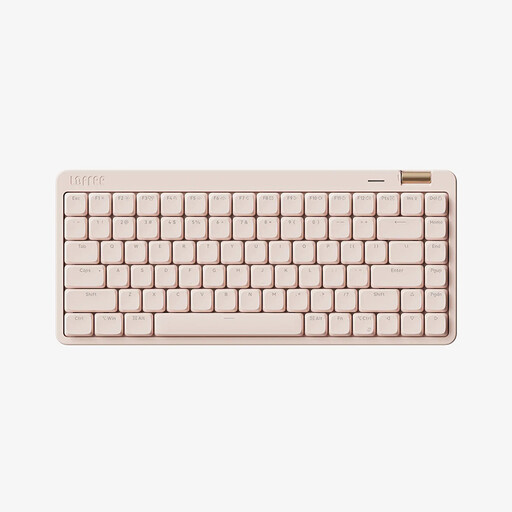
Why This Fits Their Persona: Perfect for home office users and prolific typists who value flexibility and a clean setup. The tri-mode connectivity allows for seamless switching between a laptop, PC, and tablet. The 75% layout is a great compromise between compactness and functionality.
This model debunks the "one switch fits all" myth by using quiet, linear low-profile switches. These are specifically designed for a quiet office environment while still providing a precise mechanical typing feel.
Tri-mode connectivity (Bluetooth 5.4, 2.4G, Wired) and durable PBT keycaps. The slim design and volume knob are practical additions.
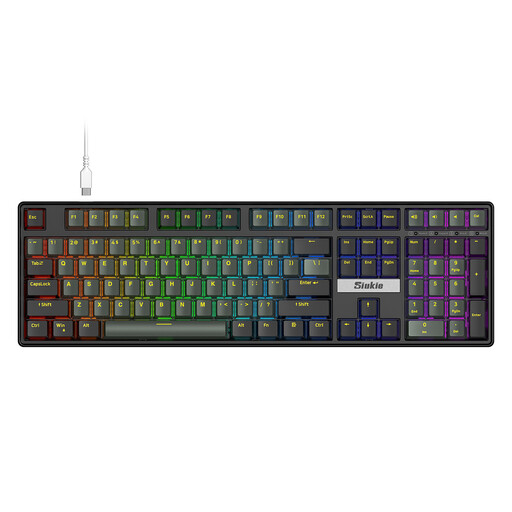
Why This Fits Their Persona: For users who want maximum control and customisation. The hot-swap capability allows for changing mechanical switches without soldering, making it possible to individually tailor the typing feel and sound. The full-size layout offers complete functionality.
Here, RGB lighting is one of many features, not the main selling point. The true value lies in the hot-swap technology, which enables long-term customisation and maintenance—a feature that goes beyond mere aesthetics.
Fully customisable switches thanks to hot-swap sockets. The ergonomic design and full-size layout are suitable for both gamers and office users. Important Note: This model comes with a QWERTY (US) layout.
For users who need a keyboard specifically for daily office use with a standard layout, we have curated a suitable selection.
One of the greatest strengths of mechanical keyboards is their longevity. While conventional membrane keyboards often wear out after a few million keystrokes, mechanical switches are rated for 50 million keystrokes or more. With proper care, such a keyboard can function reliably for many years.
No, that's a common misconception. The volume depends entirely on the chosen switch type. Linear (Red) and Tactile (Brown) switches are significantly quieter than Clicky (Blue) switches. For an especially quiet keyboard, there are also special 'silent' switches or the option to dampen the keys with small rubber rings (O-rings).
A hot-swappable keyboard allows the user to easily replace the mechanical switches without any soldering. Using a special tool, the switches can be pulled out and replaced with others. This offers maximum flexibility to customise the typing feel, sound, and responsiveness of the keyboard to your personal preferences.