Sim pilots sharing a bedroom
If you fly regularly and share the room with someone else, consider noise under load and make sure the planned location has clear ventilation.


Choose a PC to suit the flight simulator you use and your monitor. For Microsoft Flight Simulator 2024, the Microsoft Flight Simulator team’s recommended PC tier specifies 32 GB RAM and 8 GB of graphics memory. In a shared bedroom, you’ll also want to check noise levels for the exact configuration under load, keep ventilation clear and allow enough space for your monitor and controls. A compact case alone doesn’t guarantee quiet operation.
If you fly regularly and share the room with someone else, consider noise under load and make sure the planned location has clear ventilation.
If you need room for a monitor and flight controls as well as your PC, a compact computer could be a good option. Check that its connections and airflow suit the space you have in mind.
If the visuals on your monitor matter to you, compare your simulator’s requirements with the processor, graphics card and memory in the exact PC configuration.
| What matters | What to check before buying | Who is this particularly important to? |
|---|---|---|
| Performance for your simulator | Choose your simulator and monitor resolution, then compare the CPU, GPU, graphics memory and RAM in the exact configuration. For Microsoft Flight Simulator 2024, Microsoft’s recommended PC tier specifies 32 GB RAM and 8 GB VRAM. | If I want to run a particular flight simulator on my monitor, I need to compare its requirements with the PC’s actual specifications. Around 34% of consumers say simulator performance is their main concern. |
| Being considerate of others | Look for noise figures or a test of the same PC configuration under load, and keep the ventilation openings clear where you set it up. | If you fly in a shared bedroom, you’ll want to avoid disturbing others with fan noise or heat as much as possible. Around 33% of consumers make this a priority. |
| Space for your PC and flight setup | Measure the space for your PC, monitor and controls together; check the case dimensions and connection locations for the exact configuration. | If my desk also needs to fit a monitor and flight controls, I need to consider the space required for the whole setup. Around 20% of consumers are mainly looking to save space. |
| Controls and connectivity | Check that your input devices are compatible with the PC’s connections. If you’re using Microsoft Flight Simulator 2024, also make sure you’ll have a reliable internet connection where you set it up. | If you want to connect a joystick, yoke or other controls, you’ll need the right connections and enough room. Around 13% of consumers say controls and connectivity are their main concern. |
The size of a case and descriptions of its cooling don’t tell you how noisy a specific PC will be when running a flight simulator under load.
Look for noise figures or a test of the exact configuration under load, and keep the airflow clear where you plan to set it up.
The COMPUTER BILD test of the One Gaming PC AN290 was based on a test unit with an RTX 4060. The current listing covered by this research, however, specifies an RTX 5060 Ti and 16 GB RAM, so the test results can’t necessarily be applied to it.
Compare the test date and full specifications with the exact configuration you’re planning to buy.
Your monitor and chosen flight controls also take up space and need compatible connections.
Make a list of the devices you already have and those you’re planning to buy. Then check they’ll all fit in the space you have and connect to the PC.
The ROG NUC is a compact option for a desk with a separate monitor and flight controls.
The MPG Trident AS AI range offers compact desktop configurations, but you’ll need to check the specifications of each one.
The OMEN 35L is a tower option if you have enough space for the case and airflow where you plan to set it up.
The Nitro 50 is another desktop to compare; the dimensions and specifications of the exact configuration are what matter.
Configurable gaming PCs can be useful for comparison, provided you check the test unit against the specifications currently on offer.
This selection includes desktop and mini PC options. Compare the specifications of each configuration with the requirements of your flight simulator.
 No image available
Compare the specifications with the requirements of your flight simulator and monitor.
Specifications listed in the product title: i5, 32 GB RAM, 1 TB, RTX 5060 and Win11 Home.
 No image available
As a tower option, you’ll need to allow for the case and keep the airflow clear where you set it up.
Specifications listed in the product title: Core Ultra 9-285K, 32 GB RAM, 2 TB SSD and RTX 5080.
 No image available
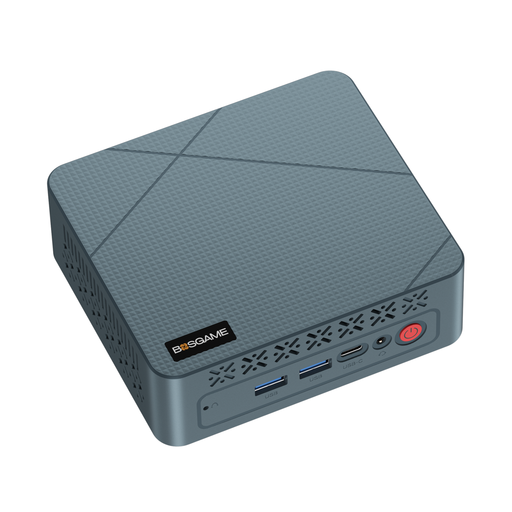
A mini PC could be worth considering if space is limited, but check whether the exact specifications meet your simulator’s requirements.
Specifications listed in the product title: AMD Ryzen 5 3500U up to 3.7 GHz, 16 GB RAM and 256 GB SSD.
 No image available
The compact design can save desk space; before buying, compare the specifications with the requirements of your chosen flight simulator.
Specifications listed in the product title: AMD 6600H, 16 GB LPDDR5, 512 GB M.2 NVMe and Windows 11 Home.
 No image available
If you’re considering a mini PC, compare this model’s specifications with the simulator you use and the monitor you want to run.
Specifications listed in the product title: AMD Ryzen 7 7735HS, Radeon 680M, 16 GB RAM and 512 GB SSD.
No, it depends on the simulator you use. For Microsoft Flight Simulator 2024, Microsoft’s recommended PC tier specifies 32 GB RAM and 8 GB VRAM. This doesn’t guarantee a particular frame rate, scenery quality or resolution.
Yes, if you want to play this game. Microsoft says Microsoft Flight Simulator 2024 requires a constant internet connection to stream content and can’t be played offline. Other simulators have their own requirements.
Keep the ventilation openings clear and clean any accessible vents in line with the device instructions. HP recommends adequate ventilation and regular cleaning to help prevent overheating; check the manual for your specific model to find out how much clearance it needs.
Check whether the monitor and flight controls you want are already included or need to be bought separately. Goods purchased by consumers from a trader in the EU are generally covered by a minimum two-year legal guarantee; an additional commercial guarantee must not limit these rights. For typical online purchases, you generally have a 14-day right to withdraw, subject to legal exceptions. Your Europe and the Council of the European Union explain these rules.