
Lieferung heute & morgen

Qualitätsgarantie

Willkommens-Angebote freischalten: KOSTENLOSE Lieferung | Bis zu 80 % RABATT | Kostenlose 30-Tage-JoyPlus-Testphase
App herunterladen
Anyone looking for business PCs and workstations for a company, home office or technical projects will find a wide selection: from compact mini PCs and slim PCs to expandable towers. Product names often sound similar, but the actual specifications can differ considerably. The key factors are not just the processor designation or the marketing claim “AI-ready”, but how the RAM, storage drive, graphics, ports, operating system and maintenance options work together.
An Intel Core Ultra PC or another AI PC may include an NPU. This unit supports certain AI functions that run locally, but it does not replace a powerful GPU for training, large models or complex 3D calculations. An NPU can be useful for standard office software, video conferences and supported AI applications. For local model inference with large datasets, however, memory capacity, GPU architecture and software compatibility are the decisive factors.
16 GB RAM is enough for typical office software, browsers, email and straightforward multitasking. Anyone using virtual machines, development environments, large spreadsheets, CAD files or image and video projects should plan for 32 GB DDR5 RAM or more. It is also important to check whether free memory slots are available and what maximum capacity the manufacturer specifies.
Mini PCs and slim PCs save space, but they often offer fewer slots and limited options for adding a graphics card or additional drives. A tower requires more desk space, but depending on the model, it can accommodate several PCIe cards, additional SSDs or larger amounts of RAM. Before buying, you should therefore decide whether the system may need to be expanded later.
For office applications, software development and data analysis, core count, clock speed, cache and platform features are important points of comparison. The Intel Core Ultra 7 265, for example, offers 20 cores, 20 threads and a specified maximum turbo frequency of up to 5.3 GHz. That alone does not indicate how quickly every application will run. Software must actually support the available cores and, where applicable, the NPU.
For particularly demanding workloads, professional workstations with 24-core processors, 64 or 128 GB RAM and high memory bandwidth may be more suitable than a traditional office PC.
An NVMe SSD connected via PCIe generally makes operating systems and applications feel highly responsive. As well as capacity, check whether 512 GB will be enough for your local projects. For large datasets, media archives or numerous virtual machines, 1 TB, 2 TB or 4 TB is more practical.
With business PCs, administrators should also pay attention to serviceability and encryption options. Some systems support TPM 2.0, while certain Dell configurations also support self-encrypting SSDs. The exact specification should always be checked against the individual model.
Integrated graphics are sufficient for office work, web applications and several standard monitors. For CAD, 3D visualisation, technical design or professional image editing, a professional graphics card with certified drivers may be more suitable. The Lenovo ThinkStation P2 Tower Gen2, for example, is equipped with an NVIDIA RTX A400 with 4 GB of dedicated graphics memory.
For businesses, a Windows 11 Pro PC is often more suitable than a device with the Home edition, thanks to features such as BitLocker, Secure Boot, domain integration and centralised management. Linux systems such as the ASUS Ascent GX10 models, on the other hand, are aimed at users who want to work with CUDA, PyTorch, TensorFlow and a Linux-based development environment.
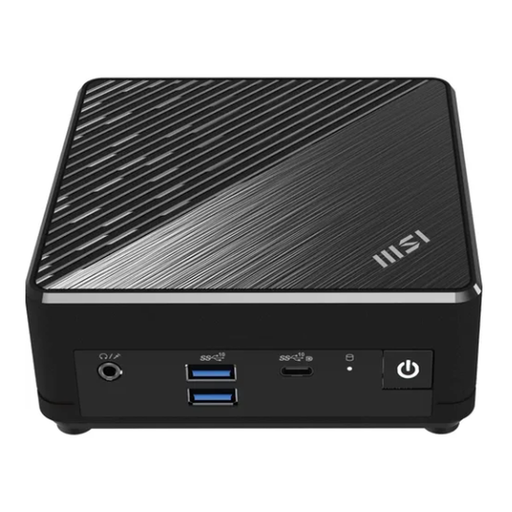
Why this product suits the profile: This compact mini PC is designed for basic office tasks, digital communication and straightforward multimedia use. Windows 11 Pro and VESA compatibility make it easier to integrate into small workspaces.
The specified 8 GB RAM and 256 GB SSD are clearly stated. Dual Gigabit LAN, HDMI and DisplayPort make the connectivity options easy to understand.
Compact casing, suitable VESA mounting and support for up to three displays according to the product specifications.

Why this product suits the profile: The combination of an Intel Core Ultra 7 265, 32 GB DDR5 RAM, 2 TB M.2 SSD and tower casing is well suited to productive workstations with greater storage and multitasking requirements.
The storage and RAM capacities are higher than those of basic office PCs, making this system better suited to more demanding multitasking. The tower format provides easier access to the components.
24 processor cores? No: this model is specified with 20 cores and 20 threads. It also includes 2 TB SSD storage and a 700-W power supply.
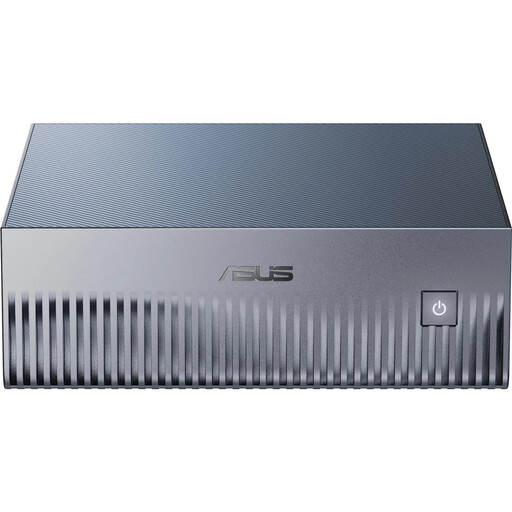
Why this product suits the profile: This system is aimed at developers and data analysts who want to develop and run local AI models with NVIDIA software, CUDA, PyTorch or TensorFlow.
The target platform is clearly defined: NVIDIA GB10 Grace Blackwell, 128 GB LPDDR5X and NVIDIA DGX OS. This is not an ordinary Windows office PC.
128 GB unified memory, 4 TB PCIe-5.0-NVMe SSD, 10-GbE connection and pre-installed NVIDIA AI software stack.

Why this product suits the profile: This workstation combines a Core Ultra 7 265 with 32 GB DDR5 RAM and an NVIDIA RTX A400. It is well suited to technical visualisation, design tasks and professional office applications.
The graphics are specified as an NVIDIA RTX A400 with 4 GB of dedicated graphics memory. This clearly distinguishes it from systems with integrated graphics only.
Windows 11 Pro, 500-W power supply, DisplayPort, HDMI, plus keyboard and mouse according to the product description.
We have put together a complete, regularly updated list of products that fully meet these strict selection criteria and the safety regulations applicable in the EU.
The service life depends on workload, maintenance, environment and software requirements. A system with sufficient RAM, an NVMe SSD and an upgradeable platform can remain suitable for longer than a device with limited specifications. Regular security and driver updates, together with unobstructed ventilation, help support reliable long-term operation.
For word processing, spreadsheets, browsers, email, video conferences and business management software, a mini PC may be sufficient. For 3D CAD, local AI development, large databases or professional video editing, you should examine the processor, RAM, graphics and cooling more closely. A tower or workstation usually offers more expansion options for these tasks.
Power consumption depends on the processor, graphics card, power supply, workload and operating time. A compact office PC with integrated graphics generally uses less energy under typical workloads than a tower with a powerful graphics card or an AI workstation. For a realistic estimate, consult the manufacturer’s power consumption specifications and consider your individual usage profile.