
Lieferung heute & morgen

Qualitätsgarantie

Willkommens-Angebote freischalten: KOSTENLOSE Lieferung | Bis zu 80 % RABATT | Kostenlose 30-Tage-JoyPlus-Testphase
App herunterladen
If you're looking to buy a computer, you'll find devices with vastly different processors, graphics cards, storage capacities and form factors. A budget-friendly laptop can be sufficient for studying and working from home, whereas professional applications, gaming or local AI development demand a completely different set of specifications.
However, the product name alone won't reliably guide you to the right choice. What really matters are the technical specifications, upgradeability and your specific use case.
A high clock speed doesn't automatically mean the overall performance will be suitable. The number of cores, architecture, cooling and power consumption all affect how well a device performs under sustained load. An Intel Core Ultra with an integrated NPU, for example, is interesting for certain AI-powered applications, but it won't replace a powerful dedicated graphics card for demanding 3D calculations.
32 GB of RAM and a 512 GB SSD serve different purposes. RAM holds the programmes and data you're currently using. The SSD permanently stores the operating system, applications and files.
For typical office tasks, 8 to 16 GB of RAM is often enough. If you're planning to run virtual machines, work with large datasets, edit video or do heavy multitasking, you should aim for 32 GB of RAM or more. 64 GB of RAM makes sense for workstations and professional creative applications; 128 GB of RAM is aimed at specialist AI and development environments.
A gaming PC or workstation needs more than just a fast processor. Pay attention to:
With a mini PC, you should also check whether the RAM is upgradeable. Compact systems save space, but they usually offer fewer expansion options than a desktop PC.
For office work, browsing, video calls and streaming, current mobile processors such as the Intel Core 5 120U or mid-range AMD Ryzen chips are suitable. For demanding software development, CAD or data analysis, more powerful desktop processors like the Intel Core Ultra 7 265 or an AMD Ryzen with many threads are a better fit.
A PC for the office and home office, on the other hand, doesn't necessarily need a dedicated graphics card. An integrated graphics unit saves space, energy and money, provided you're not planning any intensive 3D applications.
For a Windows 11 PC in the office, 8 to 16 GB of RAM and an SSD of at least 512 GB are a practical starting point. An NVMe SSD, using the appropriate interface, typically offers snappy performance when launching programmes and handling file operations.
For professional use, you should also consider upgradeability. A system with 32 GB of RAM can be sufficient for many workflows, while a workstation with 64 GB of RAM offers more headroom for simulations, rendering and large projects.
A PC for gaming needs a graphics card that matches your desired resolution and refresh rate. An NVIDIA GeForce RTX 5080 with 16 GB of GDDR7 is technically in a different category to a professional NVIDIA RTX PRO 4000 with 24 GB of GDDR7. According to the product specifications, the latter is designed for professional workloads such as rendering, simulation and AI development.
The operating system is also relevant for software compatibility. Windows 11 Home is sufficient for many home users. Windows 11 Pro offers additional features for business environments, including certain security and management options. Specialist AI supercomputers like the ASUS Ascent GX10, on the other hand, use a Linux-based NVIDIA DGX OS and therefore shouldn't be categorised as an ordinary Windows PC.
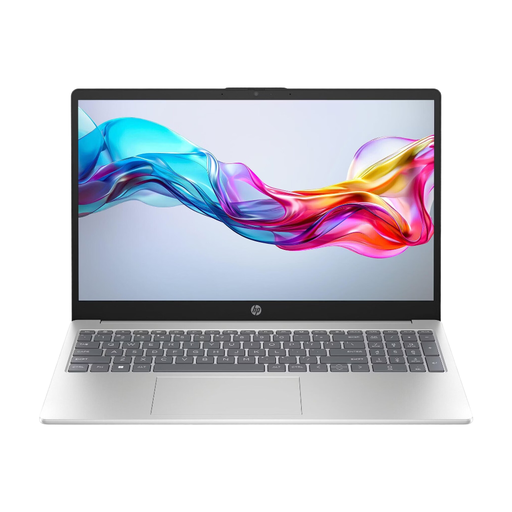
Why this product fits the profile: According to the product specifications, the HP Laptop 15-fd1054ng combines an Intel Core 5 120U, 8 GB of DDR4 RAM, a 512 GB NVMe SSD and Windows 11 Home. This makes it suitable for mobile tasks such as word processing, research, video calls and streaming.
The product description provides specific details about the display resolution, SSD, ports and weight. This makes it easier to assess its suitability for everyday use than relying on a processor name alone.
15.6-inch Full HD IPS display, 512 GB NVMe SSD, Wi-Fi 6E and a stated weight of 1.6 kg.

Why this product fits the profile: According to the product data, the ThinkStation combines an Intel Core Ultra 7 265, 32 GB of DDR5 RAM, a 512 GB NVMe SSD, an NVIDIA RTX A400 and Windows 11 Pro. This places it in the category for office work, data analysis, development and certain design tasks.
The dedicated graphics card and 32 GB of RAM are clearly stated. Buyers therefore won't confuse integrated graphics with a professionally positioned GPU.
20 processor cores, 32 GB DDR5, NVIDIA RTX A400 and multiple display outputs for multi-monitor workstations.

Why this product fits the profile: According to the product specifications, the workstation is equipped with an Intel Xeon w3-2535, 64 GB of DDR5 RAM, a 1 TB NVMe SSD, an NVIDIA RTX PRO 4000 and Windows 11 Pro. It is aimed at professional applications with higher memory and graphics demands.
The combination of 64 GB of RAM, a professional GPU, multiple PCIe slots and a 1,125 W power supply is clearly documented for long-term planned upgrades.
64 GB DDR5, 24 GB GDDR7 graphics memory, multiple PCIe slots and a 1 TB NVMe SSD.

Why this product fits the profile: According to the product description, this gaming PC combines an AMD Ryzen 7 9800X3D, 64 GB of DDR5 RAM, a 2 TB SSD and an NVIDIA GeForce RTX 5080 with 16 GB of GDDR7. The profile suits current games and graphics-intensive applications.
The graphics card, graphics memory, RAM, SSD capacity and power supply are all listed individually. This makes it easier to evaluate for high resolutions and extensive game libraries.
AMD Ryzen 7 9800X3D, 64 GB DDR5, 2 TB M.2 SSD, RTX 5080 with 16 GB GDDR7 and liquid cooling.
We've put together a complete, regularly updated list of products that fully meet these strict selection criteria and the safety regulations in force in the EU.
For office work, study and home office, 8 to 16 GB is often sufficient. If you have many programmes open, do photo editing, development or run virtual machines, 32 GB makes sense. 64 GB or 128 GB is aimed at workstations, scientific applications and local AI development.
A mini PC is a good choice if compact dimensions, a small footprint and multiple monitor connections are important. However, before buying, you should check the processor, cooling, upgradeability, operating system and port selection. For current games or compute-intensive 3D applications, a tower PC with a dedicated graphics card is usually a better fit.
The ongoing electricity costs depend on the power consumption, usage time and your electricity tariff. An energy-efficient laptop or office mini PC typically uses less power under typical load than a gaming PC or workstation with a powerful graphics card. For a rough estimate, you shouldn't directly equate the stated power supply wattage with consumption: it describes the potential supply capacity, not the permanent power draw.