
Lieferung heute & morgen

Qualitätsgarantie

Willkommens-Angebote freischalten: KOSTENLOSE Lieferung | Bis zu 80 % RABATT | Kostenlose 30-Tage-JoyPlus-Testphase
App herunterladen
Anyone looking to buy a desktop PC needs to compare more than just the processor and price. Businesses, self-employed professionals, developers, creative professionals, gamers and demanding home users all need very different systems depending on their requirements. A compact mini PC may be perfectly adequate for office work, while a CAD PC, an AI workstation or a PC for 3D rendering requires different levels of graphics performance, memory and upgradeability.
An Intel Core Ultra 7 or AMD Ryzen sounds powerful, but on its own it says little about whether a system is suitable for a particular application. Core count, memory, cooling, graphics and the power supply are also important. A business PC with integrated graphics is designed differently for spreadsheets, browsers and administration software than a gaming PC with a dedicated NVIDIA RTX graphics card.
16 GB of RAM may be enough for office work and basic multimedia tasks. However, 32 GB RAM is a more sensible starting point for virtual machines, large datasets, CAD projects or several creative applications running at the same time. Local AI development, data analysis involving extensive datasets and complex models may require 128 GB RAM.
An NVMe SSD should not be judged by capacity alone, either. 512 GB is suitable for the operating system and standard programmes, but it can quickly leave little room for large project files. 1 TB or 2 TB makes everyday work easier, while 4 TB can be valuable for local AI workflows or extensive media archives.
A mini PC or slim PC saves space and can be installed behind a monitor or beneath a desk. However, graphics cards, power supplies and storage options are often less flexible than with a tower PC. Before buying, check the dimensions, ventilation clearances, available slots and maximum RAM capacity.
For office software, software development and general multitasking, a modern Core i5 or Ryzen 5 processor is often sufficient. More demanding workflows may call for options such as the Intel Core Ultra 7 265, an Intel Core Ultra 9 or an AMD Ryzen AI Max+ PRO 395.
The graphics solution should match the software:
Windows 11 Pro offers features for business environments that are not included in Home, including BitLocker, Secure Boot and administration and deployment options. Windows 11 Home may be sufficient for personal use or gaming. With an AI workstation, check whether NVIDIA DGX OS or an Ubuntu-based environment with CUDA, PyTorch, TensorFlow or Jupyter is compatible with your existing software stack.
Check which ports you actually need. DisplayPort is often suitable for modern monitors and multi-monitor workstations, while HDMI remains relevant for many displays and televisions. Businesses should also consider Gigabit LAN, the Wi-Fi standard, USB-C and security features such as TPM 2.0 or a Kensington lock. For local AI systems, 10 GbE LAN or a dedicated high-speed interface can make data transfers easier.
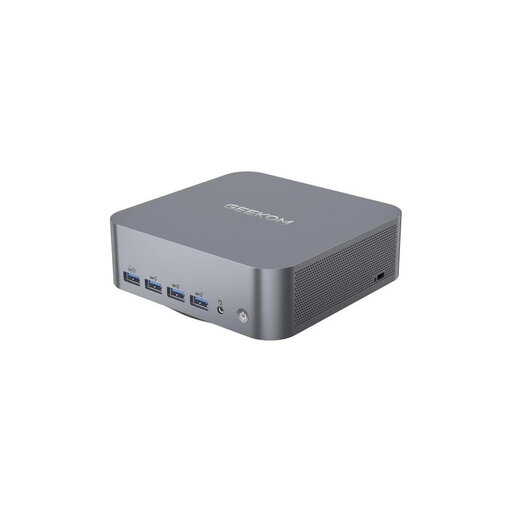
Why this product suits the profile: This compact mini PC is designed for office work, multimedia and everyday tasks. With 16 GB of memory, a 512 GB M.2 NVMe SSD and two HDMI outputs, it is well suited to a space-saving workstation with up to two monitors.
The form factor and available ports are clearly specified. However, it should not be considered a replacement for a tower PC when it comes to demanding 3D or gaming applications.
Compact dimensions, a 512 GB NVMe SSD and Wi-Fi 6 for everyday workstations.

Why this product suits the profile: This SFF workstation combines a compact width of 100 mm with 32 GB DDR5 RAM, a 1 TB SSD, NVIDIA RTX A400 graphics and Windows 11 Pro. It is aimed at architecture, engineering, design and data analysis.
The dedicated RTX A400 graphics are clearly distinguished from integrated graphics. With 1 TB of storage, you are less likely to need to move project files elsewhere straight away.
Professional graphics, 32 GB DDR5 and Wi-Fi 7 in a space-saving SFF case.
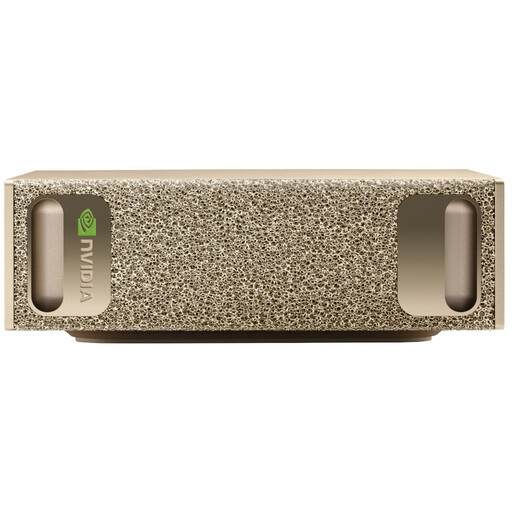
Why this product suits the profile: This ultra-small-form-factor system is designed for developers and data scientists working with local AI development, inference and large datasets. It features 128 GB LPDDR5X, a 4 TB SSD and NVIDIA DGX OS.
This platform is not positioned as a standard Windows office PC. The pre-installed DGX OS should be compatible with your planned Linux and CUDA environment.
128 GB of memory, a 4 TB M.2 SSD, 10 GbE networking and very compact dimensions.

Why this product suits the profile: This tower PC combines an Intel Core Ultra 5 225F with an NVIDIA GeForce RTX 5060 featuring 8 GB GDDR7. It is designed for gaming and graphics-intensive applications.
The dedicated graphics card and 850 W power supply are clearly specified. For professional CAD software, however, you should still check that its certifications are compatible with GeForce graphics.
RTX 5060 with 8 GB GDDR7, a 512 GB SSD and Wi-Fi 7.
We have put together a complete, regularly updated list of products that fully meet these strict selection criteria and the safety regulations applicable in the EU.
For office work, email and web applications, 16 GB is often sufficient. For professional multitasking, CAD, data analysis and creative software, 32 GB RAM is a practical benchmark. Local AI development or very large datasets may make 64 GB or 128 GB RAM worthwhile. It is also important to check whether the memory can be upgraded later.
A mini PC takes up very little space and is suitable for the office, home working and multimedia. A slim PC offers somewhat more equipment while retaining a compact form factor. A tower PC requires more desk or floor space, but generally offers more options for graphics cards, drives, cooling and upgrades. The larger form factor is often more practical for gaming, CAD or 3D rendering.
Electricity costs depend on how the PC is used, its hardware and how long it runs. A mini PC with a 60 to 85-watt power supply is not automatically this economical to run continuously, as actual power consumption depends on the workload. Gaming and workstation PCs with powerful GPUs generally use more energy under load. For a realistic estimate, measure consumption at the socket and check the power supply details, power-saving mode and average daily usage time.