
Lieferung heute & morgen

Qualitätsgarantie

Willkommens-Angebote freischalten: KOSTENLOSE Lieferung | Bis zu 80 % RABATT | Kostenlose 30-Tage-JoyPlus-Testphase
App herunterladen
A new keyboard might seem straightforward at first glance. However, many models differ significantly in layout, connection type, form factor and typing feel. If you only focus on RGB lighting, a high number of keys or particularly low prices, you could end up buying something that doesn't suit how you actually use it.
Typical mistakes come from three marketing pitfalls:
For German-language text, a QWERTZ keyboard is usually the most straightforward choice. A QWERTY keyboard can make sense for users who frequently work with English programming languages, international keyboard shortcuts or US layouts. Before buying, check the actual keycap layout, not just the language stated in the product description.
When it comes to form factor, the general differences are roughly as follows:
If you regularly enter numbers, don't underestimate the impact of a missing number pad on a compact keyboard.
A USB keyboard works without batteries or a rechargeable battery and is usually recognised immediately. This is practical for a fixed workstation. With a wired mechanical keyboard, data transmission can also be free from wireless interference.
A wireless keyboard connects depending on the model via:
On Windows and Mac, you should also pay attention to the key mapping and support for system functions. "Keyboard for Windows and Mac" doesn't necessarily mean that all special keys work identically on both systems.
A mechanical keyboard uses individual switches under the keys. The characteristics, actuation distance and noise level depend on the specific switch. Linear switches are often described as smooth, while tactile or clicky variants can provide different feedback.
Membrane and scissor-switch keyboards are often flatter. A scissor mechanism feels similar to many laptop keyboards and can be pleasantly quiet in shared spaces. For heavy typists, other factors also matter:
An RGB keyboard offers lighting effects, but doesn't replace a suitable key layout. Even a model advertised as water-resistant should not be submerged in liquid. Ratings like "splash-proof" or "IPX4" only apply within the scope described.
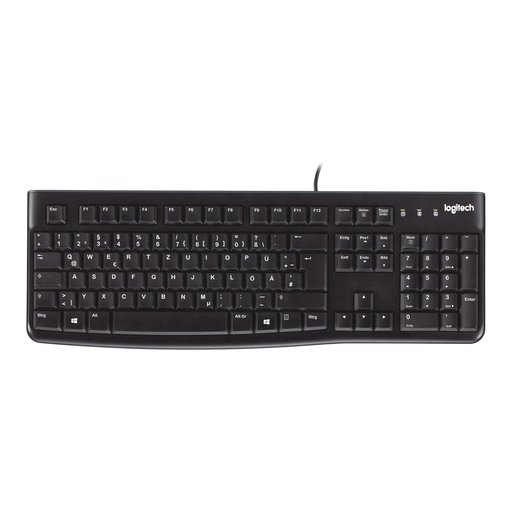
Why this product fits the profile: This wired PC keyboard with a German QWERTZ layout is designed for simple office and home use.
The DE layout prevents the typical adjustments needed with a US layout. USB plug-and-play reduces setup effort.
104 keys, number pad, adjustable feet and a splash-resistant design according to product specifications.
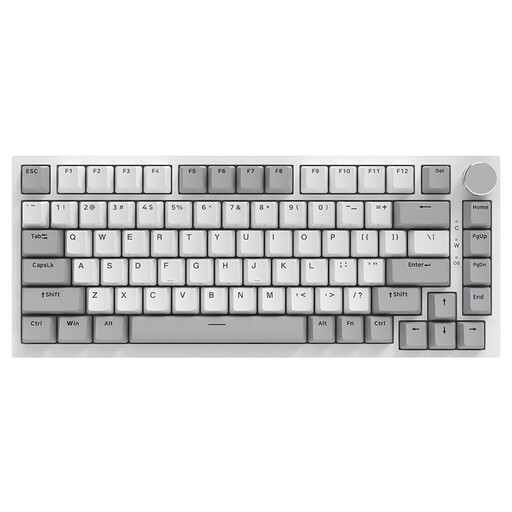
Why this product fits the profile: This mechanical 75% keyboard combines a compact size with hot-swappable switches and a volume control.
The 75% layout saves space without completely omitting arrow keys and the function layer. Connection is via a USB-C cable.
PBT keycaps, RGB lighting, gasket mount construction and 3/5-pin hot-swap support according to product data.
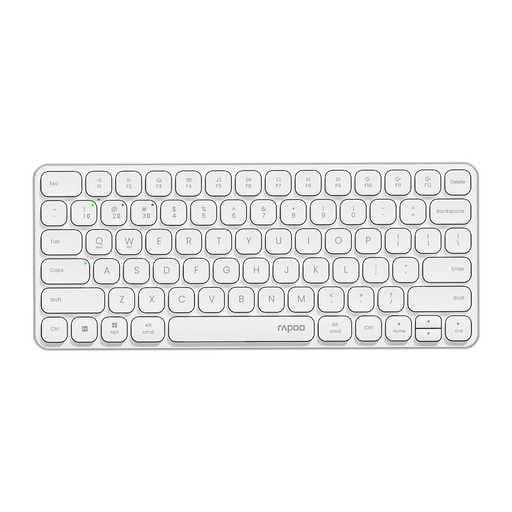
Why this product fits the profile: This slim multi-device keyboard is aimed at users who switch between a computer, tablet and smartphone.
Alongside Bluetooth 4.0 and 5.0, a 2.4 GHz mode is available. Before buying, check the QWERTY US layout against your own typing habits.
78-key format, support for up to four devices, multimedia keys and a rechargeable 500 mAh battery according to the product description.
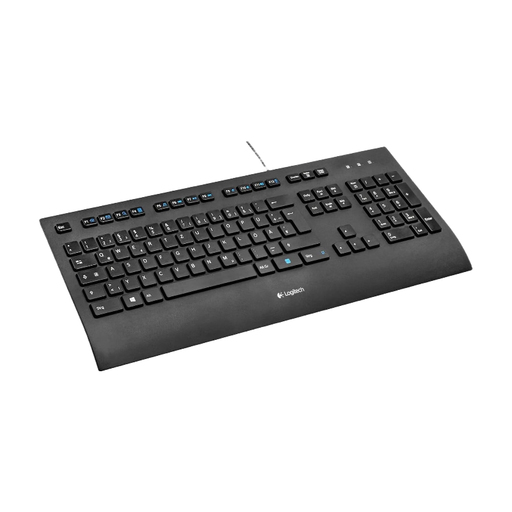
Why this product fits the profile: The German QWERTZ layout, wrist rest and USB connection are designed for a fixed workstation.
The full key layout and wired use avoid the limitations of small form factors or flat batteries.
104-key layout, single-colour backlighting, splash-resistant design and a large wrist rest according to product specifications.
We've put together a complete, regularly updated list of products that fully meet these strict selection criteria and the safety regulations in force in the EU.
For a home office, a suitable QWERTZ keyboard, a full layout and a quiet key mechanism are often more important than lighting. A USB office keyboard is low-maintenance. If you switch between a laptop and tablet, you could consider a Bluetooth or multi-device keyboard.
The lifespan depends on the switch type, usage, cleaning and mechanical stress. Some models quote a key lifespan of several million keystrokes. This manufacturer specification isn't a fixed period: heavy typists put more strain on a keyboard than occasional users. Dust, liquid and damaged cables can shorten its useful life.
Yes, provided the noise level, layout and switch characteristics suit the environment. Linear switches can feel smooth, while clicky variants may be disruptive in a shared office. For gaming, anti-ghosting, a stable connection and the desired key layout are also relevant. RGB lighting, on the other hand, is primarily a comfort and design feature.