
Lieferung heute & morgen

Qualitätsgarantie

Willkommens-Angebote freischalten: KOSTENLOSE Lieferung | Bis zu 80 % RABATT | Kostenlose 30-Tage-JoyPlus-Testphase
App herunterladen
Anyone looking to buy a PC in 2026 will find a wide range of desktop PCs, gaming PCs, mini PCs and workstations. The specifications may appear straightforward at first glance, but they are not always directly comparable. A large amount of RAM, for example, cannot replace a powerful graphics card, while a compact mini PC may have limitations in terms of connectivity and upgradeability.
This buying guide helps private buyers, gamers, students, creatives and businesses avoid common purchasing mistakes and choose hardware that matches their specific needs.
A current-generation processor alone does not make a PC suitable for gaming or demanding workloads. For games, 3D applications and local AI tasks, the combination of CPU, graphics card, RAM and cooling solution is what matters. A desktop PC with many processor cores may still deliver significantly lower gaming performance than a gaming PC with a dedicated GPU.
Always evaluate the system as a whole rather than focusing solely on the processor model name.
32 GB DDR5 RAM is a practical configuration for many games, creative applications and extensive multitasking. For basic office work, 8 or 16 GB is often sufficient. Conversely, a large SSD cannot compensate for a PC equipped only with a weak integrated graphics solution.
When it comes to storage capacity, the rule is simple: a 2 TB SSD provides more space for games, video files and projects than a 512 GB drive. Even so, check whether a second SSD or an available M.2 slot can be added later.
A compact mini PC saves space and can easily be placed behind a monitor or on a small desk. However, graphics card upgrades are generally not supported. A tower offers more room for expansion cards, larger coolers and additional drives, but it also requires more floor or desk space.
Keep ventilation grilles unobstructed on high-performance systems. Tower PCs should be placed on a hard, level surface with approximately 10 to 15 cm of clearance from the rear wall. Carpet can restrict airflow to the power supply.
Anyone searching for a gaming PC, a high-end gaming PC or a PC with an RTX 5070 Ti should examine the graphics card particularly carefully. Important factors include:
Captiva systems with an RTX 5070 Ti are offered with an 850 W power supply. Before buying, shoppers should also consider their monitor resolution and the games they intend to play. 4K gaming has different requirements from Full HD.
A PC with a Ryzen 7 7800X3D is primarily aimed at users who want to combine high gaming performance with a dedicated graphics card. The model in question features 8 cores and 16 threads, along with AMD 3D V-Cache. Its AM5 platform may be relevant for future upgrades, although exact compatibility depends on the motherboard and BIOS.
For office software, development and professional applications, however, a workstation PC with numerous processor cores, Windows 11 Pro and a professional graphics card may be the better choice. The Lenovo ThinkStation P2 Tower Gen2 uses an Intel Core Ultra 7 265 with 20 cores and an integrated Intel AI Boost NPU.
A Windows 11 PC is ready to use straight out of the box for many home users. Pay attention to the difference between Windows 11 Home and Windows 11 Pro: Pro adds features designed for business environments, including BitLocker and additional management options.
The following factors are also important for everyday usability:
The operating system is particularly important for AI hardware. An AI supercomputer such as the ASUS Ascent GX10 or the GIGABYTE AI TOP ATOM comes with a Linux-based NVIDIA DGX operating system, not Windows.

Why it’s a good fit: With an AMD Ryzen 5 7430U, 16 GB of RAM and a 512 GB SSD, this mini PC is well suited to working from home, studying and everyday office software where space is limited.
The specifications clearly list the processor, RAM and SSD. Buyers can also see that the compact form factor should not be mistaken for a dedicated gaming graphics card.
Support for 4K across up to three displays according to the product listing, plus Wi-Fi 6 and Bluetooth 5.2.

Why it’s a good fit: The Ryzen 7 7800X3D, RTX 5070 Ti with 16 GB of GDDR7, 32 GB of DDR5 and a 2 TB NVMe SSD form a well-balanced configuration purpose-built for gaming and graphics-intensive applications.
The dedicated graphics card is clearly specified. When setting up the system, connect the monitor to the RTX 5070 Ti’s ports rather than those on the motherboard.
An 850 W power supply, Wi-Fi 6, multiple USB 3.2 ports and Windows 11 Home according to the specifications.

Why it’s a good fit: This workstation combines an Intel Core Ultra 7 265, 32 GB of DDR5, an NVIDIA RTX A400 and Windows 11 Pro for business, design and development environments.
The professional RTX A400 graphics card is not positioned as a conventional gaming GPU. This makes it easier to match the configuration to CAD, visualisation or office software.
Windows 11 Pro, Intel AI Boost NPU, DisplayPort, HDMI, plus a keyboard and mouse included according to the supplier’s information.
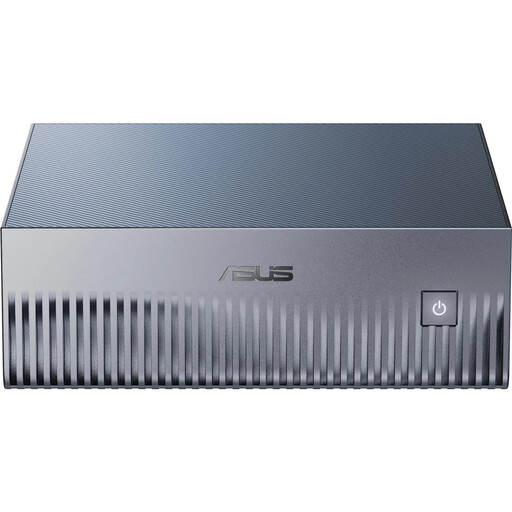
Why it’s a good fit: For local AI development, it offers 128 GB of LPDDR5X unified memory, a 4 TB PCIe 5.0 SSD and an NVIDIA GB10 chip with DGX software preinstalled.
This device is not sold as a Windows PC. Buyers can check in advance whether Ubuntu-based DGX software is compatible with their development environment.
10GbE networking, Wi-Fi 7, a 240 W power supply and support for popular AI software such as CUDA, PyTorch and TensorFlow according to the product description.
Our complete selection includes prebuilt PCs for gaming, office work, creative tasks, workstations and compact workstation setups. Before buying, continue to check the available ports, operating system, power supply and upgrade options.
For office work, studying and streaming, 16 GB is often sufficient. 32 GB DDR5 RAM is a sensible choice for current games, photo editing, programming and extensive multitasking. Local AI models and professional workflows may require 64 GB or more.
Service life depends on workload, maintenance and upgradeability. A well-ventilated tower can remain in use for many years. Dust should be removed regularly; on high-performance systems, it is advisable to inspect the fans and coolers approximately every three to six months. Depending on the case and motherboard, SSDs, RAM and graphics cards can often be replaced later.
As a rule, a mini PC designed for office and multimedia tasks consumes less power than a tower equipped with a dedicated graphics card. Actual consumption depends on the processor, power supply, workload and connected devices. For a meaningful comparison, consult the relevant manufacturer’s specifications and consider the intended usage profile.