
Lieferung heute & morgen

Qualitätsgarantie

Willkommens-Angebote freischalten: KOSTENLOSE Lieferung | Bis zu 80 % RABATT | Kostenlose 30-Tage-JoyPlus-Testphase
App herunterladen
If you’re looking to buy computer hardware, you’ll be faced with a huge selection of processors, memory modules, SSDs, graphics cards and complete systems. The technical specifications often look straightforward, but they only make sense in the context of your existing or planned system. A seemingly cheap individual purchase can end up being an incompatible or unnecessarily powerful solution.
A high clock speed or large storage capacity doesn’t guarantee a suitable upgrade. DDR5 RAM cannot be installed in a motherboard designed for DDR4 RAM. Similarly, an AMD Ryzen processor needs the correct socket, such as AM4 or AM5. Before buying, you need to ensure the motherboard model, socket, BIOS support and memory type all match up.
Processors sold in tray or OEM packaging often lack the retail box, CPU cooler and thermal paste. This applies, for example, to the AMD Ryzen 5 8400F and the AMD Ryzen 7 5700X from the selection below. To run them, you’ll need a compatible cooler, a suitable motherboard and, for processors without an integrated graphics unit, a graphics card as well.
A graphics card or processor must be compatible with your power supply, case and cooling system. A graphics card with a 300 W power draw has very different requirements to a compact office PC. With large memory modules, the height of the heatsink can also be a factor. An NVMe SSD also needs a compatible M.2 slot with PCIe support; an M.2 SATA slot is not automatically compatible.
The socket describes the physical connection between the processor and the motherboard. The AMD Ryzen 5 8400F uses AM5 and requires DDR5 memory. The AMD Ryzen 7 5700X, on the other hand, uses AM4 and DDR4 RAM. An ASRock A520M-HDV motherboard is designed for AM4 processors and DDR4, not for an AM5 platform.
When upgrading a processor, you should also check the BIOS version. A compatible socket alone isn’t enough if the motherboard only recognises the processor after a firmware update.
For many current gaming and productivity systems, 32 GB as a 2×16 GB kit is a good starting point. Two modules enable dual-channel operation, provided they are installed in the recommended slots. Figures like 6000 MT/s and CL30 describe the data transfer rate and latency. The advertised speed is often only achieved by enabling an AMD EXPO or Intel XMP profile in the BIOS. Without an active profile, the memory may start at the lower SPD default value.
Also important are the module height, the maximum memory capacity of the motherboard and the manufacturer’s qualified vendor list. RGB lighting is a feature, but it doesn’t automatically affect computing performance.
An NVMe SSD in the M.2-2280 format needs a free M.2 slot with the correct PCIe connection. The Lexar NQ790 1 TB is specified with PCIe 4.0 x4 and sequential read speeds of up to 7,000 MB/s and write speeds of up to 6,000 MB/s. For the Lexar NM790 2 TB, read speeds of up to 7,400 MB/s and write speeds of up to 6,500 MB/s are quoted. Such manufacturer figures refer to defined test conditions and are no substitute for backing up your data.
With a graphics card, you need to check the slot type, case length, power connectors and power supply wattage. According to the product data, the MSI GeForce RTX 5070 Ti 16G GAMING TRIO OC features 16 GB GDDR7, a PCIe 5.0 interface and a stated power consumption of 300 W. For a specific system configuration, you also need to consider power supply headroom and airflow.
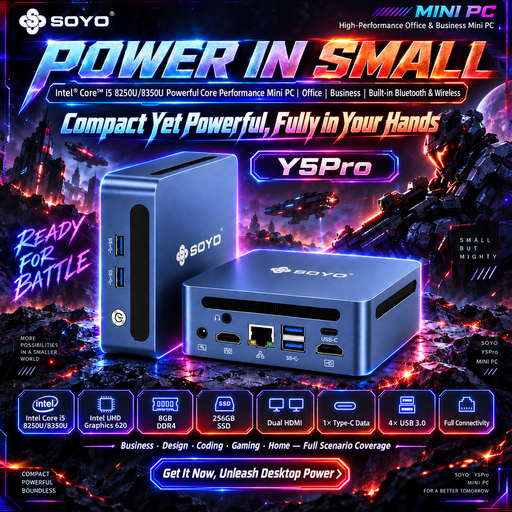
Why this product fits the profile: This compact mini PC is designed for everyday office tasks, web applications and space-saving workstations. HDMI, USB, LAN, Wi-Fi 5 and Bluetooth are all built in.
The key components are already combined. This removes the need to choose a separate motherboard, power supply and processor cooler.
Dimensions of 105 × 113 × 45 mm, two HDMI ports and one 1 Gbit/s LAN port.
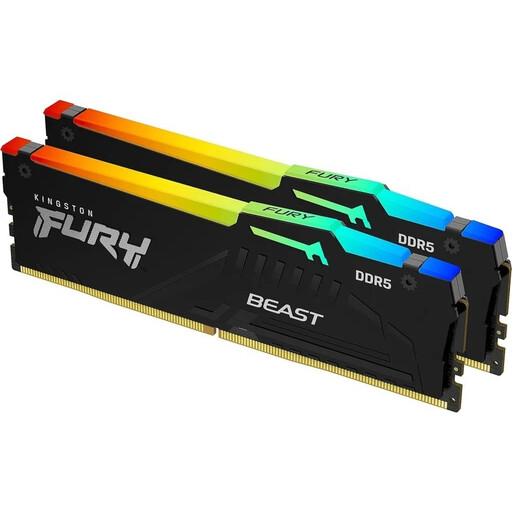
Why this product fits the profile: This 2×16 GB kit combines DDR5, a stated speed of 6000 MT/s, CL30 and support for AMD EXPO and Intel XMP 3.0.
The platform requirement is clear: the motherboard must have DDR5 DIMM slots. This prevents any confusion with DDR4 modules.
On-die ECC, integrated voltage regulation and customisable RGB lighting; module height 42.23 mm.
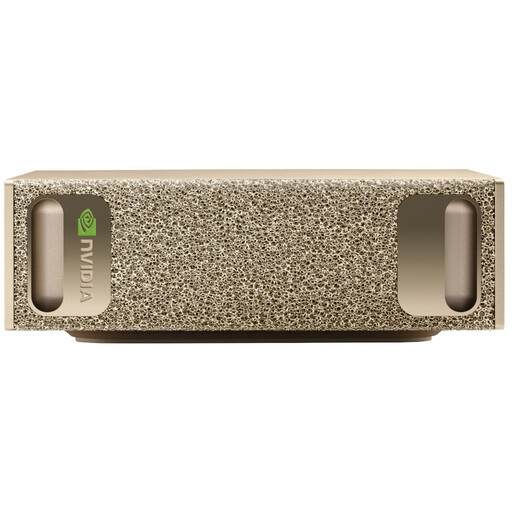
Why this product fits the profile: This compact system is aimed at AI development, data processing and local workloads with high memory requirements.
Its purpose is clearly described as a specialised AI system. It should therefore not be mistaken for an ordinary gaming PC or office PC.
128 GB LPDDR5X, 4 TB M.2 SSD, Wi-Fi 7, 10 GbE LAN and pre-installed NVIDIA DGX OS.
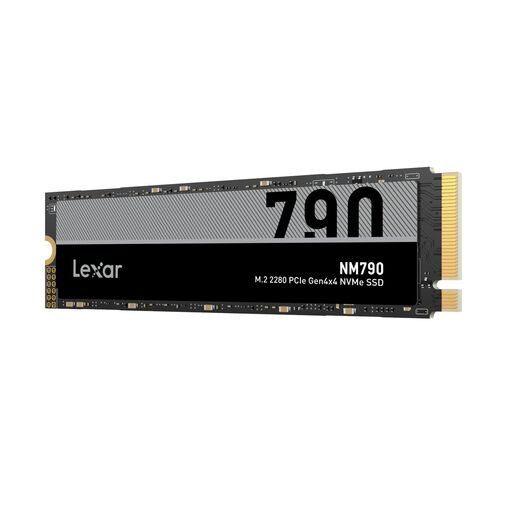
Why this product fits the profile: Two terabytes of storage are ideal for large game libraries, video projects and extensive application data.
The M.2-2280 format and PCIe Gen4 x4 are clearly stated. However, you should still check whether your own slot supports this connection before buying.
Up to 7,400 MB/s read speed according to the product specification, and compatibility with desktop PCs and laptops.
We’ve put together a complete, regularly updated list of products that fully meet these strict selection criteria and the safety regulations in force in the EU.
First, make a note of your motherboard model, processor socket, RAM type, free slots, power supply wattage and case dimensions. For a graphics card, you’ll also need to consider its length, height and power connectors. For an NVMe SSD, the M.2 format and PCIe generation are crucial.
The lifespan depends on temperature, workload, power supply and care. SSDs have a limited write volume, while memory and processors can often be used for many years with suitable cooling. Regular data backups are essential regardless of the expected lifespan.
The power consumption depends on the wattage and usage time. A component drawing 300 W will consume more energy under high load than a mini PC with a much lower power draw. For a realistic estimate, you should consider the load profile, operating hours and your individual electricity tariff.