
Lieferung heute & morgen

Qualitätsgarantie

Willkommens-Angebote freischalten: KOSTENLOSE Lieferung | Bis zu 80 % RABATT | Kostenlose 30-Tage-JoyPlus-Testphase
App herunterladen
If you want to buy electronics online, you are often faced with long product lists, similar model names and technical specifications that are not always directly comparable. A USB-C hub may promise several ports, but may not work with every laptop. A gaming monitor may quote a high refresh rate that your device cannot actually output. With smart-home accessories, app compatibility, data protection and storage options also play an important role.
The following criteria can help you distinguish marketing claims from product features that genuinely matter.
Many shoppers initially focus on the number of ports. However, what matters is which functions your computer’s USB-C port supports. For video output, the device often needs to provide DisplayPort Alternate Mode or Thunderbolt 3. A USB-C port alone is not always enough.
The specification “100 W Power Delivery” also generally describes the hub’s potential charging capacity. It does not automatically mean that every connected laptop will actually charge at 100 W. The power supply, cable and connected device must support this output too.
An HDMI adapter or USB-C docking station may support a particular resolution while the refresh rate or number of displays remains limited. For smooth visuals, shoppers should therefore compare at least the following specifications:
With a smart-home camera, the app, Wi-Fi band, cloud connection and storage method are all relevant. Some models require an additional base station, while others optionally save footage to a microSD card. Before buying, check whether a subscription is required and whether the camera works with your existing system, such as Google Assistant or Amazon Alexa.
A compact USB-C hub is suitable if you are missing individual ports for a mouse, keyboard, memory card or monitor. For a home office with several screens and a network connection, a more comprehensive USB-C docking station is the better choice. A simple HDMI adapter, on the other hand, usually performs just one task: connecting a compatible output to a monitor or television.
Pay attention to:
With a gaming monitor, resolution, panel type and refresh rate should be considered together. A 4K monitor with 240 Hz requires a suitable graphics card and an appropriate connection, such as HDMI 2.1 or DisplayPort 2.1. The advertised response time should also be assessed according to the stated measurement method, such as GtG.
Other points to consider:
With an e-scooter, the stated range is not the only factor that matters. It is often based on specific test conditions, such as a particular riding mode, rider weight and flat terrain. For use in Germany, check the road approval, required insurance sticker, lighting, brakes and permitted top speed before buying.
For electronic devices in general, manufacturer information, EU responsible-person details, warranty conditions, returns policies and disposal in accordance with applicable electronic-waste regulations are also important purchasing criteria.
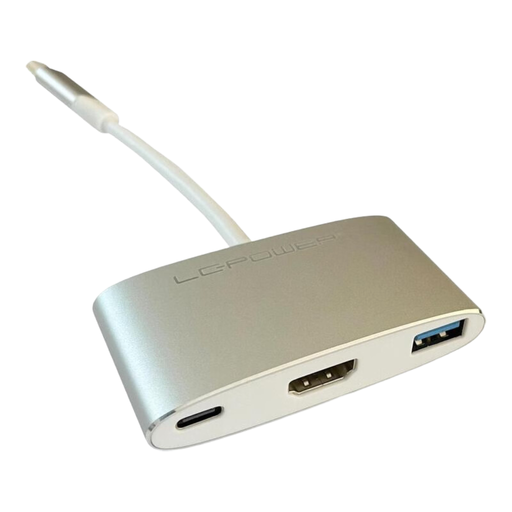
Why this product suits the profile: This compact hub combines a USB-A 3.0 port, HDMI and a USB-C PD connection. It is suitable for a simple home-office setup or mobile use with a compatible Windows laptop.
The ports and support for a single monitor are clearly specified. This makes it easier to check whether they meet the requirements of your existing laptop.
USB 3.0 with up to 5,000 Mbit/s, up to 100 W PD input and an integrated 0.85 m cable.
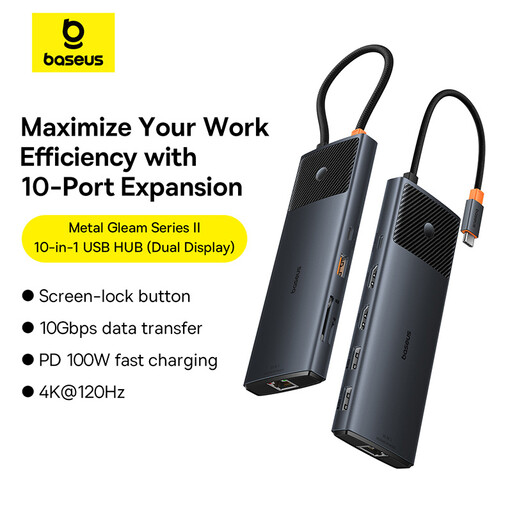
Why this product suits the profile: Its features are designed for users who want to combine several connections in one solution for working from home or managing media.
The two HDMI outputs have different maximum specifications: one supports up to 8K at 30 Hz or 4K at 120 Hz, while the other supports 4K at 60 Hz.
Two HDMI ports, RJ45, SD/TF card reader, USB ports with up to 10 Gbit/s and USB-C PD.
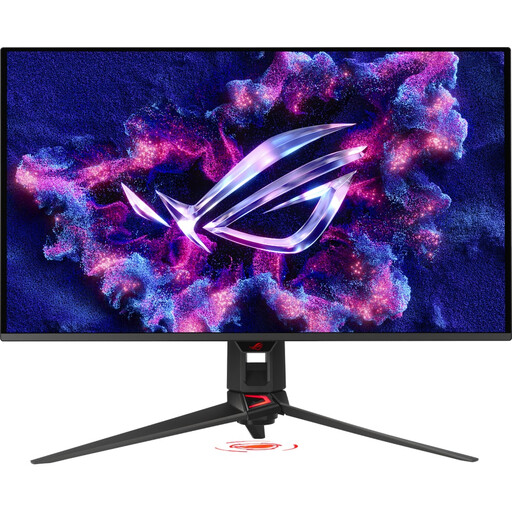
Why this product suits the profile: This monitor is aimed at gamers and creatives who want to combine 4K resolution, OLED technology and a high refresh rate in a larger display.
The relevant requirements are easy to verify: 240 Hz, 4K, HDMI 2.1, DisplayPort 2.1a and USB-C with 90 W Power Delivery. However, your hardware should support these specifications too.
31.5-inch QD-OLED panel, 3,840 × 2,160 pixels, 240 Hz, Adaptive-Sync support and integrated USB hub.
We have put together a complete, regularly updated list of products that fully meet these strict selection criteria and the safety regulations applicable in the EU.
For a streamlined setup, the Anker USB-C Display Hub (4-in-1 10Gbps) may be worth considering. According to the product description, it combines 4K output at 60 Hz, up to 100 W PD input and data transfer speeds of up to 10 Gbit/s. According to the supplier, the housing is made from 75 per cent recycled material. The key consideration remains whether your device’s USB-C port supports the required video output.
If you want to connect two DisplayPort monitors, pay close attention to the specific interface. According to the product specifications, the Choetech HUB-D03 is designed for Thunderbolt 3 ports and supports two DisplayPort outputs of up to 4K at 60 Hz per connection. This model is not automatically compatible with a standard USB-C port without Thunderbolt 3 support.
For smart-home applications, the Tapo TC72 offers 2K resolution, pan and tilt functionality, night vision, two-way audio and microSD storage of up to 512 GB, according to the product description. Before installation, check the mounting location, Wi-Fi coverage and whether the camera is pointed towards private areas. Information about recordings and access permissions is also part of responsible use.
First, check which functions your laptop or tablet’s USB-C port supports. Monitors generally require DisplayPort Alternate Mode or Thunderbolt. Then compare the data rate, charging capacity, number of monitors and the ports you actually need.
Lifespan depends on the design, heat generation, usage time, transport and care. A hub should be stored in a dry place and protected from heavy impacts. On OLED monitors, it may be useful to enable the panel protection features. Battery-powered devices such as e-scooters should be charged using the intended charger and not exposed to excessive heat for extended periods.
Potential costs depend on the storage solution. With local storage on a microSD card, a cloud subscription may not be necessary, while cloud functions may incur charges depending on the provider. Before buying, check which features are available without a subscription and how long recordings are stored locally.