
Lieferung heute & morgen

Qualitätsgarantie

Willkommens-Angebote freischalten: KOSTENLOSE Lieferung | Bis zu 80 % RABATT | Kostenlose 30-Tage-JoyPlus-Testphase
App herunterladen
An uncomfortable chair can turn a long workday in the home office or at the company into an ordeal. Many hours of sitting put a strain on the back, shoulders, and neck. An ergonomic office chair is designed to support the body and promote healthy posture. But the market is flooded with models that promise a lot but deliver little. Before you make a decision, it's crucial to know the typical pitfalls.
As a Joybuy Product Recommendation Officer, my job is to sift through market information and give you practical advice. This guide will help you distinguish marketing hype from genuine quality features.
Many chairs are advertised as "ergonomic," but the term isn't protected. This often leads buyers to fall into one of these three traps:
To avoid a bad buy, you should focus on three core features that define a good ergonomic desk chair.
The lordosis is the natural S-curve of your lumbar spine. An office chair with lumbar support is meant to support this exact area. Make sure the support is not just present, but also adjustable.
A chair with an adjustable backrest is just the beginning. For truly individual customisation, the following functions are essential:
The durability and comfort of a chair depend directly on the materials used.
Here are three models tailored to different needs that meet the quality criteria mentioned above.
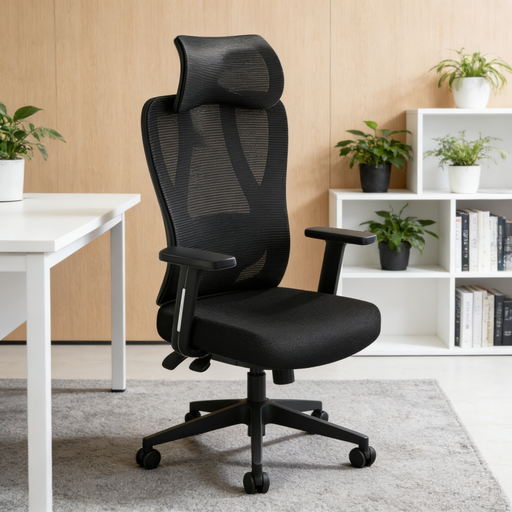
Why This Fits Their Persona: Ideal for those who spend many hours at their desk daily, switching between focused work and gaming. This chair offers maximum adjustability for intensive, long-term use.
Instead of a rigid curve, the 4D pivoting lumbar support provides dynamic adjustment to every movement. The dual-layer mesh fabric is designed for durability and lasting support.
The combination of a deep recline (up to 140°), 4D lumbar support, and a pressure-relieving seat cushion offers a high degree of comfort for long periods of sitting.

Why This Fits Their Persona: Perfect as the classic home office chair. It provides the essential ergonomic functions for an 8-hour day and is space-saving thanks to its flip-up armrests.
This chair goes beyond an empty promise by offering adjustable lumbar support and customisable seat height. The flip-up armrests are a practical detail that is often overlooked.
The combination of a breathable mesh back, a thick foam cushion, and space-saving armrests makes it a functional and comfortable solution for the home office.

Why This Fits Their Persona: Suitable for individuals who need a sturdy chair with a higher weight capacity and value essential ergonomic adjustments for long workdays.
This model relies on solid materials and a high static load capacity of up to 150 kg. It offers adjustable lumbar and headrests, thus avoiding any compromise on adjustability.
The high weight capacity, combined with the necessary adjustments for the seat, headrest, and lumbar cushion, provides a reliable and adaptable seating experience.
We have compiled a complete, up-to-date list of products that fully meet these strict selection criteria and German safety regulations.
Proper adjustment is crucial. Follow this short checklist:
The lifespan heavily depends on material quality, construction, and intensity of use. A high-quality model can last 7 to 10 years with daily use. Look for models where wear-and-tear parts like gas lifts or casters can be replaced if needed. Inexpensive models with inferior materials often show significant signs of wear after just 1-2 years.
Yes, many modern gaming chairs have become excellent ergonomic work chairs. Unlike older models with a racing-seat design, manufacturers today place more emphasis on comprehensive adjustment options. A good gaming chair often offers even more advanced features than a standard office chair, such as 4D armrests or a deep backrest recline. The crucial factor is that the chair meets the criteria for adjustability mentioned in this article (lumbar support, seat depth, armrests) and doesn't just focus on flashy aesthetics.