
Lieferung heute & morgen

Qualitätsgarantie

Willkommens-Angebote freischalten: KOSTENLOSE Lieferung | Bis zu 80 % RABATT | Kostenlose 30-Tage-JoyPlus-Testphase
App herunterladen
For many people, long hours at a desk are a daily reality. An ergonomic office chair is not merely a matter of comfort; it's a functional necessity for supporting proper posture. Choosing the right model depends on individual physical needs and its primary use case. This article breaks down the technical criteria that define a quality ergonomic desk chair and presents a selection of models with different specialisations.
A chair's functionality is defined by its mechanical adjustments and the materials used. The following parameters are crucial for making an informed decision.
A chair must adapt to your individual body dimensions. Key adjustment features include:
Lumbar support is a critical component for stabilising the lower spine. It fills the natural curve of your lower back to prevent poor posture. Options include static, height-adjustable, and dynamic lumbar supports that automatically adapt to the user's movements.
Based on the technical criteria mentioned, we present three models that cater to different user profiles.
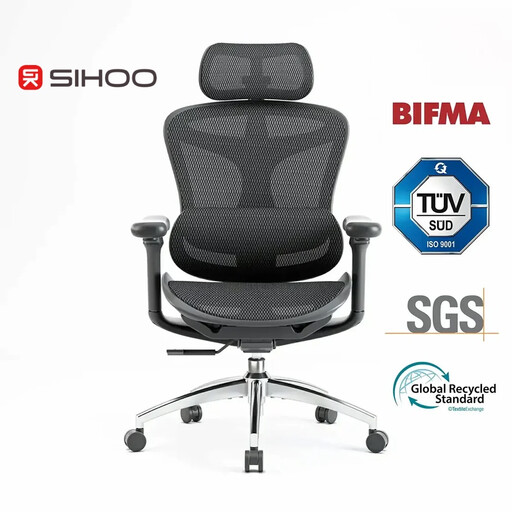
Why We Recommend It The Sihoo Doro C300 focuses on comprehensive ergonomic adjustability. Its core features are the self-adaptive dynamic lumbar support and coordinated 3D armrests that move with the user. The intelligent, weight-sensitive tilt mechanism automatically regulates the backrest's resistance. Certifications including EU REACH, EN1335, T?V, and BIFMA validate its technical specifications.
Pros
Who It's For This model is designed for users seeking a technologically advanced chair for the home office or professional environments, who value maximum dynamic adjustability for long workdays.
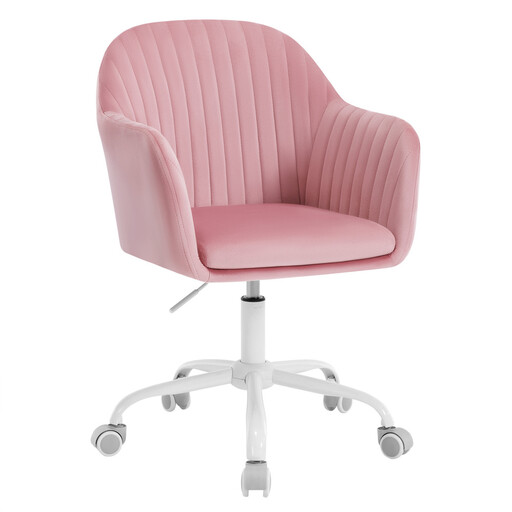
Why We Recommend It The Woltu BS166rs combines fundamental ergonomic features with a residential aesthetic. Its velvet upholstery and colour palette set it apart from traditional office chairs. The ergonomic design is achieved through a curved backrest and integrated armrests. Height adjustment and a 360-degree swivel function provide the necessary flexibility for daily use. The sturdy metal base and SGS-certified gas lift ensure a load capacity of up to 150 kg.
Pros
Who It's For This model is aimed at users looking for a comfortable and visually appealing ergonomic desk chair for a home office, study, or even as a vanity chair, where design is just as important as basic seating comfort.
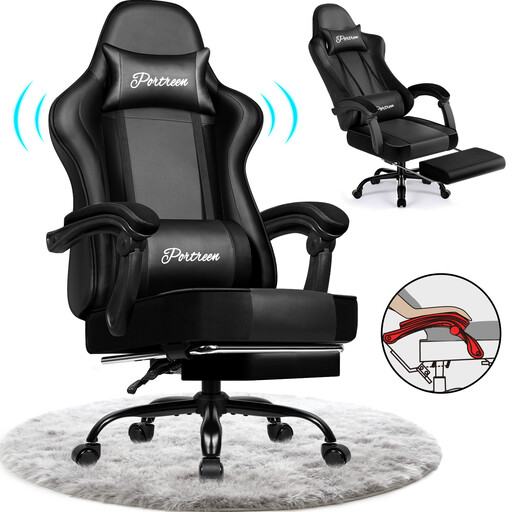
Why We Recommend It This gaming chair from GTIMEX is tailored to the specific needs of gamers and users who combine long, intense sessions with periods of relaxation. The backrest reclines from 90 to 170 degrees, allowing for a near-flat position. A retractable footrest enhances this relaxation feature. The PU leather upholstery is water-resistant and easy to maintain. Separate head and lumbar pillows offer additional, adjustable support.
Pros
Who It's For Ideal for gamers and power users who need a chair with maximum flexibility, switching between a focused work posture and a relaxed resting position. Its robust materials and high load capacity make it a durable option for heavy use.
If the models featured don't perfectly match your requirements, a broader selection can often provide the right solution. In our ergonomic home office chair category, you'll find more models with various specifications, materials, and designs to help you find the perfect chair for your needs.
1. What makes an office chair ergonomic? An office chair is considered ergonomic if it offers a wide range of adjustments to fit the user's body. These include adjustable seat height, seat depth, backrest, and armrests. Integrated lumbar support to stabilise the lower back is also a key feature. The goal is to promote a healthy, neutral posture and minimise physical strain.
2. How do you properly adjust an ergonomic office chair? Start with the seat height, ensuring your feet are flat on the floor and your thighs are parallel to it. Adjust the seat depth so there are about three fingers of space between the back of your knees and the edge of the seat. The lumbar support should fill the natural curve of your lower spine. The armrests should be set so that your forearms rest at a 90-degree angle with your shoulders relaxed.
3. How long should you sit in an office chair? Even in a high-quality ergonomic chair, it's advisable to take regular breaks. The general recommendation is to stand up, stretch, and walk around for a few minutes at least once an hour. Dynamic sitting—frequently changing your position—is also encouraged to keep muscles active and prevent one-sided strain.