
Lieferung heute & morgen

Qualitätsgarantie

Willkommens-Angebote freischalten: KOSTENLOSE Lieferung | Bis zu 80 % RABATT | Kostenlose 30-Tage-JoyPlus-Testphase
App herunterladen
If you’re looking to buy gaming hardware, you’re faced with a huge selection of graphics cards, motherboards, RAM and PC accessories. High clock speeds, RGB lighting and terms like “Pro Gaming” can sound convincing, but on their own they tell you very little about whether a component is actually right for your system. What really matters is compatibility, dimensions, power supply and how you plan to use it.
A powerful graphics card can be held back in an older system. Even a high boost clock doesn’t automatically guarantee suitable gaming performance, because resolution, processor, cooling and the software you use all play a part. Before you buy, you should at least check your CPU, power supply, case and monitor.
Modern graphics cards are often several slots wide and need plenty of room inside the case. The ASUS ROG Astral GeForce RTX 5080, for example, measures 357.6 mm and has a 3.8-slot design. In compact cases, this can block another expansion slot.
The form factor also has to be right for a gaming motherboard. An M-ATX motherboard won’t fit in every Mini-ITX case. Conversely, while an ITX board can be mounted in a larger case, it usually offers fewer slots and connections.
If you need a QWERTZ keyboard for typing in German, you shouldn’t accidentally order a US QWERTY model. Compact keyboards also often lack a number pad, function keys or individual navigation keys.
A wireless keyboard offers more flexibility, but it needs batteries or a rechargeable battery and must be compatible with the device you want to use. For low-latency gaming, a wired connection can be the simpler choice.
When you buy a graphics card, you shouldn’t just look at the GPU name and memory size. What matters is:
The RTX 5090 is specified with 21,760 CUDA cores, PCI Express 4.0 x16 and outputs for up to four monitors. The RTX 5080 uses 10,752 CUDA cores, PCI Express 5.0 and three DisplayPort plus two HDMI connections. These details help you categorise the card, but they don’t replace a full system check.
An AM5 motherboard is designed for compatible AMD Ryzen processors from the 7000, 8000 and 9000 series. The right socket, chipset and the manufacturer’s current compatibility list are all important.
The COLORFUL BATTLE-AX B850M-T WIFI V14 offers, among other things:
For a particularly compact system, the COLORFUL CVN B850I GAMING FROZEN V14 could be of interest. This ITX board measures 170 × 170 mm, also offers two DDR5 slots and PCIe 5.0 x16. However, the compact design reduces the number of expansion options.
For many gaming and work PCs, a DDR5 RAM 32 GB kit, usually made up of two 16 GB modules, is a sensible starting point. Two modules can enable dual-channel operation, provided they are installed in the slots recommended by the motherboard.
The FURY Beast RGB EXPO DDR5 32GB is specified with 6,000 MT/s, CL30-36-36, AMD EXPO and Intel XMP 3.0. The advertised speed is activated via the corresponding profile in the BIOS; by default, the memory may initially run at a lower SPD speed. Before you buy, you should check the motherboard’s memory compatibility list.
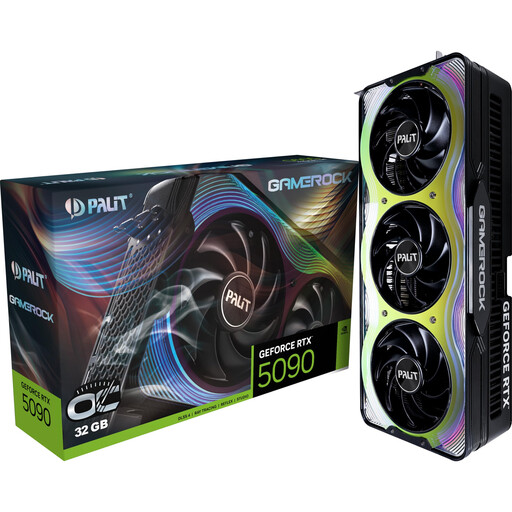
Why this product suits the profile: This card is aimed at users with high demands for 4K and 8K output, creative workflows or local AI applications.
32 GB GDDR7 and the included support bracket address high memory requirements and the weight of large graphics cards. Checking your case and power supply is still necessary.
32 GB GDDR7, 512-bit memory interface, three DisplayPort 2.1b connections and HDMI 2.1b.
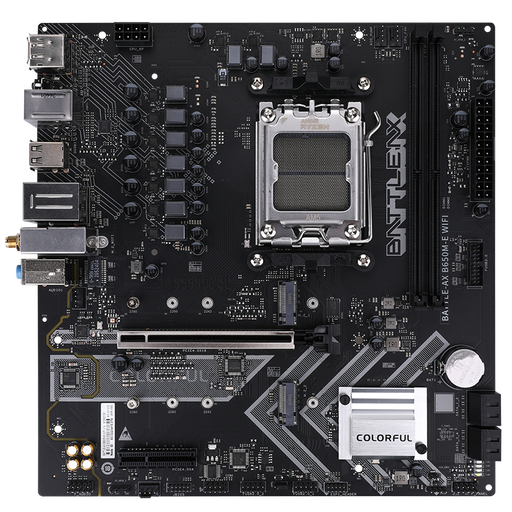
Why this product suits the profile: The M-ATX form factor is ideal for budget-conscious AM5 PC builds with modest space requirements.
Socket, DDR5 support and form factor are clearly stated. You should still check the CPU compatibility list before installation.
Two DDR5 slots, two M.2 connections, Wi-Fi 6 and Bluetooth 5.2 according to product data.

Why this product suits the profile: Heavy typists, content creators and gamers get a compact German layout with function keys and a volume control.
The clearly stated German QWERTZ layout prevents an incorrect key mapping. The wired USB-C connection requires no battery maintenance.
75% layout, RGB lighting, hot-swap support, volume control and full N-key rollover according to the product description.
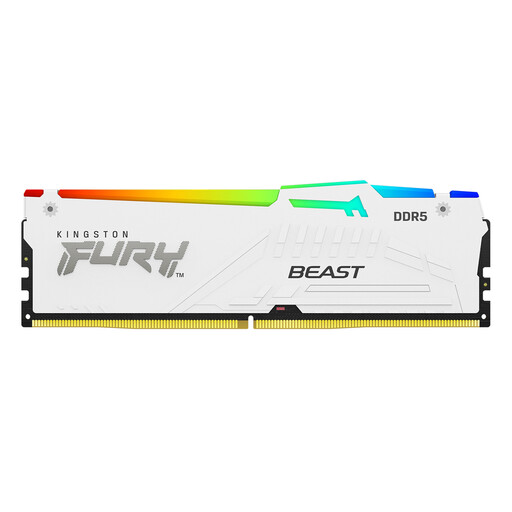
Why this product suits the profile: The 2×16 GB kit is suitable for AM5 systems and users who want a clear memory foundation with upgrade profiles.
Capacity, speed, latency and EXPO support are all specifically stated. You should check motherboard compatibility beforehand.
32 GB total capacity, 6,000 MT/s, CL30-36-36 and support for AMD EXPO and Intel XMP 3.0.
We’ve put together a complete, regularly updated list of products that fully meet these strict selection criteria and the safety regulations in force in the EU.
The graphics card has the biggest impact on image output. However, the processor, RAM and SSD must all match the graphics card. For a new AM5 build, a compatible AM5 motherboard, DDR5 RAM, a sufficiently powerful power supply and suitable cooling are all part of the basic planning.
A DDR5 RAM 32 GB kit made up of two 16 GB modules is a practical configuration for many games, multitasking and typical content creator tasks. If you regularly work with large video projects, virtual machines or extensive 3D applications, you should check the maximum memory capacity of your motherboard.
Yes, provided the layout, noise level and key arrangement are right. A mechanical gaming keyboard with a QWERTZ layout can be used for both typing and gaming. For shared spaces, quieter switches or a low-profile scissor-switch keyboard make more sense. A gaming keyboard with RGB offers additional lighting, but doesn’t automatically change the input quality.