
Lieferung heute & morgen

Qualitätsgarantie

Willkommens-Angebote freischalten: KOSTENLOSE Lieferung | Bis zu 80 % RABATT | Kostenlose 30-Tage-JoyPlus-Testphase
App herunterladen
If you're planning to buy a new graphics card, you're facing a deluge of technical specs, marketing terms, and a vast selection of models. It's crucial to set the right priorities, especially when preparing for the demands of 4K gaming and professional applications in 2026. Many buyers invest in overkill specifications or overlook critical compatibility details, leading to unnecessary expenses or performance issues. This guide will help you navigate the most common pitfalls and make an informed decision.
Before you invest your budget, you should familiarise yourself with the typical pitfalls that often lead to disappointment.
Manufacturers often advertise large amounts of video memory (VRAM). While high VRAM capacity is important for 4K textures and a professional graphics card for video editing, it's not the sole performance metric. A card with 16 GB of slow memory can be outperformed by a model with 12 GB of fast GDDR7 memory and a wider memory bus. Focus on the overall package of memory type, bandwidth, and the actual GPU architecture, rather than just the gigabyte count.
A powerful new gaming graphics card like an NVIDIA GeForce RTX 5080 won't fit in every system. Two critical points are often overlooked:
An inadequate cooling system is a direct path to performance loss. When a GPU gets too hot, it automatically reduces its clock speed (thermal throttling), and you won't get the performance you paid for. Pay attention to the type of cooling: While simple dual-fan designs are sufficient for entry-level cards, robust triple-fan solutions or even GPU water cooling for enthusiasts are recommended for an RTX 5070 Ti or RTX 5080.
To make a future-proof choice, you should carefully examine these three technical aspects.
Video Memory (VRAM) – Type and Bandwidth: For smooth gaming at WQHD (2560x1440), 8 to 12 GB of GDDR6 or GDDR7 memory is a solid foundation. If you're looking for a 4K graphics card for maximum details or for demanding creative applications, 16 GB or more is advisable. Pay attention to the memory bandwidth (specified in GB/s), which is determined by the interplay of memory clock speed and the memory interface (e.g., 256-bit). Higher bandwidth allows for faster data exchange between the GPU and memory.
Cooling Design and Form Factor: Cooling performance is crucial for consistent performance. Models with three fans generally offer better heat dissipation than those with two. For fans of minimalist setups, there are special designs like a white graphics card or compact models for Small Form Factor (SFF) cases. Those aiming for maximum cooling performance and quiet operation can consider models with a pre-installed water block for a custom GPU water cooling system.
Connectors (Power and Display): Check the card's power consumption (TDP) and the manufacturer's recommendation for PSU wattage. Ensure your PSU provides the necessary connectors, whether it's the traditional 8-pin PCIe plug or the newer 12V-2x6 connector. For monitors, DisplayPort 2.1 and HDMI 2.1 are the current standards to support high resolutions and refresh rates.
Here are some recommendations tailored to specific user profiles that take the aforementioned criteria into account.
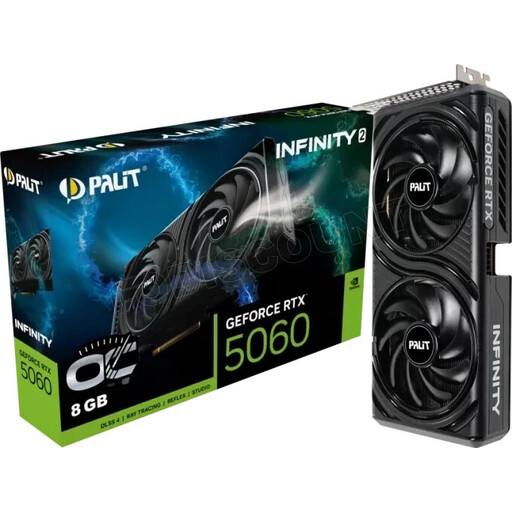
Why This Fits Their Persona: Ideal for users seeking solid performance for Full HD and WQHD gaming without spending the budget for a high-end model. It offers modern technologies like DLSS 4 and ray tracing in an efficient package.
Avoids the VRAM myth: The 8 GB of fast GDDR7 memory is optimally sized for the target resolutions. You're not paying for unused capacity.
An efficient dual-fan cooling system and moderate power consumption, which facilitates compatibility with many existing PSUs and cases.
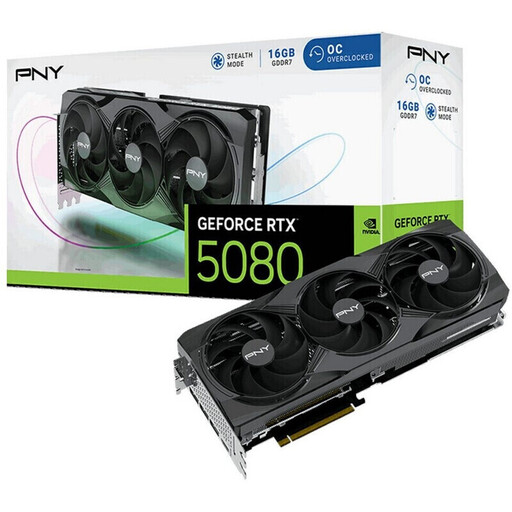
Why This Fits Their Persona: Designed for users who demand uncompromising performance for 4K gaming with high frame rates and ray tracing. The factory overclock and 16 GB of VRAM provide headroom for future titles.
Directly addresses the cooling issue with a massive triple-fan cooler that prevents thermal throttling and makes the high performance of the RTX 5080 consistently available.
The combination of 10,752 CUDA cores and 16 GB of GDDR7 memory offers enormous computing power for gaming and demanding AI applications.
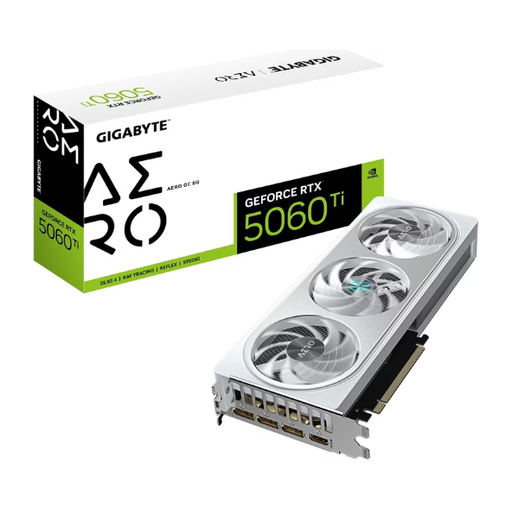
Why This Fits Their Persona: Perfect for content creators and PC builders who value a clean, modern aesthetic. This white graphics card combines strong performance for creative workflows with an elegant design.
Offers balanced performance sufficient for most video editing and 3D rendering tasks, without having to pay the premium for an absolute high-end card.
The silver-white AERO design with its triple-fan cooler is a visual highlight and simultaneously ensures reliable and quiet cooling during intensive use.
We have compiled a complete, up-to-date list of products that fully meet these strict selection criteria and German safety regulations.
The required amount of VRAM heavily depends on your target resolution and game settings. As a general guideline for 2026:
Check three points on the product pages of the graphics card and your PSU/case:
Both manufacturers offer powerful graphics cards, but they differ in technology and software ecosystem. NVIDIA GeForce RTX cards are known for their ray tracing performance and the AI-powered DLSS technology for performance enhancement. AMD Radeon cards are often strong in traditional rasterization and offer an open alternative to DLSS with FidelityFX Super Resolution (FSR). The graphics card comparison ultimately depends on the user's specific games, applications, and budget.