
Lieferung heute & morgen

Qualitätsgarantie

Willkommens-Angebote freischalten: KOSTENLOSE Lieferung | Bis zu 80 % RABATT | Kostenlose 30-Tage-JoyPlus-Testphase
App herunterladen
Anyone looking to buy a graphics card will often compare the GPU series, memory capacity and price first. However, these details alone are not enough. A powerful GPU may be too large for a small case, an apparently affordable model may be held back in modern games by insufficient VRAM, and a high boost clock says little about actual system compatibility.
This buying guide helps gaming PC buyers, streamers, content creators and users of AI and 3D applications assess the relevant technical specifications objectively.
More graphics memory is not automatically required for every application. For older games and many e-sports titles, a 1080p graphics card with a moderate memory capacity may be sufficient. However, the requirements increase significantly with high texture details, 1440p or 4K. A 4K gaming graphics card with 16 GB of memory offers more headroom for large textures and creative projects than a 4 GB model.
The memory type and memory interface are also important. GDDR7 offers different transfer rates from GDDR6, while the bit width, together with the clock speed and architecture, influences memory bandwidth.
The specifications ‘2-slot’ or ‘3-slot’ describe only part of the space required. Length, height and width may cover additional slots or clash with hard-drive cages. Particularly large cards, such as the ASUS ROG Astral RTX 5080, measuring 357.6 mm in length and using a 3.8-slot design, require a spacious case.
The power supply is equally important. According to the product specifications, for example, an RTX 5080 with a power draw of 360 W requires a recommended power supply of 850 W. For cards with a 12V-2x6 connector, the cable must be inserted fully and without any sharp bends.
Features such as DLSS 4, ray tracing, G-Sync and RGB lighting can vary in relevance depending on the game and software. DLSS 4 is an NVIDIA feature and requires supported applications and suitable drivers. RGB changes the appearance, not the processing performance. An AMD Radeon RX graphics card, on the other hand, may appeal to users who prioritise Radeon driver features and a particular balance between price and performance.
A graphics card with 16 GB GDDR7 is particularly suitable for high resolutions, large textures, video editing and certain 3D or AI workloads. According to the product data, the GIGABYTE RTX 5070 Ti models feature 16 GB GDDR7, a 256-bit interface and bandwidth of up to 896 GB/s.
AMD models such as the GIGABYTE RX 9060 XT Gaming come with 16 GB GDDR6. The RX 9070 GRE combines 12 GB GDDR6 with a 192-bit interface. So, do not compare memory capacity alone. Also consider the GPU architecture, bandwidth and software support.
Before buying, you should compare the following points from the specification sheet with your PC:
A PCIe 5.0 graphics card may also work in a compatible older PCIe system. However, the connection that can actually be used depends on the motherboard and processor.
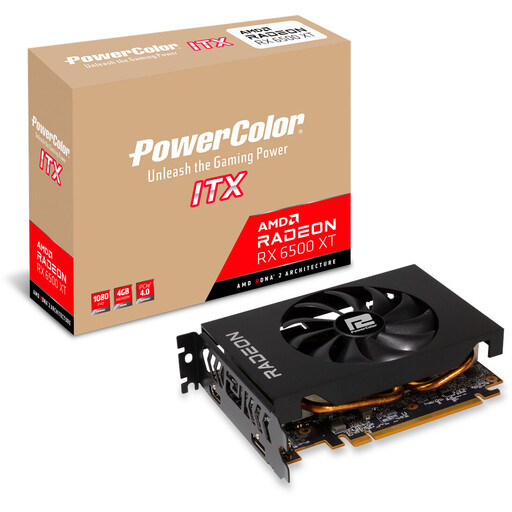
Why this product suits this profile: This compact ITX card is designed for Full HD gaming and smaller cases. According to the product specifications, it measures 165 mm in length and requires a power supply of at least 400 W.
The clearly stated dimensions and moderate power requirements make it easier to plan a compact system. The 4 GB GDDR6 capacity makes it primarily suited to 1080p.
165 mm length, 2-slot ITX format and a single 6-pin connector.
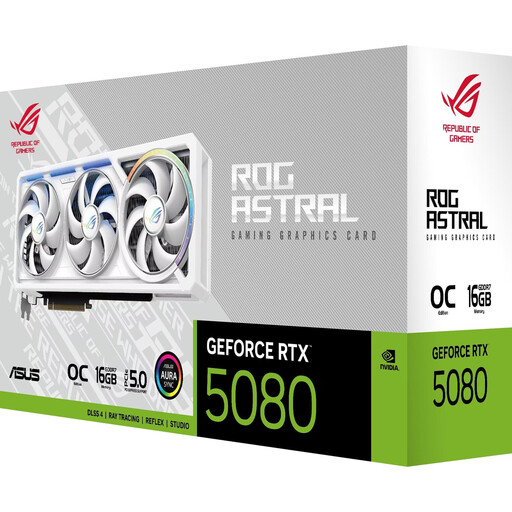
Why this product suits this profile: The RTX 5080 is aimed at users working with 4K or 8K applications, multiple monitors and high memory bandwidth requirements.
The 16 GB GDDR7 capacity, 256-bit interface and 960 GB/s bandwidth are clearly specified. However, before buying, you must take the 3.8-slot design, 357.6 mm length and an 850-W power supply into account.
10,752 CUDA cores, 16 GB GDDR7, plus 3 DisplayPort and 2 HDMI connections according to the product data.
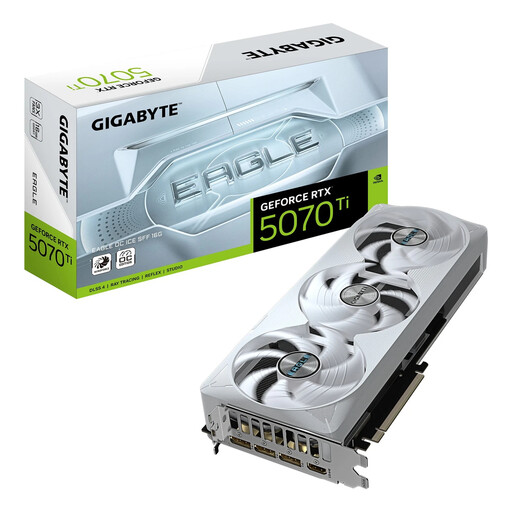
Why this product suits this profile: The SFF-Ready designation will appeal to users who want to fit high processing power into a smaller case.
Its suitability for SFF systems is not promoted based on length alone: at 304 × 126 × 50 mm and 3 slots, the actual space requirements can be checked.
16 GB GDDR7, PCIe 5.0, three fans and support for up to four screens.
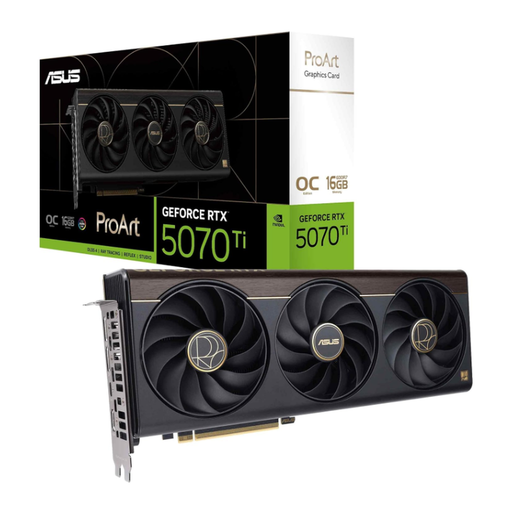
Why this product suits this profile: This card combines 16 GB GDDR7 with a 2.5-slot design and a USB-C connection for flexible creative setups.
The card height and memory capacity are clearly specified. With a boost clock of 2,610 MHz in OC mode, however, you should still consider the cooling of the entire system.
NVIDIA Blackwell architecture, 16 GB GDDR7 and an additional USB-C connection according to the product description.
We have put together a complete, regularly updated list of products that fully meet these strict selection criteria and the safety regulations applicable in the EU.
That depends on the game, quality setting and desired frame rate. According to the available product specifications, models such as the RTX 5070, RTX 5060 Ti and RX 9060 XT are designed for 1440p applications. Also check the VRAM, processor, power supply and monitor refresh rate.
For basic 1080p applications, 4 to 8 GB may be sufficient. For 1440p, 4K, large textures, video editing and 3D projects, 12 to 16 GB provides more headroom. However, memory capacity alone does not determine performance; GPU architecture and memory bandwidth are also relevant.
Service life depends on the workload, temperature, exposure to dust, power supply quality and regular driver maintenance. Ensure sufficient airflow, remove dust carefully, and check the dimensions and power connections before installation. A card with suitable performance headroom may remain suitable for your requirements for longer, although this should not be taken as a guaranteed service life.