
Lieferung heute & morgen

Qualitätsgarantie

Willkommens-Angebote freischalten: KOSTENLOSE Lieferung | Bis zu 80 % RABATT | Kostenlose 30-Tage-JoyPlus-Testphase
App herunterladen
A headset with microphone needs to deliver clear conversations in the home office, perform reliably for gaming, and work well for music or online lessons. In practice, however, unclear connection details, uncomfortable designs and exaggerated marketing claims can quickly lead to a bad purchase.
Before you buy, don't just focus on the brand name or an especially low price. What really matters is the right connection, the position and design of the microphone, and how comfortable it is to wear for the amount of time you plan to use it.
A USB-C headset with microphone may physically fit into many modern devices. However, the smartphone, tablet or laptop you connect it to must also support USB-C audio. Some USB-C ports are designed for charging or data transfer only.
Check before you buy:
With a classic wired headset using a 3.5 mm jack, compatibility is often straightforward. However, on computers with separate headphone and microphone ports, you may need a suitable adapter.
The term noise-cancelling microphone usually describes a microphone technology that reduces background noise during voice recording. It does not automatically mean that the wearer won't hear outside noise.
So, make sure you distinguish between:
For phone calls and video conferences, a flexible microphone position is often more important than a vague ANC marketing claim.
A wide frequency range or particularly high audio resolution doesn't guarantee good speech reproduction. For office conversations, what matters most is whether voices are transmitted clearly and whether you can adjust the volume and mute the microphone.
Also look out for:
A USB headset like the Logitech H390 connects directly via USB-A. Digital audio transmission happens through the computer, so no additional analogue microphone port is needed. This is practical for PCs and laptops with free USB-A ports.
A USB-C headset is suitable for newer notebooks, tablets, smartphones and consoles, provided USB-C audio is supported. The JBL Tune 530C and several Hama models use this connection.
The 3.5 mm jack is common on smartphones, tablets, laptops and older computers. The Logitech H151 has a built-in microphone, volume control and a mute switch on the cable. Before buying, check whether your device has a combined headset socket.
In-ear headphones with microphone are lightweight and space-saving. Models like the Hama "Calm" or "Noble" headphones weigh only a few grams according to product specifications and are easy to transport. However, the fit depends heavily on the size of the ear tips.
On-ear headphones rest on your ears and are often more compact than over-ear models. Padded headbands and ear cups can improve comfort during longer use.
An over-ear or closed-back headset encloses your ears more fully and can provide passive noise isolation. For long work or gaming sessions, you should pay particularly close attention to weight, padding and clamping force.
An adjustable microphone arm can be positioned closer to your mouth. This can make voice capture easier during video conferences and online gaming. Also handy are volume control, call management and a direct mute button.
Bear in mind: the quality of a microphone also depends on the distance from your mouth, the software and your environment. Correct positioning won't replace a quiet workspace, but it can help with clarity.
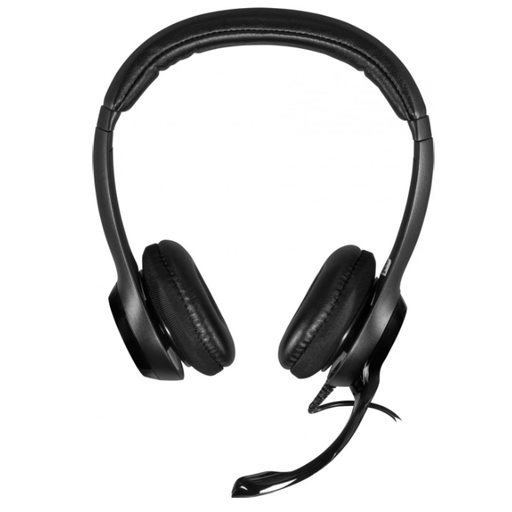
Why this product fits the profile: This stereo headset is designed for PCs and laptops with a USB-A port and offers a 190 cm cable length for typical desk setups.
The USB-A connection is clearly stated. According to the product description, the microphone, volume control and mute switch are integrated directly into the cable.
On-ear design, padded headband, rotating microphone and plug-and-play connection via USB-A.
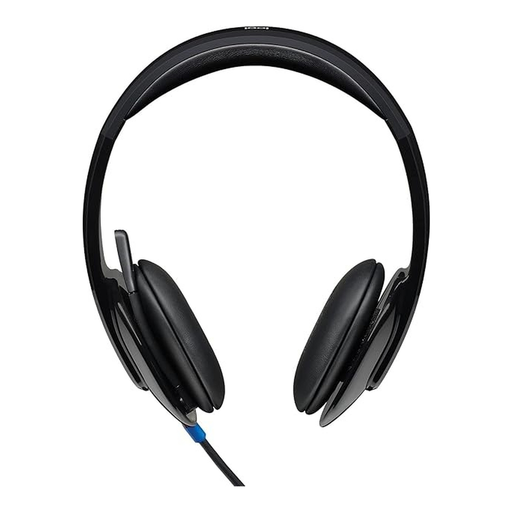
Why this product fits the profile: This model is aimed at users who prefer stereo playback, an adjustable microphone and controls located directly on the ear cup.
The product data specifies USB-A, an adjustable microphone and separate functions for volume and mute.
USB-A connection, 1.8 m cable, on-ear design, built-in equaliser and mute indicator.
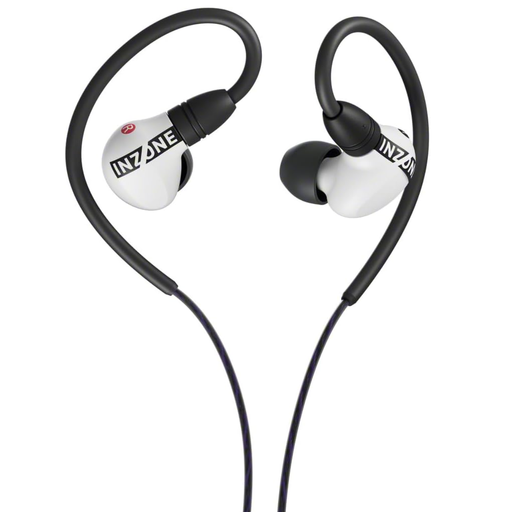
Why this product fits the profile: The USB-C in-ear design is built for gaming and suits users looking for a compact model with customisable audio features.
The connection is wired via USB-C. The fit can be adjusted using different ear tips; compatibility with USB-C audio should be checked beforehand.
In-ear design, USB-C audio box and customisable EQ or 3D audio features according to the product description.
We've put together a complete, regularly updated list of products that fully meet these strict selection criteria and the safety regulations in force in the EU.
For regular conversations, look for models with a flexibly positionable microphone, direct mute function and volume control. A USB headset is often simple to set up on a PC. If you switch between devices, a 3.5 mm model can be more practical, provided a combined socket is available.
Insert the connector fully into the correct port. On your computer, open the sound or system settings and select the headset as both the input and output device. Then test the speakers and microphone in your communication software.
The lifespan depends mainly on the cable, plug, hinges and padding. Always pull the headset out by the plug rather than the cable, avoid sharp kinks and store it in a dry place. If you notice visible damage, stop using the product.