
Lieferung heute & morgen

Qualitätsgarantie

Willkommens-Angebote freischalten: KOSTENLOSE Lieferung | Bis zu 80 % RABATT | Kostenlose 30-Tage-JoyPlus-Testphase
App herunterladen
A motherboard connects the processor, RAM, graphics card, SSDs and peripherals. If you want to buy a motherboard, you should therefore look beyond chipset names, high clock speeds and eye-catching heatsinks. What matters is whether the board is compatible with your other components and suits your intended use.
Typical buying mistakes stem from three recurring pitfalls:
Depending on the processor family, an AMD computer may use an AM4 motherboard or an AM5 motherboard, among other options. AM4 models such as the GIGABYTE A520M DS3H V2 use DDR4 and are designed for specific Ryzen 3000 and Ryzen 5000 processors. A Ryzen motherboard with an AM5 socket, on the other hand, uses DDR5 and supports Ryzen processors from the 7000, 8000 and 9000 series, depending on the chipset.
For Intel systems, an Intel motherboard with an LGA-1700 socket is, for example, designed for selected 12th-, 13th- and 14th-generation Core processors. Before buying, check the manufacturer’s CPU compatibility list and the required BIOS version.
The chipset affects, among other things:
The three common sizes are:
An ATX board will not automatically fit every case. Check the case compatibility, the position of the standoffs and the available space for the graphics card, CPU cooler and cables. With a Mini-ITX motherboard, you should also take into account the usually smaller number of RAM slots, M.2 interfaces and expansion slots.
For a modern gaming PC or content creator workstation, at least one PCIe x16 slot for the graphics card and enough M.2 slots are advisable. A PCIe 5.0 motherboard can accommodate compatible SSDs and expansion cards using this interface generation. However, this does not automatically mean that every connected component will use PCIe 5.0.
You should also look out for:
A motherboard with Wi-Fi is useful if you cannot run a network cable to your router. Actual wireless performance also depends on the router, distance, aerial position and frequency bands available in your region.

Why this product suits the profile: This Micro-ATX board is designed for compact AMD systems with an AM5 processor and DDR5 memory. It offers two RAM slots, one PCIe 4.0 x16 slot, one M.2 connection and four SATA ports.
The AM5 and DDR5 specifications make the key platform limitation clear. Before buying, check the specific CPU compatibility using the manufacturer’s list.
AM5 socket, DDR5 support, PCIe 4.0 and two M.2 slots according to the product specifications.
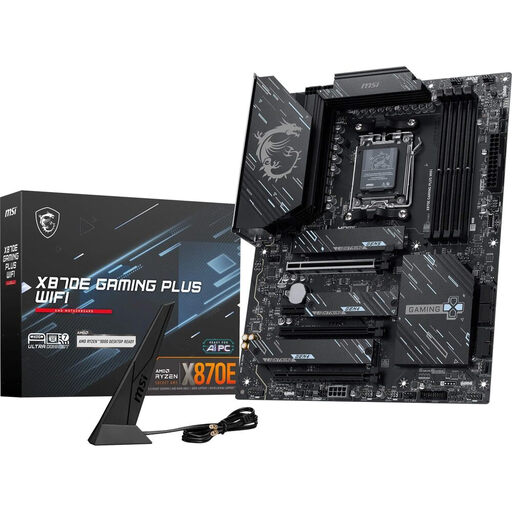
Why this product suits the profile: This ATX motherboard provides a comprehensive platform for performance-focused AMD builds, multiple SSDs and fast network connections.
The features can be assessed using the specific connections provided. High memory figures are marked as overclocking specifications and should not be confused with a guarantee that every RAM kit will work.
AM5, four DDR5 DIMM slots, PCIe 5.0, three M.2 slots, Wi-Fi 7, 5G LAN and USB4 according to the product description.
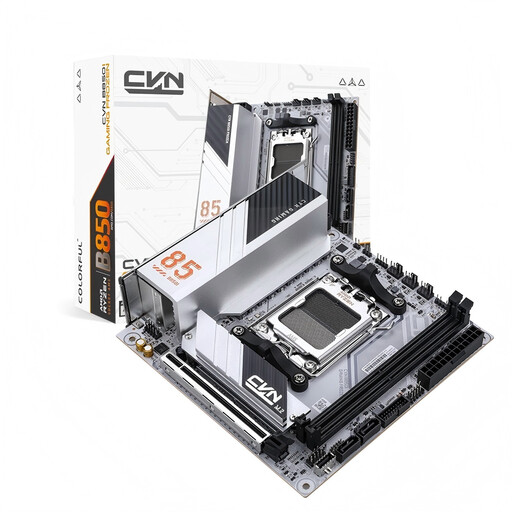
Why this product suits the profile: This Mini-ITX motherboard is designed for small AM5 cases with limited space, combining compact dimensions with fast interfaces.
The ITX form factor avoids taking up unnecessary space. With only two RAM slots and two SATA connections, you should plan any future expansion in advance.
170 × 170 mm, PCIe 5.0 x16, two M.2 slots, 2.5 Gbit LAN and Wi-Fi 6E according to the manufacturer’s specifications.
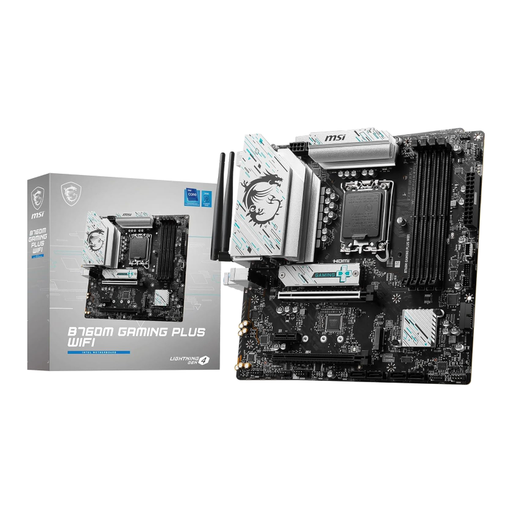
Why this product suits the profile: This Micro-ATX platform is designed for Intel systems with DDR5, integrated wireless connectivity and two M.2 slots.
The socket, chipset and DDR5 memory standard are clearly stated. Before ordering, check the CPU list for your specific model.
LGA 1700, B760 chipset, four DDR5 slots, Wi-Fi 6E, Bluetooth 5.3 and 2.5 Gbit LAN according to the product data.
We have put together a complete, regularly updated list of products that fully meet these strict selection criteria and the safety regulations applicable in the EU.
Its lifespan depends on operating conditions, dust exposure, PSU quality and how it is handled physically. A fixed service life cannot be guaranteed reliably. Regular BIOS and driver maintenance, along with adequate case ventilation, can help extend its practical usability.
Not necessarily. For gaming, the CPU, graphics card, RAM and SSD are usually more important. However, a suitable gaming motherboard should provide sufficient power delivery, compatible connections, a suitable PCIe slot and enough storage options.
Disconnect the PC from the mains, work on a non-conductive surface wherever possible and avoid electrostatic discharge. Do not touch or apply force to the CPU socket, contacts or circuit boards. Before switching on for the first time, check the 24-pin, CPU power, fan and front-panel connections.