
Lieferung heute & morgen

Qualitätsgarantie

Willkommens-Angebote freischalten: KOSTENLOSE Lieferung | Bis zu 80 % RABATT | Kostenlose 30-Tage-JoyPlus-Testphase
App herunterladen
If you want to buy PC cases and mini PCs, you should not be guided solely by lighting, processor names or particularly compact dimensions. What really matters is actual compatibility, cooling options, connections and where you plan to use the device. A case may look appealing but offer too little space for the graphics card you want. A mini PC may seem compact, yet have limitations when it comes to storage, connections or upgradability.
The designations ATX, Micro-ATX and Mini-ITX describe more than just the motherboard’s size. They also affect your choice of expansion cards, coolers, power supplies and storage devices.
Before buying, check the maximum graphics card length, permitted CPU cooler height and maximum power supply length. These figures must match your components.
An ARGB fan PC case may include several illuminated fans as standard. However, the lighting says nothing about actual airflow, noise levels or the quality of the fan control system. You should therefore check:
A mesh-front PC case promotes direct air exchange when fitted with suitable fans. A Tempered Glass PC case, on the other hand, puts your components on display but requires sufficient ventilation on the other sides of the case.
A compact mini PC is not automatically a full replacement for a customisable desktop PC that can be upgraded. Before placing your order, check whether the RAM and SSD can be replaced, which video outputs are available and whether the integrated graphics are powerful enough for your applications.
For office software and multiple monitors, a home-office mini PC can be a sensible choice. For more demanding games or graphics-intensive applications, a gaming mini PC with powerful integrated graphics or support for an external graphics card is more appealing. Claims such as ‘4K support’ should always be considered alongside the refresh rate, connection standard and specific application.
Before buying, create a brief compatibility checklist:
A water-cooling-ready PC case should not simply advertise compatibility with a particular radiator size. What matters is where the radiator can be installed and whether this blocks the graphics card or RAM.
Modern workstations benefit from USB-C, several high-speed USB-A ports and suitable video outputs. With mini PCs, you should also check the HDMI version, DisplayPort, USB4 and network speed. Two 2.5-gigabit Ethernet ports may be useful for certain office, server or networking environments, for example, but are not essential for a typical workstation.
A quiet mini PC is not determined by the processor alone. The fan profile, case ventilation and sustained workload all affect noise levels. Depending on the model, a mini PC with AMD Ryzen can combine multiple cores, integrated Radeon graphics and modern connections. However, your choice should be based on the specific processor and graphics configuration.
If you use the device continuously in a home office, it is also worth considering its energy consumption. A small computer with an efficient platform may use a different amount of power for office tasks than a desktop PC with a powerful graphics card. Actual costs depend on usage, load and your electricity tariff.
The following recommendations group the products according to different requirements and are based on the technical data provided.
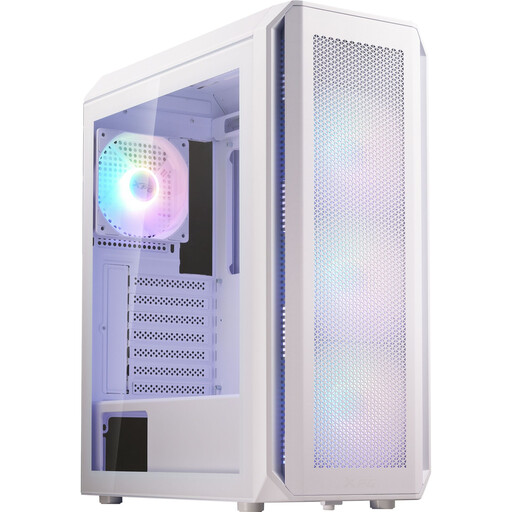
Why this product suits this profile: This mid-tower case supports ATX, Micro-ATX and Mini-ITX, allowing for several possible future build configurations.
The key space limits are clearly stated: graphics cards up to 340 mm long, CPU coolers up to 160 mm high and power supplies measuring 160–180 mm in length.
Four pre-installed 120 mm ARGB fans, support for up to six fans and radiators measuring up to 360 mm at the front.
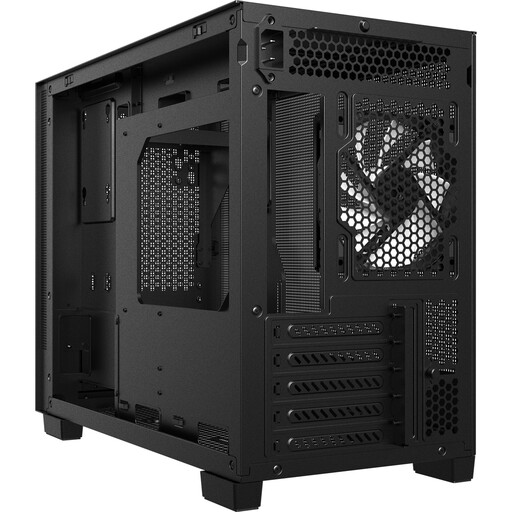
Why this product suits this profile: Its more compact design is aimed at users who want to use Micro-ATX or Mini-ITX while integrating a powerful graphics card.
The mesh front with integrated dust filters addresses the usual limitations of closed front panels. The maximum GPU length is 370 mm.
USB-C 3.2 Gen 2 on the front, support for CPU coolers up to 170 mm and radiators up to 360 mm at the top.

Why this product suits this profile: The combination of 24 GB DDR5 RAM, a 1 TB PCIe 4.0 SSD and several modern ports is designed for home working, business applications and compact gaming workstations.
The available connections are clearly specified: USB4, HDMI 2.1, Oculink, two 2.5-gigabit Ethernet ports and support for four displays.
AMD Ryzen AI 9 365 with 10 cores and 20 threads, plus Radeon 880M graphics; 4K output to four displays is specified.

Why this product suits this profile: This mini PC combines 24 GB LPDDR5 RAM and a 512 GB PCIe 4.0 SSD with a compact platform for office work, multimedia and selected games.
Rather than focusing solely on case size, the specifications clearly list three display connections, HDMI 2.1, USB4 and 2.5-gigabit Ethernet.
AMD Ryzen 5 7640HS with six cores and 12 threads, Radeon 760M graphics and support for 4K output across three displays.
We have put together a complete, regularly updated list of products that fully meet these strict selection criteria and the safety regulations applicable in the EU.
Do not plan only for the components you are currently using. Extra room for a larger CPU cooler, additional fans or a longer graphics card can make future upgrades easier. At the same time, a more spacious interior increases the case’s footprint. You should therefore choose between an ATX PC case, Micro-ATX case and Mini-ITX case based on your motherboard and planned upgrades.
That depends on the available connections and the supported display configuration. For a home-office mini PC setup, you should check the HDMI, DisplayPort or USB4 connections, the maximum resolution and the number of displays that can be used simultaneously. Each of the FIREBAT models mentioned specifies support for multiple monitors.
It is not possible to guarantee a fixed service life reliably. It depends on maintenance, heat generation, software requirements and upgradability. Regular dust removal, adequate ventilation and up-to-date security updates can help ensure reliable operation. With a desktop PC, the replaceability of individual components also affects how flexibly the system can be adapted to new requirements.