
Lieferung heute & morgen

Qualitätsgarantie

Willkommens-Angebote freischalten: KOSTENLOSE Lieferung | Bis zu 80 % RABATT | Kostenlose 30-Tage-JoyPlus-Testphase
App herunterladen
A motherboard connects the processor, RAM, graphics card, drives and peripherals. That is why, when buying a motherboard, it is not just the chipset or stated RAM speed that matters. Many poor purchases are caused by overlooked compatibility issues, missing connections or a case that does not support the chosen form factor.
An AMD motherboard with an AM5 socket is designed for compatible Ryzen processors. An Intel motherboard, on the other hand, requires the appropriate LGA socket. Even within the same platform, the BIOS version, chipset and processor series can play a role. For example, if you are choosing a motherboard for Ryzen 9000, check the official CPU support list and the required BIOS version before buying.
With a motherboard for Intel Core Ultra, particular attention should be paid to the LGA 1851 socket. Simply stating “Intel-compatible” is not enough.
DDR4 and DDR5 modules are not interchangeable. A DDR5 motherboard requires DDR5 RAM; existing DDR4 modules cannot be installed in it. Maximum capacity, supported speeds and the number of DIMM slots also differ.
High figures such as “8000+ MHz” or “8400+ MT/s” generally refer to overclocking profiles in the product specifications. The speed actually achievable depends on the processor, RAM kit, BIOS and memory configuration. For a stable system, you should take the manufacturer’s compatibility list into account.
A PCIe 5.0 motherboard or several M.2 slots can be useful, but they are not automatically necessary for every PC. The important thing is which graphics card, SSDs and expansion cards you actually intend to use.
Integrated Wi-Fi also deserves careful consideration: Wi-Fi 6E and Wi-Fi 7 require a suitable router and an operating system with the appropriate drivers. Some Wi-Fi 7 models also have additional requirements regarding the operating system version and use of the 6-GHz band.
The socket determines which processor families can be used. The chipset influences, among other things, the number of USB, SATA, PCIe and M.2 connections, as well as BIOS and overclocking features.
Before buying, always check the combination of processor, socket, chipset and BIOS support. A platform that appears to be compatible on paper may not be ready to use straight away.
The form factor determines whether the board will physically fit into your existing case:
Also check the position of the standoffs, the maximum graphics card length, and the available space for the CPU cooler and cables. A Mini-ITX motherboard can fit in a larger case, but an ATX motherboard will not fit every compact model.
An M.2 motherboard can accommodate NVMe SSDs directly on the board. Pay attention to the number of slots and their standard: PCIe 4.0 x4 and PCIe 5.0 x4 differ in their potential bandwidth. Some M.2 slots share lanes with SATA connections or expansion slots.
For offices and many home PCs, 1-Gbit Ethernet is sufficient. For NAS access, large media files or local networks, 2.5-Gbit or 5-Gbit LAN can be useful. A motherboard with Wi-Fi reduces the need for a separate network card, but it does not automatically replace a powerful router.

Why this product suits this profile: This Micro-ATX board offers AM5, DDR5, a PCIe 4.0 x16 slot, an M.2 slot and four SATA connections for a straightforward build.
The technical specifications clearly state the socket, DDR5 memory and maximum capacity. This makes it easy to check compatibility before buying.
AM5 socket, up to 96 GB DDR5, one M.2 slot, HDMI 2.1 and VGA.
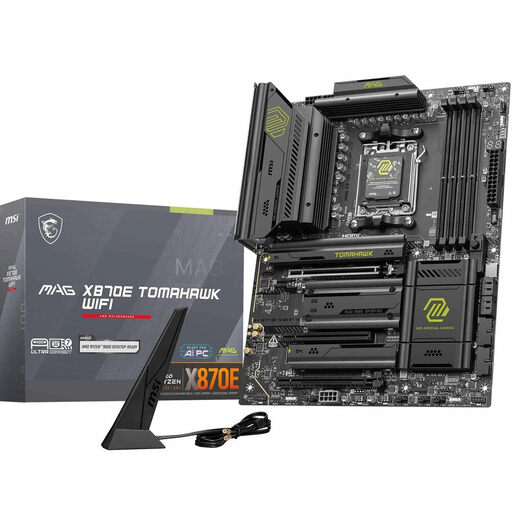
Why this product suits this profile: High-performance gaming PCs and content creation systems benefit from four DDR5 slots, several M.2 connections and modern networking and USB interfaces.
The features are clearly specified: PCIe 5.0, two M.2 Gen5 slots, Wi-Fi 7, 5G LAN and USB4. Actual usage depends on the other components in your system.
AM5 support for Ryzen 7000, 8000 and 9000, up to 256 GB DDR5 and ATX expandability.
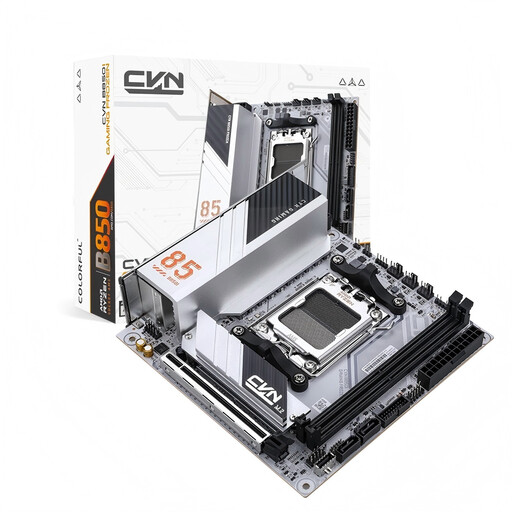
Why this product suits this profile: This Mini-ITX board is designed for compact AM5 systems and combines two M.2 slots with PCIe 5.0, 2.5-Gbit LAN and Wi-Fi 6E.
The dimensions of 170 × 170 mm make the space requirements clear. Before buying, check the case, cooler height and power supply dimensions.
Two M.2 slots, PCIe 5.0 x16, DDR5 support up to 96 GB and Bluetooth 5.3.
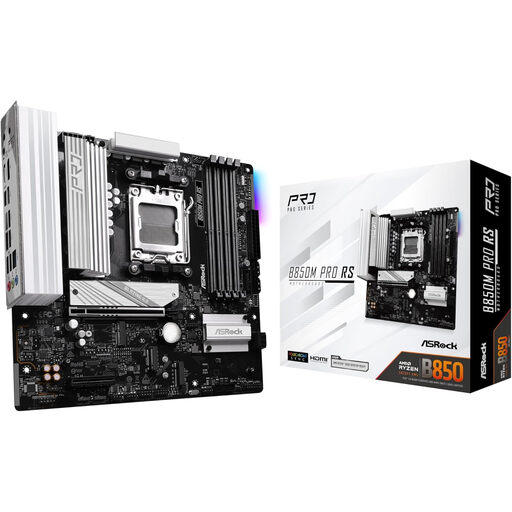
Why this product suits this profile: The Micro-ATX format provides a compact foundation for office PCs, development systems and versatile upgrades with generous DDR5 capacity.
The specifications state AM5, DDR5 and the maximum memory capacity of 256 GB. Check the specific CPU support list before placing your order.
B850 chipset, four DDR5 slots, up to 8000 MHz according to the product specifications and an HDMI output.
We have put together a complete, regularly updated list of products that fully meet these strict selection criteria and the safety regulations applicable in the EU.
Its service life depends on workload, ambient temperature, power supply and upgrade plans. A motherboard can support several generations of hardware if the socket, BIOS and connections remain sufficient. Before buying, it is therefore worth checking the available expansion options and the CPU support list.
For a motherboard for a gaming PC, you should first decide on the processor, graphics card and case. Then compare the PCIe slot, DDR5 support, number of M.2 slots, networking and cooling. An expensive chipset is only worthwhile if you will actually use the additional connections or interfaces.
The motherboard itself does not have a separately measurable fixed consumption like a standalone device. Power requirements depend mainly on the processor, graphics card, drives, fans and power supply. Additional lighting, Wi-Fi modules and multiple expansion cards can have a slight impact on overall consumption.