
Lieferung heute & morgen

Qualitätsgarantie

Willkommens-Angebote freischalten: KOSTENLOSE Lieferung | Bis zu 80 % RABATT | Kostenlose 30-Tage-JoyPlus-Testphase
App herunterladen
Deciding to buy a new PC can be complex, given the countless models and configurations available. Many advertising promises sound tempting but often lead to regrettable purchases. This guide will help you understand the essential criteria, avoid common pitfalls, and make an informed decision for your new desktop PC, whether it's for your home office, gaming, or everyday tasks.
Before diving into technical specifications, it's crucial to recognise common marketing strategies that often lead to unnecessary expenses.
To find the right PC, focus on the technical features that are genuinely relevant to your needs.
The combination of CPU and RAM is the primary determinant of system speed for multitasking.
Desktop PCs come in various designs, each with specific advantages and disadvantages.
The storage drive affects how quickly your system boots and programs load. A modern Desktop PC with Windows 11 should exclusively feature a Solid-State Drive (SSD) as its primary drive.
Here are some configurations tailored to specific user groups that take the above criteria into account.
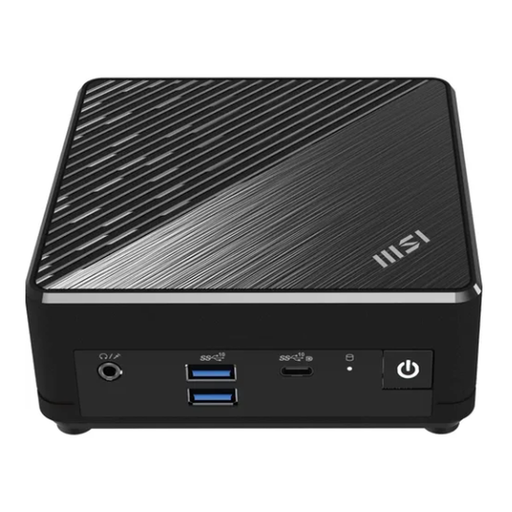
Why This Fits Their Persona: Ideal for users seeking an unobtrusive, quiet, and energy-efficient PC for everyday tasks like web browsing, streaming, and office applications. The ultra-compact chassis fits on any desk and can even be mounted behind a monitor with a VESA mount.
This model sidesteps the overkill trap. With its Intel N200 processor and 8 GB of RAM, it provides perfectly adequate performance for office and multimedia tasks without inflating the price with unnecessary high-end components.
Fanless design for completely silent operation. Supports up to three monitors and features dual LAN ports for stable network connectivity.
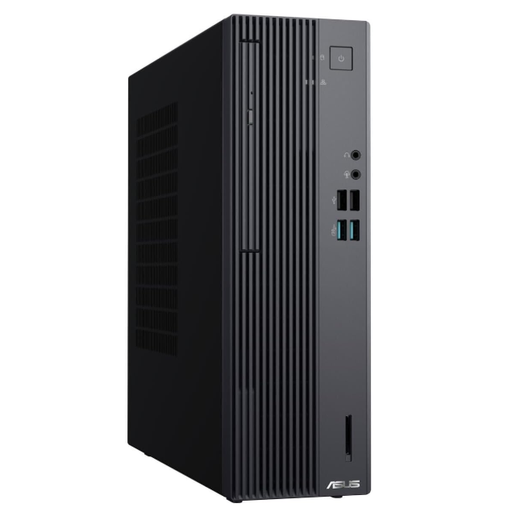
Why This Fits Their Persona: Designed for professional use, this PC delivers reliable performance for demanding office applications and multitasking. The compact Small Form Factor (SFF) case is a great compromise between space-saving design and expandability. Windows 11 Pro also offers enhanced security features.
This system avoids the unbalanced configuration trap. The modern Intel Core i5-14500 processor, 16 GB of RAM, and the fast 512 GB SSD are optimally matched to ensure consistently high work speeds without bottlenecks.
Robust performance for business applications thanks to a modern processor. The SFF chassis offers better upgrade options than a Mini PC while maintaining a small footprint.

Why This Fits Their Persona: This system is aimed at users who need maximum performance for the latest game titles at high resolutions and for compute-intensive tasks like video rendering or 3D modelling. The components are designed for peak performance.
This PC avoids the trap of neglecting the form factor. The spacious tower case not only provides excellent cooling for the high-end components but also offers ample room for future upgrades, which is crucial for performance-oriented systems.
Engineered for maximum gaming performance through the combination of an AMD Ryzen 7 7800X3D processor and a powerful graphics card. The liquid cooling ensures stable operation under heavy load.
We have compiled a comprehensive, up-to-date list of products that fully meet these strict selection criteria and German safety regulations.
The lifespan of a desktop PC largely depends on its use and care. The hardware itself can easily remain functional for 5 to 8 years or more with proper maintenance. However, for demanding applications like high-end gaming, the perceived performance may decline after just 3 to 4 years as new software requires more power. The useful life can often be extended cost-effectively through targeted upgrades, such as adding more RAM or a new storage drive.
An All-in-One PC can be an excellent choice if aesthetics and a tidy workspace are top priorities. The advantages are its space-saving design and minimal cable clutter. On the other hand, the disadvantages include severely limited upgrade options and potentially more complex and expensive repairs, as all components are housed in a confined space. For standard office work and home use where simplicity is key, an AiO is a worthwhile option to consider.
For most everyday tasks like web browsing, video streaming, email, and using office programs, the integrated graphics unit (iGPU) found in modern processors is perfectly sufficient. A dedicated graphics card is only necessary if you regularly use graphically demanding applications. This primarily includes PC games, professional video editing, CAD applications, or 3D modelling. For a pure office PC, it is generally not needed.