
Lieferung heute & morgen

Qualitätsgarantie

Willkommens-Angebote freischalten: KOSTENLOSE Lieferung | Bis zu 80 % RABATT | Kostenlose 30-Tage-JoyPlus-Testphase
App herunterladen
The search for the right gaming mouse can quickly become overwhelming. Manufacturers advertise ever-higher DPI figures, extremely lightweight designs, and wireless freedom. But not every advertised feature is a genuine advantage. Often, these very marketing points lead to poor purchases that negatively impact in-game performance. Before you make a decision, it's crucial to know the most common pitfalls and understand which technical features truly matter.
As your Joybuy Product Recommendation Officer, I'm here to help you cut through the noise. We'll analyse which specifications are critical for ambitious gamers and how you can find a mouse that is precisely tailored to your needs.
Many gamers invest in a new mouse only to find that it doesn't deliver the expected performance. This is often due to overrated features that do more harm than good in practice.
To make an informed decision, you should focus on the technical specifications that directly influence your in-game performance.
The sensor is the heart of every gaming mouse for PC. A high-quality optical sensor, such as models from the PixArt 33xx series, is characterised by flawless tracking without unwanted acceleration, smoothing, or jitter. This means that your mouse movements are translated 1:1 to the screen.
In addition to the sensor, pay attention to the Polling Rate, measured in Hertz (Hz). It indicates how often the mouse reports its position to the computer. A standard for gaming mice is 1000 Hz, which corresponds to a response time of 1 millisecond. Some high-end models already offer 8000 Hz for even more direct input.
Weight and ergonomics are crucial for comfort and control during long gaming sessions.
The choice of connection depends on your priorities.
Here are some recommendations tailored to specific needs and player types.
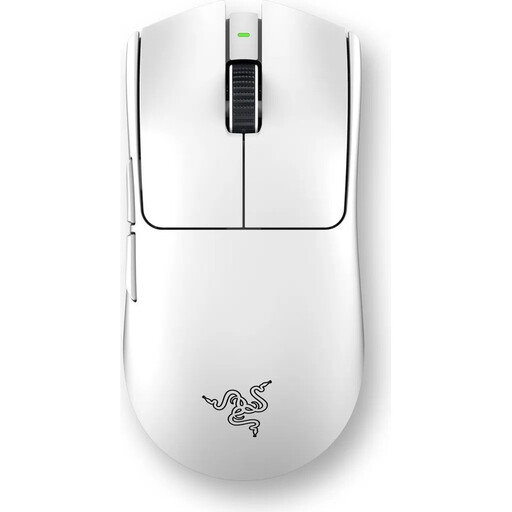
Why it fits this profile: Engineered for maximum competitive performance. The extremely low weight and latency-free wireless technology are tailored to the needs of professionals who depend on every millisecond.
It bypasses the DPI trap by focusing on sensor precision (Focus Pro 35K) and an extremely high polling rate (8000Hz HyperPolling). The low 54g weight is achieved through a stable chassis co-developed with pros, not through material compromises.
Ultralight 54g Design: Enables effortless and rapid movements. Razer 8000Hz HyperPolling: Delivers extremely low latency for near-instantaneous responses.
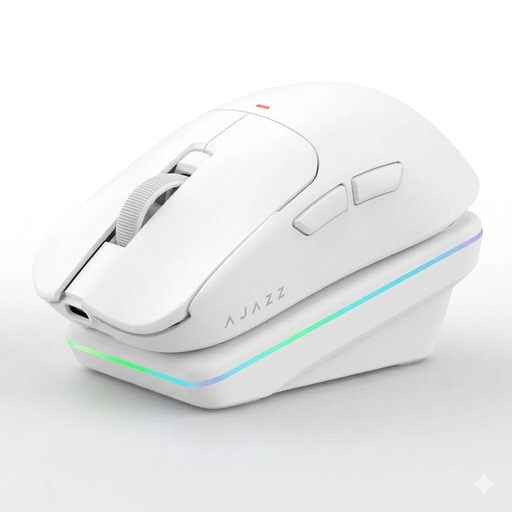
Why it fits this profile: Perfect for gamers who need a high-performance, flexible mouse for both gaming and productivity. The tri-mode connectivity and charging dock offer superior convenience for daily use.
It provides a reliable 2.4 GHz connection for lag-free gaming, thus debunking the wireless myth. The lightweight design (63g) is combined with a sturdy "Dragonbone" structure, striking a great balance between weight and durability.
Tri-Mode Connectivity: Switch between 2.4 GHz, Bluetooth, and wired. Magnetic Charging Dock: Convenient charging and a stylish addition to your desk.
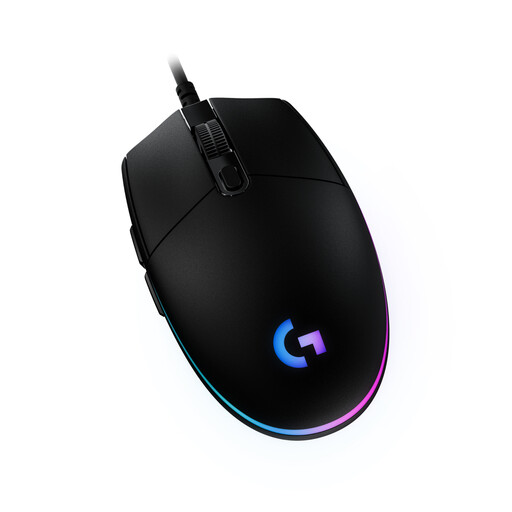
Why it fits this profile: Delivers solid and reliable performance for beginners without breaking the bank. Its proven shape and solid sensor make it a safe bet for starting out in PC gaming.
As a wired mouse, it eliminates any concerns about latency or battery life. It focuses on the essentials: a reliable sensor with a practical DPI range (up to 8,000) and a durable, time-tested design.
Proven Design: The classic and comfortable shape is suitable for a wide variety of hand sizes and grip styles. Reliable Performance: Offers precise tracking and consistent clicks at an accessible price point.
We have compiled a complete, real-time updated list of products that fully meet these strict selection criteria and UK/EU safety regulations.
For most gamers and even professionals, DPI values between 400 and 1600 are perfectly sufficient. A higher maximum DPI value is not an indicator of quality. Far more important are a precise sensor that transmits movements without errors or artificial corrections, and a setting that suits your playstyle and screen resolution.
Yes, a modern wireless gaming mouse with 2.4 GHz wireless technology from a reputable manufacturer offers latency that is humanly indistinguishable from a wired connection. This technology is esports-proven and reliable. Only pure Bluetooth mice are ill-advised for competitive gaming, as their latency can be noticeably higher.
Weight is an important factor whose significance depends on the genre of game being played. In fast-paced games like FPS (First-Person Shooters) or MOBAs (Multiplayer Online Battle Arenas), a lightweight gaming mouse (typically under 70g) allows for quicker reactions and reduces arm fatigue during long sessions. For slower-paced games or general use, comfort and ergonomic shape may be more important than the lowest possible weight.