
Lieferung heute & morgen

Qualitätsgarantie

Willkommens-Angebote freischalten: KOSTENLOSE Lieferung | Bis zu 80 % RABATT | Kostenlose 30-Tage-JoyPlus-Testphase
App herunterladen
A motherboard connects the processor, RAM, graphics card, storage drives and ports. Even so, PC buyers often focus on the CPU or graphics card first. This can lead to costly mistakes: a processor may not fit the socket, existing RAM may be incompatible, or the desired case may not support the motherboard form factor.
This buying guide from the Joybuy Product Recommendation Officer explains the most important criteria and presents a selection of suitable models for different usage profiles.
An AMD AM5 motherboard is not automatically compatible with every Ryzen processor. The socket, chipset and the CPU list approved by the manufacturer are all decisive. For current Ryzen systems, for example, AM5 models with AMD B-series chipsets are suitable options. Older AM4 processors, on the other hand, require an AM4 motherboard, such as the MSI B550M PRO-VDH WIFI.
The same principle applies to Intel systems. An Intel motherboard with LGA 1700 is designed for certain Intel Core processors, while newer-platform Intel Core Ultra processors require an LGA-1851 socket. Before buying, you should therefore compare the exact processor designation with the motherboard manufacturer's support list.
A DDR5 motherboard requires DDR5 DIMMs, while a DDR4 motherboard requires DDR4 DIMMs. The modules differ in terms of their notch, electrical design and memory standard. DDR5 RAM cannot be installed in a DDR4 slot, and vice versa.
If you want to upgrade an existing PC, you should first check the RAM modules already installed. For a new build, DDR5 can provide a more future-ready platform, while DDR4 motherboards may be a cost-effective choice when using existing memory modules. Stated clock speeds marked “OC” refer to profiles or overclocking operation and are not automatically guaranteed.
Features such as PCIe 5.0, WiFi 6E or particularly high memory speeds may look appealing. What matters, however, is whether the specification suits your own system. For a standard graphics card, PCIe 4.0 may be sufficient depending on the application. PCIe 5.0 can be useful for future upgrades or compatible NVMe drives, but it does not by itself provide an automatically noticeable benefit.
It is also worth checking the specifications for M.2 slots: the number of slots, PCIe generation, supported length and any limitations caused by occupied SATA or PCIe slots may vary.
The socket determines which processor family can be used. The chipset affects, among other things, the available ports, PCIe lanes, memory options and overclocking functions. In addition, certain CPU models may require a BIOS update. Some boards include a Flash or Q-Flash function, making it easier to update the BIOS without a fully configured system.
Before buying, check:
The most common formats are ATX, Micro-ATX motherboard and Mini-ITX motherboard. Micro-ATX generally offers more expansion options than Mini-ITX while maintaining compact dimensions. Mini-ITX typically measures 17 × 17 cm and is suitable for small cases, but provides fewer DIMM and PCIe slots.
A motherboard with rear-facing connectors requires an explicitly compatible case. The MSI B760M PROJECT ZERO is one example. The connectors are located on the rear of the board, so a standard case may not be suitable.
For office work, streaming, gaming and content creation, the number of RAM slots and maximum capacity are important points of comparison. Two DIMM slots are sufficient for compact systems, while four slots make future upgrades easier.
For storage, check whether one or more M.2 SSD slots are available and which PCIe generation they use. For wired networks, 1 Gbit and 2.5 Gbit LAN offer different performance levels. A WiFi motherboard can make additional adapters unnecessary. Actual wireless performance also depends on the router, distance, antenna position and building conditions.
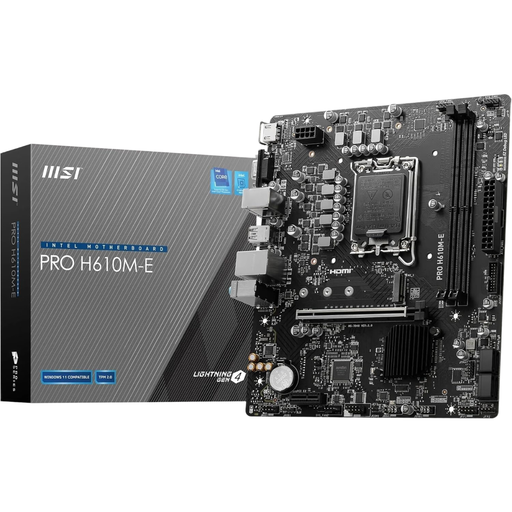
Why this product suits the profile: This Micro-ATX board is designed for compact everyday and office PCs with compatible Intel Core processors and existing DDR4 modules.
The specification clearly states DDR4 and LGA 1700. This makes it easy to check platform compatibility with the CPU and RAM before buying.
2 DDR4 DIMM slots, PCIe 4.0 x16 and an M.2 slot for NVMe SSDs.
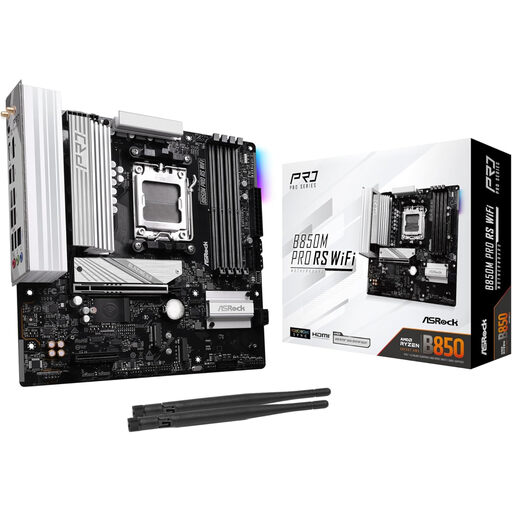
Why this product suits the profile: For a modern Ryzen PC, this AMD AM5 motherboard combines DDR5 support with built-in wireless connectivity in a Micro-ATX format.
The AM5 socket, AMD B850 chipset and DDR5 support are clearly specified. CPU, memory and case compatibility must still be checked in advance.
Up to 256 GB DDR5 according to the product details, plus built-in WiFi and PCI Express connectivity.
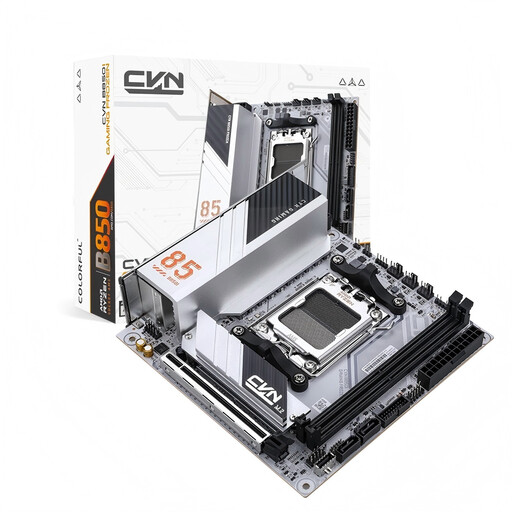
Why this product suits the profile: This Mini-ITX model is designed for compact gaming systems where a small footprint and multiple high-speed storage options are important.
The compact ITX form factor is specified as 170 × 170 mm. Before ordering, make sure the case explicitly supports Mini-ITX.
2 M.2 slots, including a PCIe 5.0 x4 connection, plus WiFi 6E, Bluetooth 5.3 and 2.5 Gbit LAN.
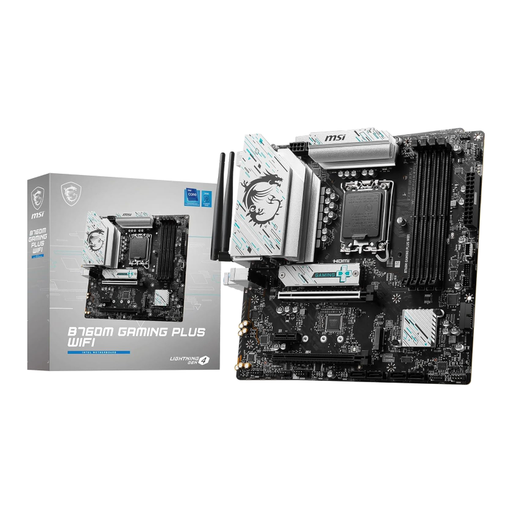
Why this product suits the profile: This Intel motherboard combines four DDR5 slots with WiFi 6E, 2.5 Gbit LAN and two M.2 connections for versatile systems.
The LGA 1700 socket and support for Intel Core processors from the specified generations are clearly documented; DDR4 memory is not supported.
4 DDR5 DIMM slots, two M.2 Gen4 x4 slots and integrated wireless and wired network connectivity.
We have put together a complete, regularly updated list of products that fully meet these strict selection criteria and the safety regulations applicable in the EU.
Its service life depends on operating conditions, component quality, dust levels, temperature and maintenance. There is no standard lifespan that applies in every case. Good ventilation, careful installation and a suitable PSU help reduce typical stresses.
The price depends primarily on the socket, chipset, form factor, RAM standard, networking and expansion options. A basic DDR4 Micro-ATX board may be sufficient for office PCs. For gaming, content creation or multiple high-speed SSDs, additional M.2 slots, a more powerful power delivery system and WiFi can increase the price.
Yes, provided you follow the installation instructions. The PC must be completely disconnected from the mains. Use suitable standoffs, protect the components from electrostatic discharge, and never force the CPU, RAM or M.2 SSD into place. Take particular care with the socket contacts and the small CR2032 battery.