
Lieferung heute & morgen

Qualitätsgarantie

Willkommens-Angebote freischalten: KOSTENLOSE Lieferung | Bis zu 80 % RABATT | Kostenlose 30-Tage-JoyPlus-Testphase
App herunterladen
When your printer's warning light comes on, an often overwhelming search begins. The market for toner cartridges is vast, and making the right choice is crucial for print quality, device lifespan, and your budget. As your Joybuy Product Recommendation Officer, I'll help you separate the essential facts from marketing promises and make an informed decision.
Many buyers unknowingly fall into cost traps that are easy to avoid. Before you order a new printer toner, you should be aware of the following points.
Choosing a new toner cartridge can quickly lead to frustration if you're not aware of the typical pitfalls. These three mistakes are particularly costly:
To avoid these mistakes, you should focus on three objective criteria. These will help you systematically find the right toner for your needs.
The most important step is to check the exact model number of your printer. You can usually find it on the front or top of the device, on a sticker on the back, or in the manual. Write down the complete model name before you start your search for a Canon toner, Brother toner, or HP toner. Only a 100% match with the compatible printer models listed in the toner's product description guarantees functionality.
The choice between an original product from the printer manufacturer (OEM) and a compatible alternative is a fundamental decision.
The page yield indicates how many pages a toner cartridge can print. This value is determined according to a standardised procedure (ISO/IEC) at 5% coverage per page. A simple text letter corresponds roughly to this coverage. To determine the true cost, divide the price of the cartridge by the stated page yield.
Formula:Cost per Page = Price of Toner Cartridge / Stated Page Yield
A toner for €50 with a 1,000-page yield costs 5 cents per page. A toner for €80 with a 2,000-page yield costs only 4 cents per page, making it the more economical choice.
Based on these criteria, we have selected some products for typical use cases.
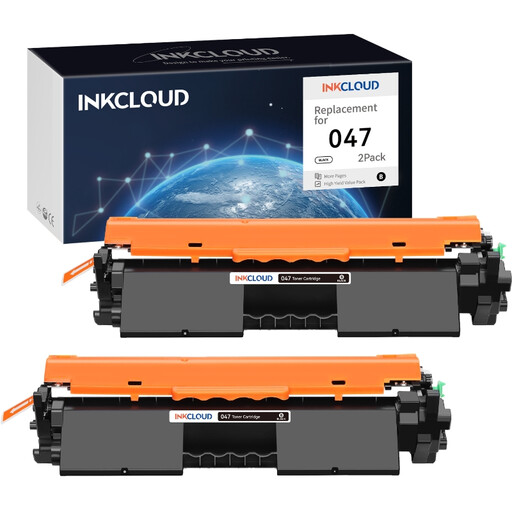
Why This Fits Their Persona: A cost-effective solution for home offices or private users with moderate printing volumes who own a Canon i-SENSYS printer. The twin-pack offers excellent value for money and reduces the frequency of reordering.
This compatible toner from an established supplier is specifically designed for the LBP113w and MF113w models, which minimises the risk of the compatibility trap.
Lower initial cost compared to the original. Supplied in a convenient twin-pack.
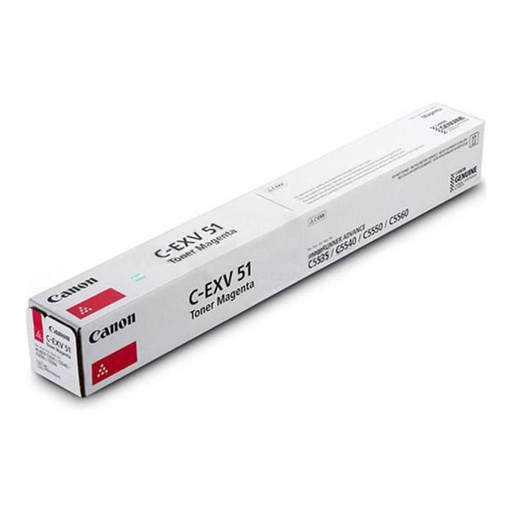
Why This Fits Their Persona: For businesses that rely on Canon imageRUNNER ADVANCE systems where colour accuracy and reliability for presentations or marketing materials are non-negotiable. Downtime is not an option here.
As an Original Toner from Canon, it eliminates any compatibility risk. The high page yield of up to 26,000 pages ensures predictable and low costs per page.
Guaranteed performance and colour quality. High yield reduces maintenance effort.
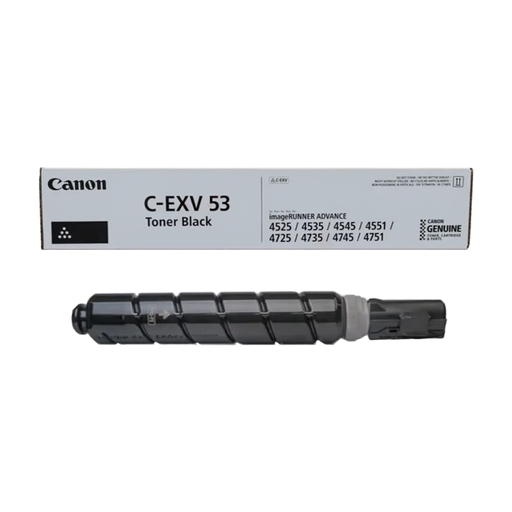
Why This Fits Their Persona: Ideal for IT departments managing printer fleets with extremely high print volumes. The focus is on maximising uptime and minimising the Total Cost of Ownership (TCO).
With a page yield of 42,100 pages, this toner counters the fallacy of initial cost. The price per page is extremely low, making it ideal for bulk printing jobs.
Extremely high page yield for maximum efficiency. Significantly reduces the administrative overhead for replacing consumables.
We have compiled a complete, up-to-date list of products that fully meet these strict selection criteria.
1. How do I find the exact model number of my printer? The full model name is usually clearly visible on the front or top of the printer. Alternatively, you can find a sticker with all relevant data (including serial number and model) on the back of the device or inside the cover that provides access to the toner cartridges.
2. Can a compatible toner damage my printer or affect the warranty? Printer manufacturers often state that using third-party toners may void the warranty. However, with high-quality compatible toners from reputable suppliers, the risk of damage is low as they are developed to the printer's specifications. Look for retailers who offer a functional guarantee for their compatible products.
3. How do I properly store a toner cartridge to maximise its lifespan? A toner cartridge should remain in its sealed original packaging until use. Store it flat (horizontally) in a cool, dry place and protect it from direct sunlight and extreme temperatures. This prevents the toner powder from clumping and distributing unevenly.