Photographers with a fixed shooting position
If your camera stays above your calligraphy sheet, a compatible cable release can let you take photos without touching the camera body. The exact camera model and connection are key.


For a fixed camera setup above your calligraphy sheet, a cable release compatible with your exact camera model is a straightforward way to take photos without touching the camera. If you reposition the sheet between shots, a compatible wireless remote may be a better option. To control your camera from a smartphone, first check which app features your camera supports. None of these release methods will fix banding or colour shifts caused by artificial light.
If your camera stays above your calligraphy sheet, a compatible cable release can let you take photos without touching the camera body. The exact camera model and connection are key.
If you adjust the paper or lighting between shots, consider a compatible wireless remote. With wireless kits, you should also check whether a camera cable is required.
If you want to take photos or control available camera settings from your smartphone, check which features are supported by your camera model. Canon describes these options through Camera Connect for compatible cameras.
A good fit if: You’re using a fixed camera setup and your camera model is confirmed as compatible with the release.
Consider: The cable length and connection will limit where you can take photos from.
A good fit if: You want to reposition the sheet without being restricted by a short release cable.
Consider: The camera and remote must be compatible; a wireless kit may still require a camera cable.
A good fit if: Your camera supports the app and you want to control available settings from your smartphone as well as take photos.
Consider: Connectivity and features vary by model; the app won’t fix issues caused by artificial light.
| Priority | What to check before buying | Who is this important to? |
|---|---|---|
| Camera compatibility | Check the full camera model and connection against the compatibility list; for wireless models, check which connections are explicitly supported. | When I buy a release, I want to be sure the connection or wireless link is compatible with my camera. Around 36% of consumers put compatibility first. |
| Taking photos from a fixed position | Check that the connection is compatible and the cable can reach your shooting position. | When my camera is positioned above a stationary sheet, I don’t want to touch the camera body to take a photo. Around 29% of consumers prioritise taking photos from a fixed position without touching the camera. |
| Freedom to move around the sheet | Check camera compatibility and what’s included, especially the transmitter, receiver and any camera cable you may need. | When I reposition the paper before taking a photo, I want to be able to take it from where I’m standing. Around 21% of consumers say freedom to move around the sheet is their main priority. |
| App control | Check which remote-control features the manufacturer’s app offers for your exact camera model. | If my camera supports a compatible app, I want to use its features before buying an additional release. Around 14% of consumers put app control first. |
The percentages shown refer to consumers whose main purchasing priority corresponds to the relevant point in the table.
Even cameras from the same brand may need different connections. Canon, for example, distinguishes between E3 and N3 connections; for the RR-100, Fujifilm identifies certain cameras that require an adapter.
Check your full camera model and the specific connection against the manufacturer’s compatibility list.
Depending on the combination, you may need an additional adapter; a release with the wrong connection won’t work with your camera.
A wireless connection doesn’t always replace the connection between the receiver and the camera. According to Rollei, the Wireless Remote Release SKU 28146 requires a camera cable selected to match your camera.
Check separately that the remote works with your camera and that the right cable is included in the offer. Bluetooth remotes are only an alternative if your camera supports them.
Remote releases control the camera; they don’t affect the lighting conditions. Canon warns that flickering artificial light can cause banding or colour shifts. An incorrect white balance can also affect colour reproduction.
Check a test shot and your white balance. Use flicker reduction only if your camera has a suitable feature.
Cable and Bluetooth releases, plus Camera Connect for selected Canon cameras.
Model-specific cable releases and Bluetooth remotes for compatible cameras.
The RR-100 is designed for specific, listed X and GFX cameras.
The RMT-P1BT is a Bluetooth remote for compatible Sony cameras.
The Wireless Remote Release Kit SKU 28146 is a wireless option for which you’ll need to check the camera connection too.
The Joybuy products below are mainly for smartphone photography with a Bluetooth remote and tripod. If you’re using a mirrorless or DSLR camera, make sure to check whether the product works with your camera model.
 No image available
For taking smartphone photos remotely, the product description lists a detachable Bluetooth remote.
With built-in fill light and 1/4-inch tripod thread.
 No image available
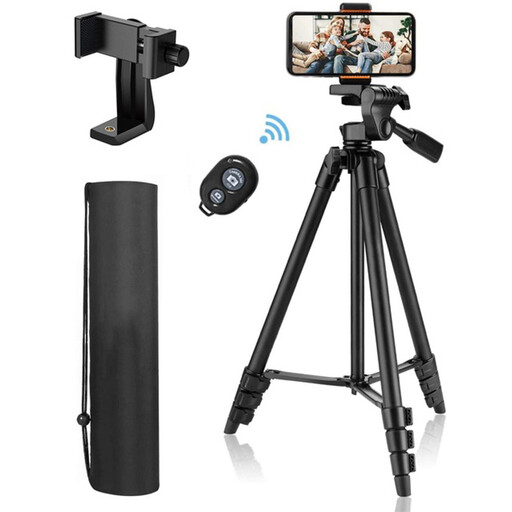
For an adjustable smartphone setup, the product description lists a holder and a Bluetooth remote.
The stated height ranges from 44 to 106 cm; the 1/4-inch connection is rated for a maximum load of 2 kg.
The description lists smartphones, compact cameras, video cameras and DSLRs as compatible devices.
 No image available
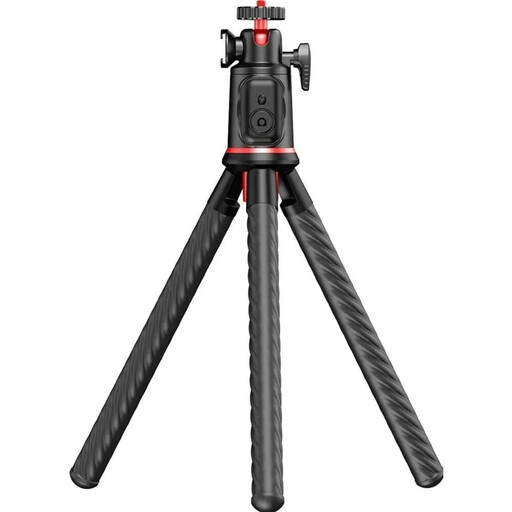
For a fixed setup or an unusual shooting angle, the product description lists flexible legs that can be attached to suitable structures or used as a tabletop tripod.
The Bluetooth remote is designed for use with a camera or smartphone, according to the description; the stated maximum load is 2 kg.
The stated remote range is up to 10 m; make sure the flexible legs are secure before letting go of your camera.
Not necessarily. Canon describes Camera Connect as a way to take photos remotely with compatible cameras. A separate release can help you avoid touching the camera when taking a photo, but it won’t fix lighting problems.
First, check your full camera model and remote connection against the release’s compatibility list. Some Fujifilm cameras also require a 2.5 mm to 3.5 mm adapter for the RR-100; this only applies to the models specifically marked as needing one.
If the colours look different, check your white balance. If flickering artificial light causes banding or colour shifts, check whether your camera has a suitable flicker-reduction feature; there’s no evidence that switching to a different remote release will solve the problem.
Check the product listing to see whether a required camera cable is included; Rollei lists it as an optional extra for the Wireless Remote Release SKU 28146. Under EU consumer law, online purchases from a trader generally come with a 14-day right to cancel from the date of delivery, subject to statutory exceptions. This is separate from the legal guarantee for faulty goods, which lasts for at least two years under EU law. Check the returns conditions before you buy, including who pays for return postage.
The German Federal Network Agency lists CE marking, product identification and the accuracy of manufacturer information among the points it checks when monitoring the market. These general checks don’t confirm that a specific product listing is compliant, so check the information for the product you’re considering separately.