Calligraphy teachers working at a desk
You want to show your writing process on a computer and need an overhead view of the paper and your hand that’s easy to position.


When choosing a camera for calligraphy, start with your paper size, the overhead view you want and the distance from the desk. Check the frame with your paper, nib and writing hand before prioritising a high resolution. A mirrorless camera can be adapted to different framing needs by changing the lens, while a document camera or webcam can make it easier to connect to a computer. A camcorder comes with an integrated optical zoom. None of these features alone confirms that a camera can focus close enough at your desk or record a full writing session without interruption.
You want to show your writing process on a computer and need an overhead view of the paper and your hand that’s easy to position.
You’re planning edited footage of complete lettering and close-up views of the nib and strokes. Framing and choosing the right lens are key.
You want to record your process from a fixed position. Check recording time, power supply and image monitoring for your specific set-up.
Choosing a camera for calligraphy at your desk comes down to what matters most to you: capturing the whole writing area, fine lines, live lessons or longer recordings.
A good choice if: You want to film both the whole writing area and individual strokes in close-up, and choose the lens and camera distance to suit your needs.
The trade-off: The camera body alone isn’t a complete overhead set-up; the framing depends on the lens you choose.
A good choice if: You want to switch between a wider view and close-ups without changing lenses, and the fixed zoom range suits your desk and camera position.
The trade-off: You can’t replace the lens later, so check the framing you can achieve over your paper.
A good choice if: You want to film from a fixed camera position and change the framing without swapping lenses.
The trade-off: Optical zoom doesn’t confirm that the camera can focus close enough at your desk or record for a particular length of time.
A good choice if: Video calls or live demonstrations on a computer are your priority, and the writing area can be captured from the position you choose.
The trade-off: A presentation mode alone doesn’t confirm that fine nib strokes will look large and sharp enough from your camera’s distance.
A good choice if: An adjustable overhead view of your paper and direct use with a computer matter more than choosing your own lens.
The trade-off: Check the frame rate and resolution together if you want hand movements to remain visible during demonstrations.
| Buying priority | What to check | Who should pay particular attention |
|---|---|---|
| Overhead view and full framing | Measure your paper and the available camera-to-desk distance; check the field of view and whether there’s a secure place for a mount. | If I want to show the whole writing area and my hand from above, the frame needs to suit both the paper and the set-up. Around 33% of consumers consider a full overhead view their top buying priority. |
| Clear nib strokes and close focusing | Compare the focus range of the specific lens or camera with the mounting distance. | For close-ups, I want to be able to make out individual lines from the actual recording distance. Around 27% of consumers put the rendering of fine lettering details first. |
| Live lessons on a computer | Check the computer connection, software, mounting angle and frame rate together. | If I want to show my writing process directly on a computer, I need a usable video feed and a suitable view of the desk. Around 20% of consumers prioritise direct integration with live lessons. |
| Longer recordings | Check recording limits, power supply, storage and the intended video mode for the exact model. | For a longer writing session, a practical recording process from a fixed camera position matters to me. This is the top priority for around 20% of consumers. |
A high resolution doesn’t tell you whether both the paper and your hand will fit in the frame at the available mounting height.
Check the framing using your paper size and the specific lens or camera position.
For the IPEVO V4K, the maximum frame rates quoted by the manufacturer vary depending on the resolution.
Compare the combination of resolution and frames per second that suits your demonstration.
Show Mode and optical zoom describe features, but they don’t confirm the focus or framing you’ll get in your workspace.
Check the recording distance, focus and full writing area for the exact model.
Canon offers the EOS R50 V as an interchangeable-lens camera and the PowerShot V1 as a compact camera with a fixed zoom lens.
The ZV-E10 II is a video-focused mirrorless camera for a desk set-up you can tailor to your needs.
The HC-VX3 is a camcorder with integrated optical zoom.
The MX Brio is a USB webcam for computer-based presentations and streams.
The V4K is a USB document camera for an adjustable view of paper and other items on your desk.
The following Joybuy products include USB webcams and compact clip cameras for computer-based or small-scale video set-ups. For calligraphy, check the position, focus and framing with your paper size at your own desk.
 No image available
For computer-based video recording when a USB webcam suits your set-up.
1080p video at 30 fps, 120° lens, automatic light correction, built-in microphone and privacy cover, plus USB plug and play.
 No image available
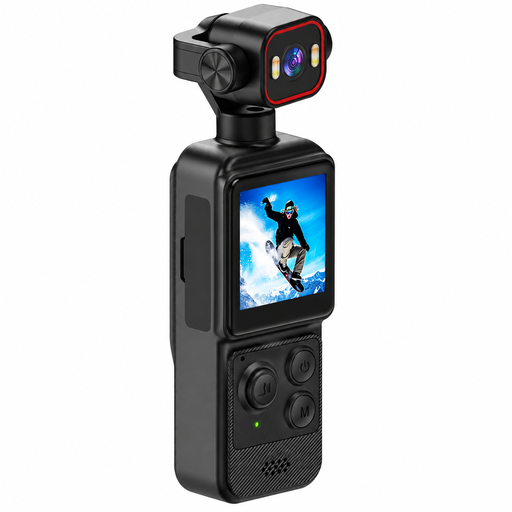
A compact clip camera may suit you if you can use the supplied clip to mount it in the position you need.
Features include 4K video, a 1.54-inch display, a 140° wide-angle lens, app control, LED lighting and a 1200-mAh battery.
 No image available
For computer-based recording or streaming when a webcam suits your recording distance and software.
1080p at 60 fps, autofocus and a wide-angle lens; the product description also lists compatibility with streaming software.
 No image available
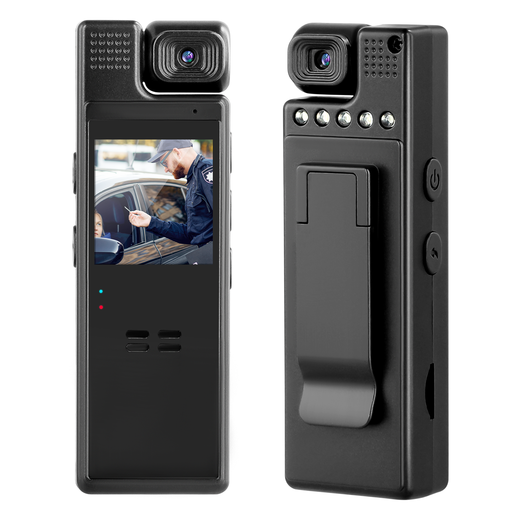
For indoor recording if the clip can be used at your intended camera position.
The product description lists 1080p video, a 180° rotating lens, a 1.3-inch display and a rear clip.
 No image available
For computer-based video recording if you can point the webcam at your writing area from its intended position.
4K video at 30 fps, 99° field of view, mount that tilts by 180° and swivels by 360°, and plug-and-play operation. The product description lists compatibility with PC and Mac.
Lay out the paper you’ll be using, along with your writing hand, then set the framing and focus at the planned mounting height. IPEVO describes the V4K as having an adjustable articulated stand and being suitable for video recording with Visualizer software. Secure any additional mounts according to their instructions.
Not necessarily: for the V4K, IPEVO specifies up to 15 frames per second at 3264 × 2448 pixels and up to 30 at Full HD. Choose a mode that gives you the right balance of detail and visible movement.
Check what’s included against the requirements of your set-up. With a mirrorless camera, you’ll need to consider the lens and, if required, a mount. Canon describes the EOS R50 V as an interchangeable-lens camera, while Sony distinguishes between the ZV-E10 II body and lens kit. Also check what power and storage components you’ll need for your chosen video mode.
Your statutory rights for faulty goods are generally claims against the seller and are separate from any voluntary guarantee. If there’s a fault, the first step may be to seek a repair or replacement. Consumer advice centres also point out that online purchases generally come with a 14-day right to cancel; exceptions and the circumstances of the contract should be taken into account.
For certain electrical and electronic products, Germany’s Federal Network Agency recommends checking, among other things, the CE marking, product identification and any required German-language information. If you want to distribute or publicly show images of other people, § 22 KunstUrhG generally requires their consent; any applicable legal exceptions should be considered on a case-by-case basis. Simply recording your own writing does not count as an image of a person requiring consent.