Start by choosing the framing, camera position and focus distance that work for your actual workspace; a high video resolution alone won’t solve any of these issues. A webcam is best suited to PC recording, while a mirrorless camera with the right lens is ideal for close-up details, and a compact camera offers a setup without lens changes – provided the mounting, power supply and recording time meet your needs.
Who is this camera guide for?
Clay modellers with limited desk space
You need a steady view of your hands and work surface without an awkward camera position getting in the way of your modelling. Logitech describes a Show Mode for desk content on the MX Brio; whether the framing works depends on your setup.
Creators focusing on fine details
If you want to show small shapes or surface details, you’ll need to plan the shooting distance, framing and space for your hands together. Sony lists a minimum focus distance of 0.095 m and a maximum magnification of 1:1 for the SEL30M35.
PC-based tutorial or streaming recordings
For recording or streaming on a computer, the connection and audio matter as well as the view of your desk. Elgato lists a focus range starting at 10 cm for the Facecam Pro; according to Elgato’s model comparison, it has no built-in microphone.
What should you look for when choosing?
For a small modelling desk, the field of view, focus distance and computer setup should all suit the available camera position and the type of recording you have planned.
Webcam connected to a PC
A good fit if: you mainly record or stream on a computer and need a view of your desk.
Things to consider: Check the framing, connection and mount; you’ll need a separate microphone with the Elgato Facecam Pro.
Mirrorless camera with interchangeable lens
A good fit if: small surface details are your focus and you want to choose the lens and camera position carefully.
Things to consider: According to Sony, the SEL30M35 macro lens achieves 1:1 magnification at a minimum focus distance of 0.095 m; the short distance in front of the lens can leave less room for your hands and lighting.
Compact camera with fixed lens
A good fit if: you want to film without changing lenses.
Things to consider: The Canon PowerShot V10’s built-in stand does not guarantee a straight-down view; the field of view and secure mounting need to suit your desk.
Small gimbal camera
A good fit if: you want to capture moving perspectives or time-lapses as well as a fixed view of your desk.
Things to consider: You’ll need a suitable mount for a fixed overhead view; DJI lists a focus range starting at 0.2 m for the Osmo Pocket 3.
| Priority |
What to check before buying |
Who is this important to? |
| Overhead view and work surface |
Check that both hands stay in shot and the mount doesn’t restrict your modelling space. |
If I want to show both hands and my work area, the planned mounting position needs to leave enough room; this is the main priority for around 36% of consumers who want an overhead view. |
| Sharp focus on small shapes |
Compare the actual distance to your subject with the focus range of the camera and, where applicable, the lens. Check close-up and full-workspace views separately. |
If you want to show small shapes clearly, consider focus distance and framing together; around 29% of consumers make detailed views their main priority. |
| PC recording and streaming |
Check the connection, software, mount and view of your desk in the recording or streaming app you plan to use. |
If I want to record or stream directly from my computer, the connection and view of my desk need to fit my workflow; around 21% of consumers make PC recording their main priority. |
| Long recordings and audio |
Check your planned recording time and power supply, as well as storage and, if needed, how to connect a separate microphone. |
For longer modelling sessions or recordings with commentary, I want to plan audio and battery life around the intended camera position; around 14% of consumers make long recordings and audio their main priority. |
Common planning mistakes
-
Assuming 4K guarantees sharp close-ups
High resolution can’t make up for a focus distance that’s too short or framing that doesn’t suit your setup.
Compare the focus range of the specific model with your planned setup, and check both the full view and the finer details.
-
Planning for macro magnification without leaving room for your hands
For the Sony SEL30M35, Sony lists a minimum focus distance of 0.095 m and a distance of 2.4 cm in front of the lens for the close-up described.
Distinguish between focus distance and working space in front of the lens. For a full view, consider a different camera position or lens.
-
Assuming a view of your desk is the same as a straight-down shot
The Logitech MX Brio’s Show Mode displays desk content, but it doesn’t guarantee that your entire modelling area will fit in the frame from your chosen mounting position.
Check the framing and make sure your planned mount is stable before choosing your camera and accessories.
Key brands at a glance
Logitech
The MX Brio is a USB webcam for PC-based recording. Logitech describes a Show Mode for desk content.
- Show Mode may be useful for presenting your work surface.
- Whether the framing and distance suit your modelling area depends on your setup; the feature alone doesn’t prove that it’s suitable for practical clay modelling.
Sony
The ZV-E10 II uses E-mount interchangeable lenses; Sony describes the SEL30M35 as a macro lens for close-ups.
- Sony lists a maximum magnification of 1:1 and a minimum focus distance of 0.095 m for the SEL30M35.
- Your choice of lens affects the framing. The 2.4 cm distance in front of the lens listed by Sony may leave little room for your hands and lighting.
Canon
The PowerShot V10 is a compact camera with a fixed lens, built-in stand and smartphone remote control.
- The built-in stand gives you an option for positioning the camera.
- A stand doesn’t guarantee a straight-down view of your desk; the lens can’t be changed.
DJI
The Osmo Pocket 3 is a small gimbal camera. DJI lists a time-lapse mode and a focus range starting at 0.2 m.
- Time-lapses and moving perspectives may be useful for capturing additional angles.
- A separate mount is needed for a permanently fixed overhead view; bear the focus distance in mind when mounting the camera close to your subject.
Elgato
The Facecam Pro is a PC webcam with variable autofocus. Elgato lists a focus range starting at 10 cm.
- The listed focus range is relevant for short distances across a desk.
- According to Elgato’s model comparison, it has no built-in microphone; you’ll need a separate audio solution for spoken tutorials.
Joybuy products for PC recording and modelling videos
This selection includes webcams for PC recording and streaming, as well as a compact camera for video recording. For each model, check whether the viewing angle, mounting position and focus distance suit your small work desk.
 No image available
Full HD 1080p webcam with microphone
For PC recording if you’re looking for a webcam with an adjustable angle.
1080p video, 120° lens, rotatable lens, built-in tripod and omnidirectional microphone.
Check that the wide field of view captures your modelling area without showing too much of the surroundings.
View at Joybuy
 No image available
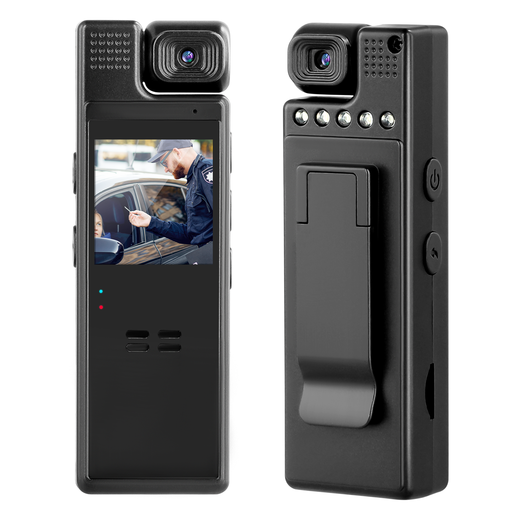
Compact camera with audio, 1080p and 180° rotating lens
For indoor video recording if you want a rotating lens and built-in screen.
1080p video, manually rotatable 180° lens and 1.3-inch screen.
A recording time of 8–10 hours per charge is listed for video; check that the planned camera position gives you the view of your desk you want.
View at Joybuy
 No image available
AOC webcam with microphone, 4K and 99° field of view
For PC-based recording if you’re considering a webcam with an adjustable angle.
4K video, 99° wide-angle lens, 180° tilt, 360° swivel and built-in microphone.
Check the framing and webcam position at your actual workspace.
View at Joybuy
 No image available
AOC 4K PRO webcam with Sony IMX363 sensor
For PC recording or streaming if you’re looking for a webcam with autofocus and two microphones.
4K video, PDAF autofocus, two microphones, 75° field of view, and USB-A and USB-C connections.
Check that the field of view covers your workspace from the planned mounting position.
View at Joybuy
 No image available
Logitech C922 Pro Stream Webcam
For PC-based streaming if you’re looking for an adjustable stand and built-in microphone.
1080p at 30 fps or 720p at 60 fps, 78° field of view, autofocus and built-in stereo microphone.
A tabletop tripod and adjustable stand are listed; check whether they let you achieve the camera position you want.
View at Joybuy
Frequently asked questions
Is 4K enough for sharp footage of small clay details?
No, resolution alone isn’t enough. The camera or lens needs to focus from your actual shooting distance, while leaving enough room in the frame for your hands. Elgato lists a focus range starting at 10 cm for the Facecam Pro, while DJI lists one starting at 0.2 m for the Osmo Pocket 3.
Can I simply put a camera on its stand to film straight down?
A stand gives you an option for positioning the camera, but it doesn’t guarantee a straight-down view. Choose the field of view and a secure mount to suit your work surface; Canon lists a built-in stand for the PowerShot V10, but it doesn’t automatically give you the angle you want.
How should I plan for audio and longer recordings?
Check audio recording from the planned camera position, along with the device’s power supply, storage and the recording time you need. According to Elgato’s model comparison, the Facecam Pro has no built-in microphone; DJI lists microSD storage and a time-lapse mode for the Osmo Pocket 3.


