What should you look for when buying?
Start by checking the lighting and colour reproduction in the recording setup you plan to use. Then make sure the framing and mounting work for your mixing table. For longer takes with spoken explanations, audio and recording time are important too.
| What matters |
What to check before buying |
Who is this important to? |
| Reliable colour reproduction |
Test white balance in the video mode you’ll use, keep the lighting as consistent as possible and record a neutral reference. |
If I need to teach colour transitions, I want to check them under my actual lighting. Around 28% of consumers put colour reproduction first. |
| Flicker under artificial light |
Test with the lights you plan to use. Sony suggests 1/50 s or 1/100 s as shutter-speed starting points with a 50 Hz power supply; Canon gives 1/50 s at 25 fps as a rule of thumb. |
If you want to avoid bands or brightness fluctuations in your lesson video, test with your own lights. Around 22% of consumers prioritise flicker control. |
| Tabletop perspective |
Check the distance from the mixing surface, the framing you need, the focus range and secure mounting. |
If both hands and the mixing surface need to be visible, the framing must suit the table. Around 22% of consumers put the tabletop view first. |
| Longer explanations with audio |
Check recording time in your own conditions, power options and whether there’s a microphone and, if needed, a headphone socket. |
If you want to explain the mixing process without frequent interruptions, consider the recording workflow and clear speech audio. Around 17% of consumers prioritise take length and audio. |
| Portable setup |
Test on location how quickly the camera and mount are ready to use, and whether the lens gives you the framing you want. |
If I change rooms often, a compact setup matters more than choosing a lens later. Around 11% of consumers prioritise portability. |
Joybuy products for tabletop and PC recording
The products below include webcams for PC and desk recording, as well as a compact action camera for video recording. Check the framing and mounting with your own mixing table; resolution specifications are no substitute for a test clip under the lights you’ll use.
 No image available
Full HD 1080P webcam with microphone
An option for PC recording if you want to point the webcam at the mixing surface.
The product description lists a 120° wide-angle lens, a built-in microphone and a flexible tripod. USB Plug & Play is also specified.
View at Joybuy
 No image available
Razer Kiyo V2 X Full HD webcam
A PC webcam that suits a setup where you want to record or stream the view of your mixing surface on a computer.
The product title specifies 1080p at 60 FPS. The description lists an 80° field of view, an integrated microphone and software-based framing adjustments.
View at Joybuy
 No image available
AOC 4K PRO webcam with Sony IMX363 sensor
A PC webcam option for tabletop recording, where the specified field of view needs to suit the framing you want.
The product specifications list 4K video, autofocus, a 75° viewing angle, two microphones and a tabletop tripod. USB-A/USB-C is listed in the product title.
View at Joybuy
 No image available
Insta360 Link 2C Standard Bundle Graphite Black
The listed DeskView mode is designed for PC recording when you want to show your work surface.
The product specifications list 4K, a 1/2-inch sensor and DeskView. Autoframing, HDR and a noise-cancelling microphone are also listed.
View at Joybuy
 No image available
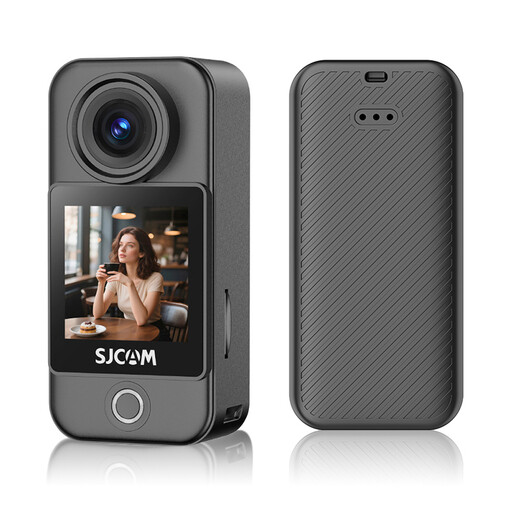
SJCAM C400 Pocket Action Camera 4K
A compact action camera option if you want to record the mixing process as a video. Before you buy, check that it can be mounted securely for the tabletop view you want.
The product specifications list 4K recording, six-axis stabilisation, a touchscreen, white balance presets and exposure compensation.
View at Joybuy
Frequently asked questions
How do I set the white balance for a colour-mixing lesson?
Light the workspace as you would for the actual recording, set the manual white balance there using a neutral reference, then check a short test clip. Canon Academy recommends manual white balance for more accurate colour reproduction in different lighting conditions; it won’t automatically compensate for lighting that changes or is uneven.
Which settings can help prevent bands caused by lights?
First, test a clip using exactly the lights you’ll have on while recording. Sony Support suggests 1/50 s or 1/100 s as shutter-speed starting points with a 50 Hz power supply; Canon Academy gives 1/50 s at 25 fps as a general rule of thumb. You may need to run further tests with LEDs that flicker at different rates.
Do I need to buy a new camera for lesson videos?
No. A camera you already own or can borrow may be suitable if a test clip works for your planned setup. The Baden-Württemberg Teacher Training Server lists borrowing and using other recording devices as options. Check the clip on the computer you plan to use, looking at colour, framing, audio and how easy it is to edit.
What if a product develops a fault after I buy it as a consumer?
For consumer purchases in the EU, you’re generally entitled to a minimum two-year legal guarantee from the seller, starting when you receive the goods. Your Europe explains this EU-wide minimum period. A voluntary manufacturer’s warranty doesn’t replace your statutory rights, and the remedy available depends on the fault and the applicable legal requirements.
Can I film other people for the lesson and publish the video?
If people can be identified, you need an appropriate legal basis to process their personal data. Consent is one possible basis, but not the only one. The Federal Commissioner for Data Protection and Freedom of Information and the Rhineland-Palatinate Commissioner for Data Protection and Freedom of Information explain the relevant requirements. Different rules may apply to schools, recording and publication, so check the intended use and the school’s data protection requirements in advance.


