Which camera is right for you?

Teachers giving colour-critical demos

If you’re showing how new shades emerge from your starting colours, adjustable white balance and even lighting matter more than a simple 4K promise. Canon Germany explains how natural light changes the way colours look, while Nikon Germany recommends removing any unnecessary light sources.

Creators filming at a worktable

To keep your mixing bowl or palette and both hands in view from the planned camera position, your lens, focusing distance and depth of field need to suit your setup. Canon Germany explains depth of field, while Canon and DJI list model-specific focusing and field-of-view features.

Solo teachers recording longer explanations

If you’re filming without someone else operating the camera, plan recording time, sound, storage and framing together. Canon Germany, Panasonic Germany and Nikon Germany list different features for their respective models.

What should you consider when choosing?

Interchangeable-lens camera

A good fit if: you want to adjust the framing of your palette and hands by choosing a lens, and set the white balance yourself. Sony describes a custom white balance setting for the ZV-E10 II.

Bear in mind: the lens, working distance, tripod and accessories all need to suit your tabletop setup. Canon lists RF and RF-S compatibility for the EOS R50 V; EF-M lenses are not compatible.

Camcorder for a fixed teaching setup

A good fit if: you record longer explanations from a fixed position and want to use audio or memory card features directly on the camera. Canon lists a microphone input and two card slots for the LEGRIA HF G70.

Bear in mind: Canon gives the LEGRIA HF G70 a minimum focusing distance of around 1 cm at the wide-angle setting and 60 cm across the other zoom ranges. Check the distance and framing together.

Compact gimbal camera

A good fit if: a small setup that’s quick to reposition matters more to you than choosing an interchangeable lens. DJI lists a rotatable screen and a focus range starting at 0.2 m for the Osmo Pocket 3.

Bear in mind: according to DJI, the Osmo Pocket 3 has a fixed focal length equivalent to 20 mm. So check that the whole palette fits in the frame from your mounting position. D-Log M does not automatically mean colour-accurate footage when the light from a window changes.

What you’re looking for What to look out for Who it matters most to
Colours in window light Record a test in your planned location and check the white balance. Canon Germany points out that daylight can look warmer or cooler depending on the conditions. If I want to compare shades across several mixing stages, I need adjustable white balance and suitable lighting conditions. Around 36% of consumers would put this exact colour comparison first.
Palette and mixing details in shot Check the lens or fixed field of view, focusing distance and the whole work surface from your planned camera position. Canon Germany gives a zoom-dependent minimum focusing distance for the LEGRIA HF G70; DJI describes the Osmo Pocket 3 as having a fixed field of view. For my close-up, the palette, my hands and the mixing area need to stay in the planned frame. Around 29% of consumers would make visible working steps their main buying consideration.
Longer recordings and sound Compare recording conditions, microphone options and memory card features, and test the planned length of a take. Panasonic warns that recording with the DC-G97 may be interrupted at high ambient temperatures. If I’m recording a longer lesson on my own, I want to plan recording time, speech and storage together. Around 21% of consumers would prioritise an uninterrupted explanation with clear sound.
Easy to reposition Plan the screen position, mounting and field of view together for your chosen camera position. DJI lists a rotatable screen and a fixed focal length equivalent to 20 mm for the Osmo Pocket 3. If I reposition the camera often, I want to be able to check the framing without a complicated setup. Around 14% of consumers would put a simple, compact setup first.

Common misconceptions when choosing a camera

  • Assuming 4K or a Log profile means colour-accurate footage

    Resolution alone won’t solve the problem of changing light from a window. DJI describes D-Log M as an option for post-production; this does not automatically guarantee consistent colour when the lighting changes.

    Check the white balance and lighting with your actual colour mixes before recording your lesson.

    Allow extra time to manage the lighting and, if necessary, correct the colours.

  • Assuming the minimum focusing distance guarantees a good tabletop shot

    The minimum focusing distance of the Canon LEGRIA HF G70 depends on the zoom setting, while the DJI Osmo Pocket 3 has a fixed field of view. So a single focus figure won’t tell you whether the mixing area and your hands will fit in the frame as you want them to.

    Consider your camera position and work surface, then check the full frame before deciding on a model.

  • Confusing a camera body with a complete teaching setup

    Depending on the model and your recording plan, you may also need a suitable lens, mount, storage or audio accessories. Panasonic describes the DC-G97 as a camera body; the lens and included items are listed separately for the Canon EOS R50 V kit.

    Compare what’s included with the setup you’ll actually need for your lesson.

Camera brands to consider

Sony

The ZV-E10 II is an interchangeable-lens camera designed for video recording.

  • Sony describes a custom white balance setting. For the German kit, Sony lists the E PZ 16–50 mm F3.5–5.6 OSS II.
  • You’ll need to check whether the kit lens captures enough mixing detail from your mounting height. CHIP Testcenter also notes in its review that the camera has no viewfinder or in-body stabilisation.

Canon

The EOS R50 V offers an interchangeable-lens option, while the LEGRIA HF G70 is a camcorder for a fixed teaching setup.

  • Canon lists RF and RF-S compatibility for the EOS R50 V. For the LEGRIA HF G70, Canon lists two card slots and a microphone input.
  • According to Canon, EF-M lenses are not compatible with the EOS R50 V. The minimum focusing distance of the LEGRIA HF G70 depends on the zoom setting.

Panasonic

The LUMIX DC-G97 is an interchangeable-lens option for longer, fixed-position recordings and audio monitoring.

  • Panasonic lists 4K/30p recording with the DC-G97 and no specified recording time limit, as well as microphone and headphone sockets.
  • Panasonic says recording may be interrupted at high ambient temperatures. You’ll need to choose a suitable lens separately for your desired framing.

Nikon

The Z 30 is an interchangeable-lens camera option for explanations recorded with an external microphone.

  • Nikon lists 4K UHD at 30p and space for up to 125 minutes of uninterrupted footage.
  • The stated recording time is the manufacturer’s figure under specific conditions, not a guarantee for every setup. You’ll still need to check the lens and framing at your own table.

DJI

The Osmo Pocket 3 is a compact gimbal camera for frequent repositioning.

  • DJI lists a rotatable screen, a focus range starting at 0.2 m and a fixed focal length equivalent to 20 mm.
  • The fixed field of view limits how much you can adjust the framing for a large palette. DJI’s D-Log M specifications do not demonstrate colour accuracy in changing window light.

Related products at Joybuy

The Joybuy products below include compact vlog cameras and a webcam for recording on a PC. Before buying, check that the framing from your planned position shows your palette and hands.

Osmo Pocket 4P Vlog Combo in black

Osmo Pocket 4P Vlog Combo, Black

For a compact video setup; check the framing and white balance in the actual light from your window.

Features listed include 4K recording, a 20 mm wide-angle lens and a 1-inch sensor.

View at Joybuy

Osmo Pocket 4P Standard Combo in black

Osmo Pocket 4P Standard Combo, Black

For a compact solo recording setup; check beforehand that the field of view captures your entire work surface.

Features listed include 4K video, a 1-inch sensor, 3-axis stabilisation, 2x lossless zoom, a rotatable screen and 107 GB of built-in storage.

View at Joybuy

KINSI mini vlog camera with 4K video and 64 MP

KINSI Mini Vlog Camera 4K, 64 MP, Wi-Fi

For a flexible camera position; check that the lens angle and tripod suit your tabletop setup.

Features listed include a 330° rotating lens, a 1.72-inch touchscreen and a tripod.

View at Joybuy

AOC 4K webcam for PC and laptop

AOC 4K Webcam for PC and Laptop

For a PC-based tabletop recording setup; check that the field of view shows your whole palette from the planned position.

Features listed include a 99° field of view, a microphone, 180° tilt and 360° rotation.

View at Joybuy
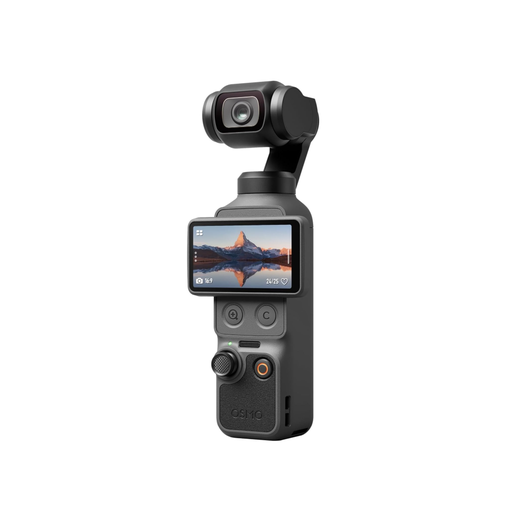
DJI Osmo Pocket 4 Standard Combo

DJI Osmo Pocket 4 Standard Combo, Black

For a compact setup; test whether the field of view and camera position work for capturing mixing details.

Features listed include a 1-inch CMOS sensor, 4K/240fps, 3-axis stabilisation, 2x lossless zoom, 107 GB of built-in storage and a rotatable 2-inch screen.

View at Joybuy

Frequently asked questions

How do I set the colours before a lesson by a window?

First, check which light sources are actually illuminating your palette. For the Sony ZV-E10 II, Sony describes setting a custom white balance using a white surface under the recording conditions. If the light changes, check the setting again and record a short test clip.

Are 4K and a short focusing distance enough to show mixing details?

No. What matters is how large the mixing area appears in the frame from your planned camera position, and whether the whole work area you need stays in focus. Canon gives different minimum focusing distances for the LEGRIA HF G70 depending on the zoom setting.

What should I check before buying a camera for a longer lesson?

Plan the length of each take, voice recording, storage and power supply together, and record a test of the intended length. Panasonic lists 4K/30p recording for the DC-G97 with no specified time limit, but warns that recording may be interrupted at high ambient temperatures.

What are my rights when buying a camera online in Germany?

When you buy online from a trader in the EU, you generally have 14 days from delivery to cancel, although exceptions may apply. Your Europe also explains that faulty goods are covered by a statutory minimum two-year guarantee from the date you receive them; this is separate from any manufacturer’s warranty.

Can I simply film other people in a lesson I’m publishing?

Not automatically. If people can be identified in the footage, you need to check that you have an appropriate legal basis for processing their data. The Federal Commissioner for Data Protection and Freedom of Information lists consent as one of several possible legal bases under Article 6(1) of the GDPR.