Choose a camera based on the seating arrangement and the audio capture you need, not just its stated resolution. A webcam may be enough for one teacher, while several voices in the room call for a suitable room-audio solution. A front-facing video bar is better suited to a group on one side of the room; for people seated around a table, a 360° camera is an option. Test the actual seating arrangement to check that even quieter contributions from the furthest seat can be heard, and make sure the connections work with your conferencing software.
Who are the different cameras suited to?
Teachers with several voices in the room
If learners speak quietly in person or take turns frequently, microphone position matters, as does listening from every seat. Logitech and HP list ranges for specific models, but these manufacturers’ specifications do not prove that every voice will come through clearly in every room layout. According to Zoom Support, several active audio devices in the same room can also cause echo.
Teachers with changing seating arrangements
A front-facing camera may suit a group seated against a wall or on one side of the room. If participants sit around a table, a table camera with a 360° view is another option. Jabra describes the PanaCast 50 as offering a wide front-facing view; it does not provide an all-round view.
Teachers working alone
If one person does most of the talking in front of the computer, a single webcam may be enough. If other people in the room are also speaking, assess room audio separately: a webcam’s built-in microphone is not automatically suitable for a group in the room.
What should you look for when buying?
Single webcam
A good fit if: one teacher does most of the talking at the computer and the camera mainly needs to capture them.
Keep in mind: If other people are speaking in the room, you’ll need a separate solution for the group image and room audio.
Front-facing video bar
A good fit if: the group sits in front of the camera or along one side of the table, and you want to use a shared room device.
Keep in mind: The field of view and stated microphone range are no substitute for a listening test from the seats around the edges.
360° table camera
A good fit if: people are seated around the table and remote participants need to see different speakers as they take turns.
Keep in mind: The camera’s position in the middle of the table needs to work with the seating arrangement without obscuring faces or practice materials.
| What matters |
What to check before buying |
Who will find this important? |
| Every voice comes through clearly |
Check the microphone position and stated pickup range; test the audio from every seat using the conferencing service you plan to use. |
If I want to make sure quieter contributions and changes of speaker come through, I pay particular attention to audio; around 31% of consumers put speech clarity first. |
| Everyone who needs to be seen is in shot |
Check the seating plan against the camera position; don’t confuse horizontal and diagonal fields of view. |
If remote learners need to see everyone in their seats, I check the view from each position; around 25% of consumers prioritise a complete group shot. |
| Changes of speaker and seating arrangement |
Run a typical conversation exercise using the actual seats, then check the camera views in your conferencing service. |
If learners sit opposite one another or speak in a circle, remote participants should be able to follow who is speaking; around 19% of consumers prioritise changing speakers and seating positions. |
| Simple set-up |
Check the USB connection, power supply, mounting and selected audio source against the computer you already have. |
If I want to set up the room without lots of extra components, I check the connections I already have first; around 13% of consumers prioritise a straightforward set-up. |
| Privacy and careful handling of sensitive data |
Check for a physical cover or camera shutter; if you’re transmitting or recording, consider the purpose and legal basis separately from your choice of device. |
If I want to cover the camera between sessions and plan carefully how image and audio data are handled, this is a key consideration; around 12% of consumers prioritise privacy and careful handling of sensitive data. |
Common buying and usage mistakes
-
Assuming high camera resolution means clear room audio
Image resolution and microphone pickup are different functions. For conversation exercises, remote participants also need to hear quieter contributions from people outside the camera’s direct position.
Before choosing a model, test a quiet voice from the furthest seat you plan to use, with the conferencing service you intend to use.
-
Assuming a 180° front view and a 360° table view are interchangeable
A 180° view captures a wide area in front of the camera; a 360° table camera is designed to show what’s happening all around the table. The seating arrangement determines which perspective you need.
Sketch out the seating positions and compare them with the camera view before deciding where to mount it.
-
Joining the same meeting on several devices with audio enabled
Zoom Support identifies several computers with active audio in the same meeting room as a possible source of echo.
Choose one room audio source and, if needed, fully disconnect audio on any other devices rather than simply muting their microphones.
-
Judging the version and what’s included by the product name alone
The HP Studio R30+ bundle includes different items from the R30 model on its own. Yealink lists expansion microphones for the UVC40 E2 as optional.
Check the full model name, connections and included accessories against the manufacturer’s information.
Depending on your set-up, you may also need a mount, power supply or microphone extension. Remember to include these components in your plans for the intended location.
Relevant brands and product ranges
Logitech
The MeetUp 2 is a USB conference camera with built-in audio for small meeting rooms, supporting use with a computer or in BYOD mode.
- Logitech lists a 113° horizontal field of view and six microphones for the MeetUp 2.
- The stated microphone range of up to 7 m is a manufacturer specification, not proof that every quiet voice will come through clearly. Remember to plan for a power supply and suitable cabling.
HP Poly
HP recommends the Studio R30 for small rooms with 3–5 people.
- HP lists a 110° horizontal field of view and a microphone range of up to 4.57 m; a removable privacy cover is also included.
- The stated range is not an independent measure of speech clarity. The R30+ bundle includes different items from the R30 on its own.
Jabra
The PanaCast 50 is an option for an especially wide front-facing group view.
- Jabra lists a 180° field of view, three cameras and eight microphones.
- A 180° view does not show all the way around a table. The PanaCast 50 is not the same as the PanaCast 50 Video Bar System; manufacturer claims about improved interaction do not prove it is better for conversation practice.
Owl Labs
The Meeting Owl 4+ is a table camera offering a 360° view and picking up different speakers around the table.
- Owl Labs lists eight microphones and automatic focusing on active speakers.
- Test the stated 5.5 m audio range and speaker switching with your actual seating arrangement. An additional microphone is optional.
AnkerWork
The PowerConf C200 is a single webcam for one person at a computer, not a proven all-in-one solution for voices throughout the room.
- Anker lists two microphones, selectable fields of view of 65°, 78° and 95°, and a built-in cover.
- The AnkerWork guide warns that backlighting can cause overexposure, and that directional microphone pickup may suppress voices outside the selected area.
Yealink
The UVC40 E2 is a USB video bar for small rooms; a microphone extension is optional.
- Yealink lists a 120° field of view, eight microphones, speaker tracking and an electric camera shutter.
- Claims of better sound and picture are manufacturer descriptions. Support for a microphone extension does not mean it’s included.
Joybuy products for conversation practice
The Joybuy products below include single webcams for one teacher and a front-facing conference camera for small meeting rooms. If several people will be speaking in the room, pay particular attention to the microphone position and audio clarity from the seats you plan to use.
 No image available
Full HD 1080p Webcam with Microphone
A single webcam may be suitable if one teacher does most of the talking at the computer.
The product description lists Full HD 1080p, USB plug-and-play, an omnidirectional microphone, a 120° lens, an integrated tripod and a physical camera cover.
View at Joybuy
 No image available
Logitech ConferenceCam
According to the product description, this conference camera is designed for small groups and meeting rooms.
Specifications include a 78° field of view, USB, HD video, a full-duplex speakerphone and a microphone range of 2,40 m. Check that the seats you plan to use fall within this stated range.
View at Joybuy
 No image available
Philips 4K UHD Webcam 4000 Series SPL6408BT/00
This may suit you if one teacher does most of the teaching at the computer and you want a webcam with a privacy cover.
The product details list 4K, autofocus, two built-in microphones, a privacy cover and USB-A. Zoom and Teams are listed as compatible platforms.
View at Joybuy
 No image available
Insta360 Link 2C Standard Bundle Graphite Black
This webcam is described as a solution for one person on video calls, not as a room camera for several people speaking in person.
Specifications include 4K, autofocus, auto-framing, a built-in microphone and a physical privacy switch. According to the product description, this model is not currently compatible with ARM-based Windows systems.
View at Joybuy
 No image available
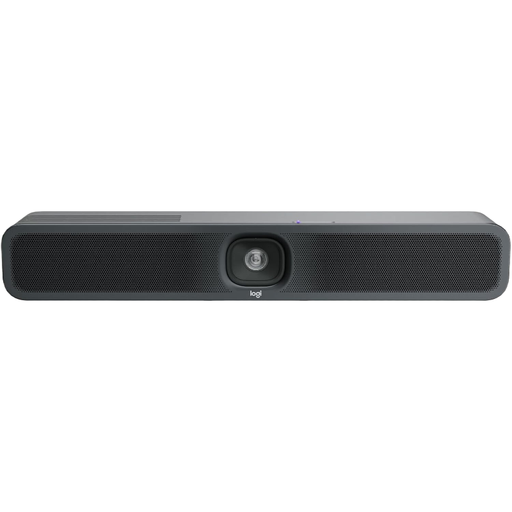
Logitech MeetUp 2 4K All-in-One Conference Camera
This front-facing conference camera is described as suitable for small meeting rooms where a group sits in front of the device.
The product details list 4K, USB, built-in microphones and speakers, and an external power supply. Logitech lists six microphones, a 113° horizontal field of view and a pickup range of up to 7 m for the MeetUp 2; these manufacturer specifications do not guarantee clear audio in every room layout.
View at Joybuy
Frequently asked questions
How can I check that every voice comes through clearly?
Ask someone joining remotely to assess a short exercise, with a quiet voice and changes of speaker, from every seat you plan to use. In your conferencing service, select the microphone and speakers on the room device you intend to use. Zoom Support warns that several active audio devices in the same room can cause echo.
Should the camera go on the wall or on the table?
A front-facing video bar is designed for seats in front of the camera; a 360° table camera may suit people seated around the table. For the specific model, check the mount, power supply and USB connection, as well as choosing a position that won’t obscure faces or practice materials.
What should I bear in mind after buying when it comes to settings and maintenance?
Retest the picture and audio if the seating arrangement changes. For the PowerConf C200, AnkerWork recommends keeping the firmware up to date and adjusting the microphone pickup direction and field of view in the software. These recommendations apply to this model.
Are a manufacturer’s guarantee and statutory rights the same thing?
No. The Verbraucherzentrale distinguishes between your statutory rights against the seller and a voluntary guarantee. For the specific offer, check the seller, guarantee terms and what’s included. If there’s a fault, you should generally first ask the seller to put it right.
Can I simply record conversation practice in Germany?
Having a recording function or camera cover does not, by itself, make recording permissible. According to the Federal Commissioner for Data Protection and Freedom of Information, the organisation responsible for processing the data is responsible for data protection and must check that there is an appropriate legal basis for the specific image, audio and conversation data. Whether recording is allowed in a particular teaching situation depends on how it is being used.


