Artists with a fixed filming desk
If you want to show your paper and hand movements from a fixed position, pay particular attention to the framing. The Canon and Sony camera systems covered here let you choose a lens to suit your filming setup.


For drawing demonstrations by a window, an interchangeable-lens camera gives you more flexibility to choose a lens and frame the shot to suit your desk and paper. A compact camera with a fixed zoom can make your setup simpler, while a gimbal camera is mainly worth considering if you also want moving shots from different angles. Before you buy, check from the actual camera distance that both the whole sheet and the details you need will fit in frame.
If you want to show your paper and hand movements from a fixed position, pay particular attention to the framing. The Canon and Sony camera systems covered here let you choose a lens to suit your filming setup.
If you want the white of the paper and your drawing colours to look consistent as the light from the window changes, plan to make a test recording. Canon points out that natural light can affect colour differently depending on the conditions.
If you’re recording longer drawing sessions with spoken commentary, check recording time, power supply, storage and audio connections together. Nikon quotes up to 125 minutes of continuous footage for the Z 30, but this isn’t a guarantee for every recording situation.
A good fit if: You want to switch between showing the whole sheet and close-up details, or change the camera position. Canon and Sony both offer interchangeable-lens cameras for this.
The trade-off: The lens needs to suit the distance and layout of your desk, so choosing a lens is part of the purchase.
A good fit if: You want to avoid changing lenses and keep your setup simple. Canon says the PowerShot V1 has a built-in fixed zoom lens.
The trade-off: You can’t swap the lens later for one with a different angle of view, so check the framing from your planned mounting position.
A good fit if: You regularly want moving shots or different angles alongside a fixed view of your desk. DJI describes the Osmo Pocket 3 as having three-axis mechanical stabilisation.
The trade-off: Stabilisation can’t replace a suitable fixed position above the paper, so check the angle of view and mounting options for your desk setup.
When choosing a camera for a drawing demonstration by a window, your decision will mainly depend on which of your priorities matters most.
| Priority | What to check before buying | Who is this important to? |
|---|---|---|
| Capturing the image and details | Decide on your paper size and camera distance; check the framing with the specific lens or fixed zoom. | If I want to show the whole sheet and my hand movements from a fixed camera position, getting the framing right matters to me. Around 36% of consumers say framing is their top buying priority. |
| Controlling light and colour | Check whether you can adjust white balance and exposure; make a test recording with white paper and the actual colours you’ll be using. | If the light from the window changes, I want to be able to assess the paper’s whiteness and the colours in the footage. Around 29% of consumers say light and colour are their top priority. |
| Long recordings with sound | Match your planned recording time to the power supply, storage and recording format; if you’re adding commentary, check for microphone and headphone connections. | If I’m recording longer drawing sessions with spoken commentary, I want to avoid interruptions and audio that’s difficult to monitor. Around 21% of consumers say long recordings and audio are their top priority. |
| Additional moving angles | Think about how often you’ll need moving shots; check the fixed angle of view, focus distance and mounting options. | If I want to show hand movements or materials from different angles as well as the desk view, flexibility of movement is essential. Around 14% of consumers say additional moving angles are their top priority. |
High resolution won’t fix poor framing or incorrect exposure on your paper. Sony points out that 4K generates more data than HD and can make editing more demanding.
First, check the framing and exposure with your sheet of paper. Then use a test recording to decide which resolution you need for your chosen output format.
4K can also require more storage and editing time.
With an interchangeable-lens camera, the usable framing also depends on the lens you choose. A camera body deal alone won’t tell you whether a suitable lens is included.
Check what’s included with the specific version you’re buying, then match the paper size and camera distance to that exact lens.
If the included lens doesn’t give you the framing you want, you may need a different one.
According to DJI, the Osmo Pocket 3 has mechanical stabilisation and a fixed angle of view. Whether it can capture the whole sheet from your available camera position is a separate consideration.
Choose a gimbal camera for moving shots you genuinely need, and check the fixed view of your paper separately.
You may also need a suitable, stable mount for a fixed desk view.
The examples below refer to the product ranges mentioned. The brand alone won’t tell you whether the lens and accessories will suit your drawing desk.
Canon offers the interchangeable-lens EOS R50 V and the more compact PowerShot V1, which has a fixed zoom lens.
The Sony ZV-E10 II is an interchangeable-lens camera for anyone who wants to frame their shot with a suitable E-mount lens.
The Nikon Z 30 is a compact interchangeable-lens camera for video recording and longer tutorials.
The Panasonic LUMIX G100D kit pairs a Micro Four Thirds interchangeable-lens camera with a 12–32-mm standard zoom lens.
The DJI Osmo Pocket 3 is a compact gimbal camera for additional moving shots.
These Joybuy camera options include models for vlogging and adding moving angles. For each one, check that the angle of view, distance and setup will suit your drawing desk.
 No image available
Check whether the stated 20-mm wide-angle lens can capture the whole sheet from your planned camera distance.
The product description specifies 4K/240 fps for slow-motion mode only.
 No image available
The rotating lens may be useful for different angles; check the view of your sheet from the position you plan to use.
The product title specifies 2K resolution and a lens that rotates through 360°.
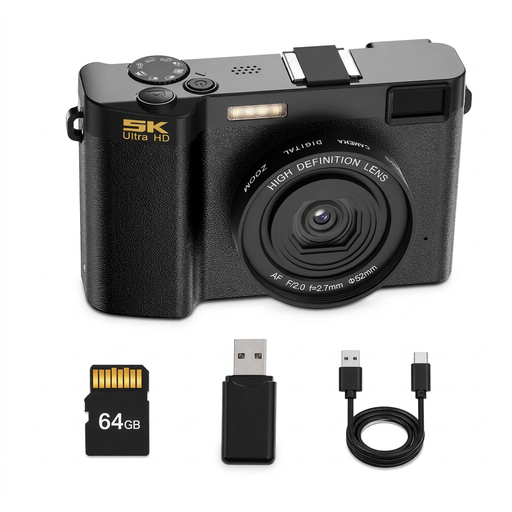 No image available
For a drawing demonstration, check the framing from your planned camera distance before deciding on this camera.
The product description specifies 5K video and an included 64 GB microSD card.
 No image available
The stated mini tripod may be useful for a possible desk setup; check the framing in the exact position you’ll use.
The product title specifies 4K, 64 MP, Wi-Fi, a 1.72-inch touchscreen, face recognition, Type-C and a tripod.
 No image available
The stated gimbal stabilisation may be useful for additional moving angles; plan your fixed view of the drawing separately.
The product title specifies three-axis stabilisation, 2× lossless zoom and 107 GB of built-in storage.
Other details in the title include 4K/240 fps, a 1-inch CMOS sensor and a rotating 2-inch screen.
First, decide on your paper size and camera position, then check the viewfinder to make sure it shows both the whole sheet and your finest strokes. Next, make a test recording in the actual window light to check the exposure and how white the paper looks. Canon points out that natural light can have different effects depending on the conditions.
No, not necessarily. If HD shows your strokes clearly enough in your intended output format, it can save storage space and editing time. Sony points out that 4K generates more data and can be harder to edit. Compare both formats using a short clip of your drawing.
Match your planned recording time to your power supply, storage and recording format. If you’ll be speaking as you draw, connections for an external microphone and, if needed, headphones may be useful. Canon lists a microphone input and headphone output for the EOS R50 V.
No. In Germany, statutory warranty rights are a legal entitlement against the seller; a guarantee is a voluntary offer with its own terms and conditions. The Verbraucherzentrale explains the difference.
Under § 22 KunstUrhG, consent is generally required to distribute or publicly display images of identifiable people; any exceptions and data protection grounds need to be considered on a case-by-case basis. The German Federal Ministry of Justice also explains that works reflecting personal intellectual creativity may be protected by copyright. This does not amount to a general ban on recording or publishing your own drawing demonstration.